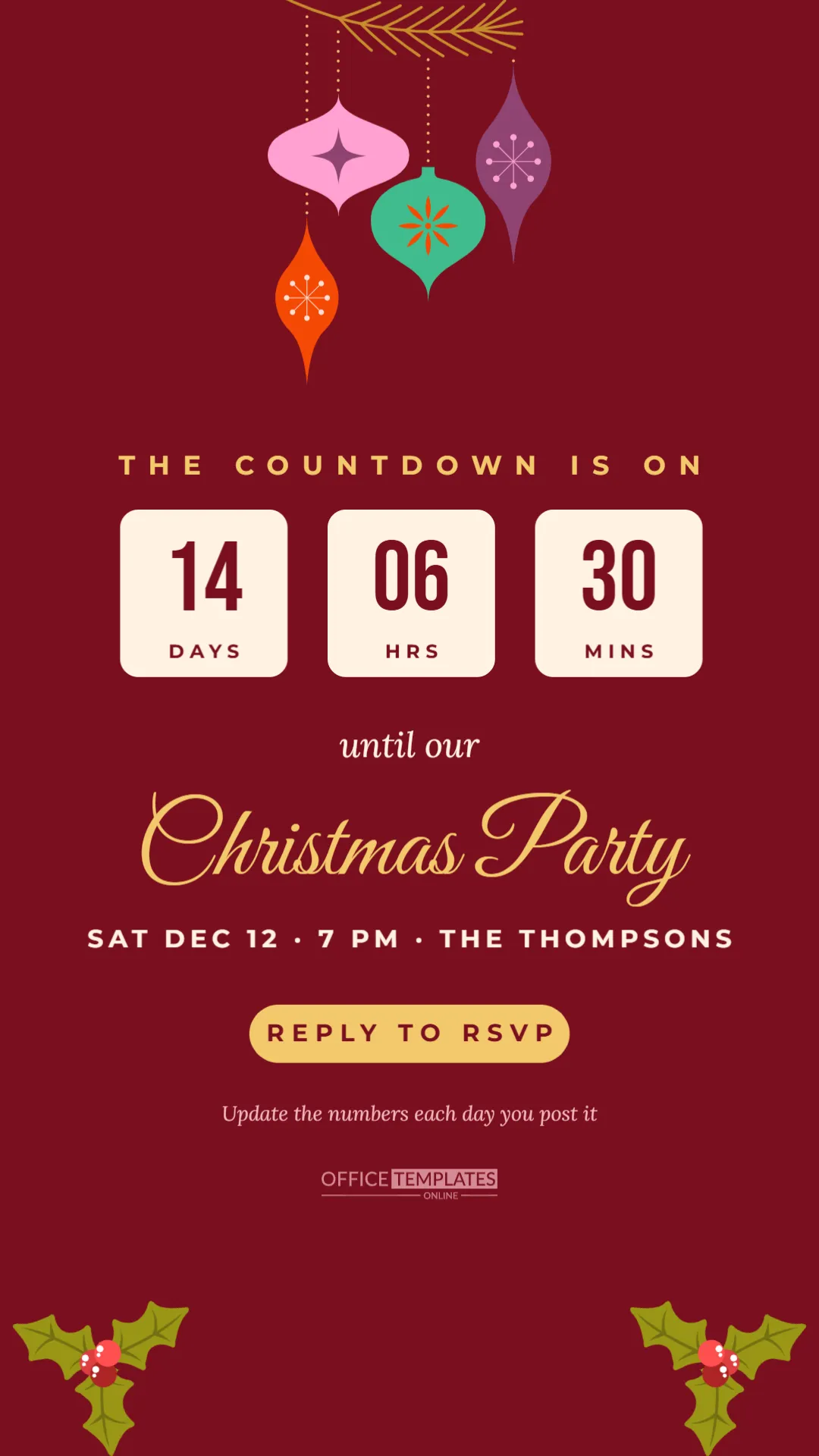
Excitement builds in the weeks before a Christmas party, and a countdown is a fun way to keep guests talking about it. This 1080 x 1920 pixel story template is designed for Instagram, Facebook, and WhatsApp stories: a deep red screen with retro ornaments hanging from a golden pine sprig, THE COUNTDOWN IS ON in gold capitals, three cream tiles showing days, hours, and minutes, and the party title in gold script. Post it, update the numbers, and post it again as the party gets closer.
Updating the Days, Hours and Minutes Tiles
The three cream tiles show the time remaining: 14 DAYS, 06 HRS, 30 MINS in the sample. They are ordinary text boxes, so you update them before each post. Many people post a countdown at key moments: two weeks before, one week before, three days before, and on the morning of the party. Each time, change the numbers and download a new image. The tiles use tall Bebas Neue numerals in deep red, with small labels below, so they read clearly on a phone screen.
A small line under the button says Update the numbers each day you post it, as a reminder to yourself. Delete it before posting if you prefer.
The Story Layout
From top to bottom: a golden pine sprig with four retro ornaments in pink, teal, plum and orange hanging on fine threads; THE COUNTDOWN IS ON in spaced gold capitals; the three cream number tiles; until our in cream italic; Christmas Party in large gold Great Vibes script; the date, time and host in spaced cream capitals; a gold REPLY TO RSVP button; the reminder line; the brand mark; and holly sprigs in the two bottom corners. The important content sits in the middle of the screen, away from the top and bottom areas that story apps cover with their own buttons.
Why Countdowns Work on Social Media
Countdown posts keep an event visible without repeating the same invitation. Each new number gives followers a reason to look again, and the shrinking time creates gentle urgency for anyone who has not replied yet. Countdowns also build a shared sense of anticipation; guests often reply with excited messages or share the story themselves. For public events, such as a bar’s Christmas party or a community celebration, a countdown can boost ticket sales in the final days.
Using the Countdown Sticker
Instagram offers a countdown sticker that lets followers tap to get a reminder. You can place it on top of the story when you post, for example, over the space below the button. Followers who tap it receive a notification when the countdown ends. Combine the sticker with this design for a story that is both beautiful and practical.
Editing the Story
Click each tile number to change it, and the labels if you want to show weeks, days, and hours instead. Edit the date and host line, keeping it short so it stays on one line. Change the button text, for example to TAP THE LINK or DM TO RSVP. The ornaments are an editable vector; select them to change their colours. The holly sprigs are editable too. Click the background to change the deep red to green, navy, or plum.
A Countdown Posting Plan
Here is a simple schedule for a party on Saturday, December 12. Post the first story with 14 days to go, on November 28, together with the main invitation. Post again with 7 days to go, on December 5, adding a line about what to bring. Post with 3 days to go, on December 9, as a reminder to reply. Post on the morning of December 12 with zero days and a message such as Tonight’s the night. Keep each version consistent, changing only the numbers and one line of text.
Story Captions and Stickers
Stories do not have captions like posts, but you can add text, polls, and question stickers. A poll such as Ugly sweater or festive glam? gets guests involved. A question sticker lets people ask about parking or dress code. Keep added stickers away from the countdown tiles and the title so the design stays clear.
Countdowns for Businesses and Venues
Bars, restaurants and venues can use the same design to count down to a ticketed Christmas party, New Year’s Eve event or holiday brunch. Change the title to the event name, add the venue in the date line, and change the button to BOOK NOW. Pair the story with a link sticker to the booking page.
Saving and Reusing the Design
Because you will post several versions, keep the original template and download a new image each time. Name the files clearly, such as countdown-14-days.png, so you can find them quickly. After the party, reuse the design next year by changing the date.
Party Countdown Story Questions
Can I use it as a WhatsApp status?
Yes. The 1080 x 1920 size is also the WhatsApp status size.
Can I add a photo?
Replace the ornaments with a circle from the Elements panel and use Replace Image.
Do the numbers update automatically?
No. They are text, so change them before each post.
Designing a Matching Story Series
Countdown stories work best as part of a small series with the same look. Use this design for the countdown, the digital invitation in this collection for the main announcement, and a simple thank you story after the party with a photo from the night. Keep the same red, cream, and gold palette and the same script title, so followers instantly recognise each story as part of your party. Save the stories to a highlight on your profile named after the party, so late followers can catch up on all the details in one place.
Keeping Guests Engaged Between Posts
Between countdown posts, share small behind-the-scenes moments: the decorations arriving, a test batch of cookies, the playlist in progress. These short updates keep the party in people’s minds and make guests feel involved in the preparations.
Count Down to Christmas Fun
Set the numbers, post the first story, and watch the excitement grow. Each countdown brings your guests one step closer to the party.