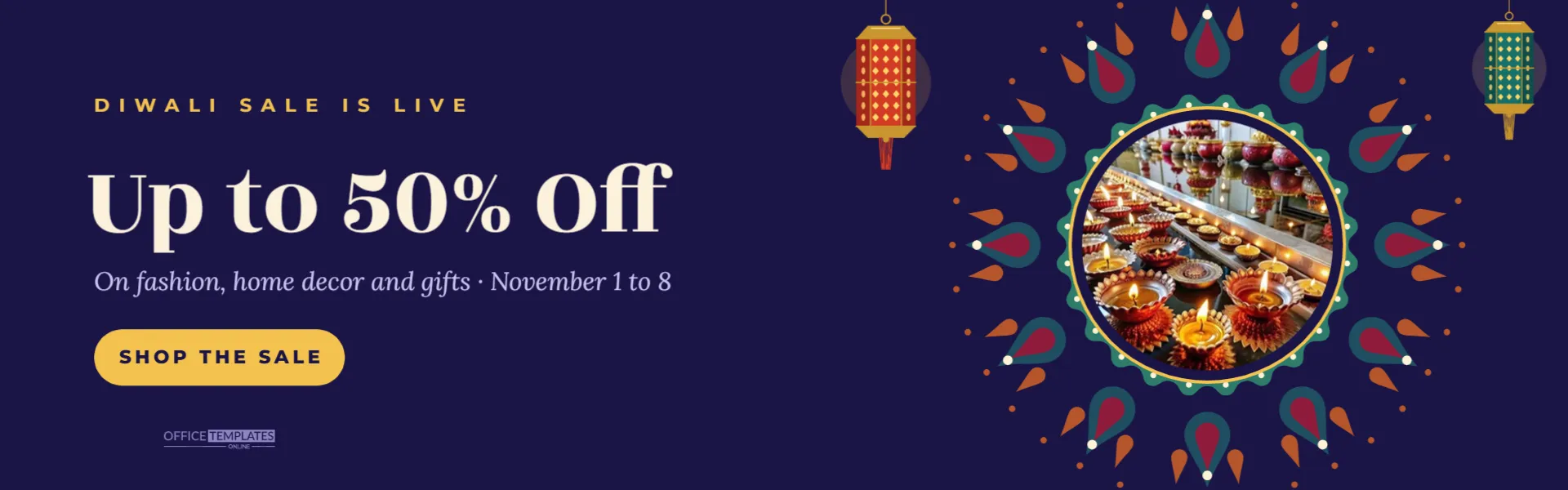
The homepage hero is the most valuable space on an online store. During the festival season, it should tell every visitor at a glance that your Diwali sale is on, what they save, and where to click. This 1920 x 600 pixel banner is designed for that space, with the message on the left where people start reading and a festive product display on the right.
Banner Specification
| Element | Detail |
|---|---|
| Canvas | 1920 x 600 pixels, a 16:5 wide hero shape |
| Background | Deep indigo night |
| Kicker | DIWALI SALE IS LIVE in small-spaced gold capitals |
| Headline | Up to 50% Off in large ivory Rozha One |
| Subline | Categories and dates in lavender Lora italic |
| Button | Rounded gold button reading SHOP THE SALE |
| Visual | Jewel rangoli around a round product photo frame, a red lantern and a teal lantern hanging from the top edge |
The Product Photo Inside the Rangoli
A round photo frame sits at the centre of a large jewel-toned rangoli in teal, deep red, and burnt orange, with a gold ring around it. It is a pattern-filled shape, so clicking it and choosing Replace Image swaps in your product while keeping the circle. Good choices are a hero product shot on a plain background, a flat lay of festive items, or a lifestyle photo cropped close. Because the frame is round, centre the product in your photo before uploading.
Writing the Headline and Button
The headline is the offer, nothing else. Up to 50% Off works because it is short and specific. Alternatives that fit the space: Flat 30% Off Everything, Free Gift Wrapping, Diwali Gifts From $15, or Buy 2 Get 1 Free. The subline carries the categories and dates: On fashion, home decor, and gifts, November 1 to 8. The button text should be an action: SHOP THE SALE, SHOP GIFTS, SEE THE OFFERS, or BOOK NOW. Remember that the banner is an image; the button becomes clickable when you link the banner (or place a real button over it) in your website builder.
Designing for Different Screen Sizes
Website builders handle wide banners in different ways. Some show the whole image and shrink it on phones; others crop the sides to fill a taller mobile hero. This banner keeps its content in two clusters so it adapts well:
- Left cluster: the text and button, starting a little over an inch in from the left edge.
- Right cluster: the rangoli and photo, with lanterns as optional decoration at the far edges.
If your theme crops the sides on mobile, you may lose part of the right cluster, but the message stays. Many themes let you upload a separate mobile banner; the 1080 x 1920 offer story in this collection makes a good vertical alternative.
Accessibility and Search
Text inside an image cannot be read by search engines or screen readers. Add alt text such as Diwali sale, up to 50 percent off fashion, home decor and gifts until November 8. Better still, if your theme supports text over a background image, export the banner without the headline and type the offer as live text in your builder.
Editing the Homepage Hero Banner
- Click each text line and type your own kicker, headline, and subline.
- Change the button label.
- Replace the photo in the rangoli frame with your product.
- Adjust colours if needed: the indigo background, the gold button, and the rangoli and lantern swatches.
- Download a PNG or a high-quality JPG and upload it to your homepage hero.
Keeping the Page Fast
Large banners can slow a homepage, especially on mobile data. After downloading, compress the file with an image optimiser or your platform’s built-in compression; a JPG at good quality is usually much smaller than a PNG for a design with this much colour. Aim for a file size that loads quickly on a phone while keeping the lettering clean.
Running the Banner Through the Festival
In 2026, Dhanteras falls on Friday, November 6, and Diwali on Sunday, November 8. A banner schedule might be: launch on November 1 with the main offer, switch the kicker to DHANTERAS SPECIALS on November 6, change the subline to Last day of offers on November 8, and replace the banner with a Happy Diwali greeting or a thank you message afterwards. Keeping the same design and changing only the words gives returning visitors continuity.
Recolouring for Your Store
Indigo suits fashion and gifts. A maroon background feels more traditional, emerald feels premium, and black with gold feels luxurious. Change the button colour to your brand’s accent colour so it matches buttons elsewhere on your site. The rangoli and lanterns are editable vectors with their own colour swatches.
Website Banner Questions
Can I use the banner on social media?
The wide shape is made for websites. It can work as a Twitter or X header, but for feeds the square and story designs in this collection are better.
Can I remove the lanterns?
Yes. Select each and delete it. The rangoli on its own gives a cleaner look.
What if my theme uses a different banner size?
Change the canvas size in the editor and move the two clusters apart or closer together. Keep the text on the left and the visual on the right.
Pairing the Banner With a Sale Collection Page
A homepage banner works only if the click leads somewhere useful. Before launching, create a Diwali collection or category page that holds every discounted product, ideally sorted by best sellers first, and link the banner to it. Repeat the headline offer at the top of that page so visitors know they are in the right place, and show the end date again. Customers who land on a generic homepage after clicking a sale banner often leave without buying.
Checking the Banner on a Live Page
Once uploaded, open your homepage on a phone, a tablet, and a laptop. Make sure the headline is readable, the product in the rangoli is not cropped awkwardly, and the banner links to the sale page.
Make Your Homepage Feel Like Diwali
Swap in your product, type your offer, and upload the banner before the first weekend of November. A bright, clear hero turns festival visitors into festival customers.