The costume contest is often the highlight of a Halloween party. Hours of planning, cardboard, hot glue, and face paint all come down to one moment: the announcement of the winners. A real certificate makes that moment special. This template gives you four award certificates in one file, one for each of the most popular contest categories.
Black Frame, Cream Panel, Coloured Rosette
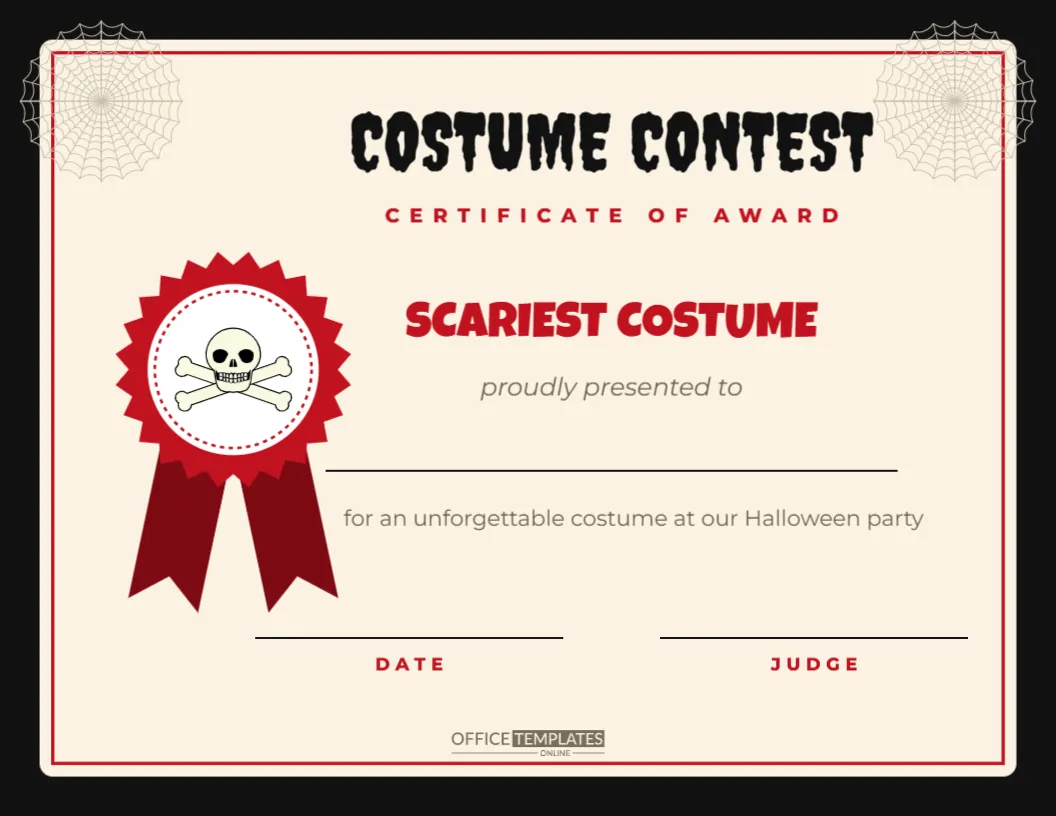
Each certificate is landscape, 11 x 8.5 inches. A black outer frame surrounds a cream panel with a fine border in the category colour. Pale spider webs sit in the top-left and top-right corners. COSTUME CONTEST is set in black Creepster, the dripping horror-film font, with CERTIFICATE OF AWARD in spaced capitals underneath.
On the left, a large rosette in the category colour has a pinked edge, a white centre with a dashed ring and two ribbon tails. An icon sits in the middle of each rosette. To the right are the category name in bold, Luckiest Guy, proudly presented to, a line for the winner’s name, a line explaining the award, and two signature lines labelled DATE and JUDGE. The OTO logo is at the foot.
The Four Categories
| Page | Category | Colour | Rosette icon |
|---|---|---|---|
| 1 | Scariest Costume | Blood red | Skull and crossbones |
| 2 | Funniest Costume | Golden yellow | Smiling ghost |
| 3 | Most Creative Costume | Purple | Witch hat |
| 4 | Best Group Costume | Teal | Bat |
Each category lives on its own page in the same file, so you can print all four at once or just the ones you need.
Adding More Categories
Bigger contests often have more winners. Duplicate a page in the editor, change the category name, pick a new colour for the rosette, border, and title, and swap the icon. Popular extra categories include:
- Best Homemade Costume
- Best Pet Costume
- Most Original Idea
- Best Couple Costume
- Best Pop Culture Costume
- Cutest Little Monster (for babies and toddlers)
- Best Use of Cardboard
- Judges’ Choice
Running a Fair Costume Contest
A clear process keeps the contest fun rather than contentious. Announce the categories in advance, so people know what they are competing for. Use a costume parade where each entrant walks past the judges, or number the contestants and let guests vote with a simple ballot. Mix judges from different groups (a teacher, a parent and a neighbour, for example) for balance. For children’s contests, many hosts make sure every child receives a certificate, using categories like Best Smile or Bravest Monster so nobody goes home empty-handed.
Filling In the Certificates
You can type winners’ names straight into the editor before printing, or print the certificates blank and write the names by hand on the night. Handwriting is often the most practical choice, because winners are only decided at the event. Use a fine black marker or a metallic gold pen for the name, and have the judge sign and date it on the spot. If you prefer typed names, add them in the editor and print a fresh certificate during the party if you have a printer to hand.
Recolouring and Customising
The rosette is a grouped shape, so select it to move or resize it, or ungroup it to change the colour of the points, ring, and tails separately. The icons are editable vectors that can be recoloured from their swatches. The black frame, cream panel, and border are separate shapes, so you could switch the frame to deep purple or the panel to white. Change the title text to PUMPKIN PARADE or MONSTER MASH CONTEST for a different event. Fonts are Creepster, Luckiest Guy, and Montserrat, all free Google Fonts.
Prizes to Go with the Certificates
A certificate is often enough, but small prizes add excitement. Ideas include a mini trophy spray-painted gold, a bag of sweets, a gift card for a costume shop, a pumpkin to take home, movie tickets, or a golden broom trophy made from a toy broom. For office contests, an extra hour of lunch or a parking spot for a week is a much-loved prize.
Presenting the Awards
Make a moment of the announcements. Gather everyone, play a drumroll on a phone speaker, and call out the categories one by one, saving the Scariest or the Best Group for last. Hand over the certificate with a photo opportunity: winner in costume, certificate held up, judges behind. Those photos often end up framed next to the certificate.
A Simple Voting Ballot
If guests vote rather than judges, keep the ballot simple. Give each guest a small slip with the category names and space to write a contestant number under each. Collect the slips in a pumpkin bucket or a cauldron, and ask two volunteers to count them together while the music plays. Announce the results within fifteen minutes so the excitement does not fade. For children’s parties, letting the kids vote for Funniest while adults decide Scariest keeps everyone involved and makes the results feel fair to all ages.
Printing the Certificates
Download the PDF and print on bright white or cream card stock, about 200 to 250 gsm, in landscape orientation. The black frame prints best on a laser printer; on an inkjet printer, let each sheet dry before stacking. For a premium finish, use parchment-style certificate paper or add a gold foil seal sticker on the rosette.
Costume Contest Questions
Who should sign the certificates?
The head judge or the party host usually signs, along with the date of the event.
Can I use these for an office party?
Yes. The wording is suitable for any age, and the categories work for workplace contests.
Can I print just one category?
Yes. Choose the page you need when printing, or delete the others in the editor.
Do I need to print in colour?
Colour looks best, but the certificates are still clear in black and white.
Can I change “Costume Contest” to another event?
Absolutely. The title is editable, so the certificates also work for pumpkin, trunk, or cookie contests.
Print all four, grab a gold pen, and get ready for the big reveal. Somebody’s cardboard robot deserves a proper award.