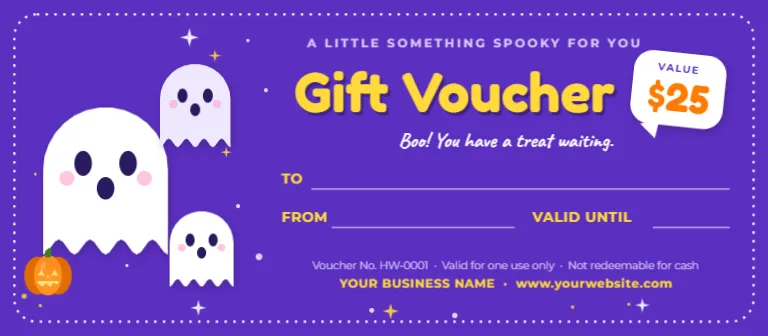
Keep Halloween friendly with this Halloween gift voucher template starring three cute ghosts. Bright purple, sunny yellow and a speech-bubble value badge give it a playful look that kids and parents will love.
It suits toy stores, kids’ activity centers, family cafes and school events, and it makes a fun gift for a child’s trick-or-treat bag.
What’s included in this boo ghost gift voucher template
- Three friendly ghosts with pink cheeks and a tiny jack-o’-lantern
- A bubbly yellow “Gift Voucher” title
- A white speech-bubble value badge, for example $25
- A “Boo! You have a treat waiting” handwritten message
- TO, FROM and VALID UNTIL lines with a terms line and business details
- Fully editable text, so you can change every name, date, caption and message
- Download options: PDF, PNG and JPG
Design details and size
A vivid purple card with a white dotted border and twinkling stars. Three cute white ghosts with pink cheeks and a tiny pumpkin fill the left side, while the right side has a bubbly yellow “Gift Voucher” title, a white speech-bubble badge for the value and a friendly “Boo! You have a treat waiting” message. The template is 8 x 3.5 inches in landscape orientation and made up of one page. The color palette combines vivid purple, white, sunny yellow and orange. Decorative touches include three friendly ghosts with pink cheeks, a small jack-o’-lantern, stars and a speech-bubble value badge. All fonts are Google Fonts, and every element can be recolored, resized, moved or deleted, so the design adapts to your own style.
Why choose this boo ghost gift voucher template?
Designing a Halloween gift voucher from scratch means choosing fonts, balancing colors, lining up photos and checking that everything fits on the page. This template does that work for you. The layout is already balanced, the vivid purple, white, sunny yellow and orange palette has been chosen so the text stays easy to read, and the three friendly ghosts with pink cheeks, a small jack-o’-lantern, stars and a speech-bubble value badge are placed where they add charm without crowding your words. You only need to add your details, which saves time and keeps the result looking professional, even if you have never designed anything before.
Ideas for using this voucher
- Toy stores, bookstores and children’s clothing shops
- Kids’ activity centers, gyms and trampoline parks
- Family restaurants and ice-cream shops
- Schools, PTAs and classrooms giving prizes
- Trick-or-treat gift bags and party favors
- Grandparents giving a treat voucher
Voucher wording and offer ideas
- “Boo! You have a treat waiting.”
- “Good for one free ice-cream sundae at our Halloween party.”
- “$25 to spend on costumes and candy.”
- “From your friendly neighborhood ghost.”
How to customize your Halloween gift voucher
- Open the template in the editor and click any text to change it. Add your business name, website, the voucher value and the wording of the offer.
- This design has no photo slots, so you can focus on wording. You can still add your own logo or picture from the editor toolbar.
- Set the terms line (for example, valid for one use only) and change the voucher number for each copy you print.
- Change colors and fonts from the toolbar, or keep the ready-made palette of vivid purple, white, sunny yellow and orange.
- Move, resize or delete decorations such as three friendly ghosts with pink cheeks, a small jack-o’-lantern, stars and a speech-bubble value badge to suit your brand.
- Download your voucher as a PDF for printing, or as a PNG or JPG to email.
Tips for selling and gifting vouchers
- Use short, playful wording that children can read.
- Give a clear expiry date so families know when to redeem.
- Add your shop’s logo in the corner for brand recognition.
- Print several vouchers on one sheet for handing out in bulk.
- Choose a bright card stock to keep the purple vivid.
Download and print
This voucher is 8 x 3.5 inches, a comfortable long, thin shape that fits a standard business envelope. Download the PDF and print on white or cream card stock, 80 to 110 lb (200 to 300 gsm), for a sturdy feel. Three vouchers fit on one US Letter sheet, so you can print a batch at home, cut along the edges with a paper trimmer and number them by editing the voucher number before each download. Print shops can trim large batches for you if you sell or give away many.
Share it online
The voucher works digitally too. Download the PNG or JPG version and email it to a customer, send it as a message or post it on social media as part of a Halloween promotion, then print physical copies for in-store or gift-wrapped use.
Frequently asked questions
Is this voucher suitable for young children?
Yes. The friendly ghosts and bright colors are kid-friendly, and you can simplify the wording for younger readers.
Can I change the ghost colors?
Yes. Each shape is editable, so you can recolor the ghosts, stars and background.
What size is this boo ghost gift voucher template?
It is 8 x 3.5 inches in landscape orientation.
Can I add my own logo or wording?
Yes. Every line of text is editable, and you can add your logo or any extra text from the editor toolbar.
Can I change the colors and fonts?
Yes. All text uses Google Fonts and can be restyled from the toolbar, and every shape and decoration can be recolored, moved or deleted.
Do I need design software or design experience?
No. The template opens in your web browser, and you edit it by clicking text and photos, just like a simple document. There is nothing to install, and every Google font used in the design loads automatically.
Can I edit the template again after I download it?
Yes. You can reopen the template at any time, make changes and download a fresh copy, so it is easy to reuse the same design for another date, name or offer.
Which file formats can I download?
You can download your finished design as a PDF, PNG or JPG. Use the PDF for printing and the PNG or JPG for sharing online.
Ready to hand out some friendly Halloween treats? Add your details and download your Boo ghost gift voucher in minutes.