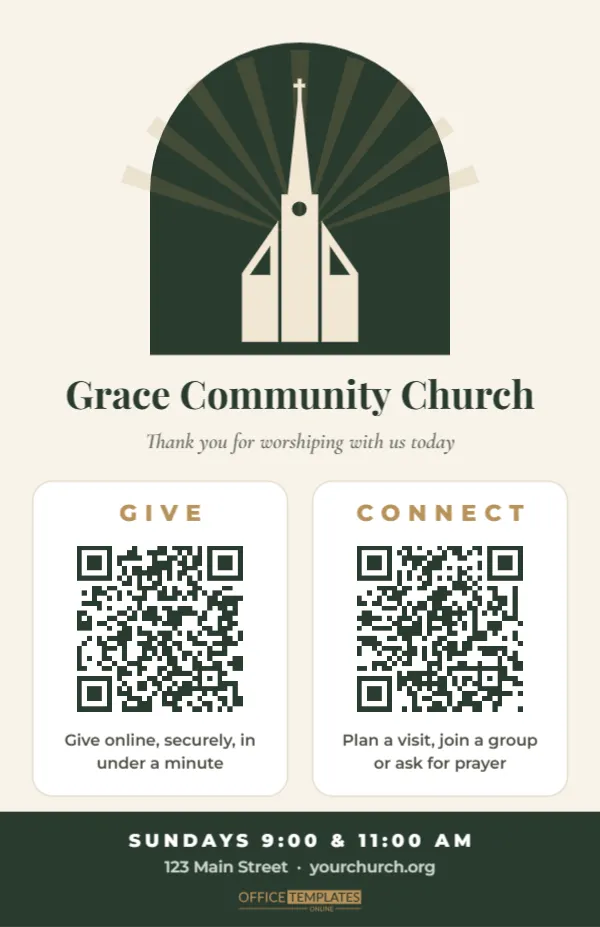
Many churchgoers no longer carry cash or a chequebook, and newcomers rarely fill in a paper card in the pew. Yet people still want to give, and visitors still want to take a next step. This half-letter card offers both in one calm, welcoming design: one QR code for online giving and a second to connect with the church.
A Window of Light at the Top
The card is 5.5 x 8.5 inches, the size of a folded bulletin insert. It opens with a forest green arched window at the top, with soft gold rays of light fanning out from behind a cream church silhouette with a steeple and cross. Below the window, the church name, Grace Community Church, is set in Playfair Display, with an italic line in Cormorant Garamond: Thank you for worshiping with us today.
The middle of the card holds two white panels side by side. The left panel is headed GIVE in gold spaced capitals, with a QR code and the line Give online, securely, in under a minute. The right panel is headed CONNECT, with its own QR code and the line Plan a visit, join a group or ask for prayer. A forest green band at the bottom lists service times and the church address and website.
Two Codes, Two Clear Next Steps
Separating giving from connecting is deliberate. A visitor who is not ready to give should not feel that the only thing on the card is a request for money, and a member who wants to give should not have to search through a newcomer form. Each code is a link, and each opens its own page.
| Code | What it should open | Who uses it |
|---|---|---|
| Give | Your online giving page with one-time and recurring options | Members and regular attenders |
| Connect | A short connection form or next steps page | First-time visitors and people seeking help |
To update either one, select the code, click Edit Code, paste the right address into URL/Website, and press Update QR Code. Test both from the back row of the sanctuary with your own phone.
What a Good Connect Form Asks
A connection form should take less than a minute. Long forms on a phone during a service rarely get finished. Keep it to essentials:
- First and last name
- Email or phone, whichever they prefer
- Is this your first visit? (yes or no)
- How can we help? (plan a visit, join a group, prayer request, talk to a pastor, serve)
- A short optional message box
Make sure someone receives the form responses and follows up within a few days. A fast, warm reply is what turns a visitor’s scan into a second visit.
Encouraging Giving With Grace
Online giving is now common in churches of every size, but the way it is introduced matters. The card’s wording is gentle and practical, focused on ease and security rather than pressure. During announcements, a short explanation helps: If you’d like to give today and don’t carry cash, the code on the card in your seat takes you to our giving page. Mention that recurring giving can be set up once, which helps the church plan its budget, and that every gift, whatever the size, is appreciated.
Keep a traditional offering plate or box as well. Some people prefer it, and children often love placing their gift in it themselves.
Older members may be less familiar with scanning codes. A volunteer at the welcome desk who can show someone how to open the camera and point it at the card makes a real difference, and many people only need to be shown once. Consider a short how-to-give moment after a service, with a few helpers in the foyer, so nobody feels left behind as the church adds new ways to give. Printing the giving web address under the code also helps anyone who would rather type it at home later in the week.
Fitting the Card to Your Congregation
Double-click the church name, welcome line, service times, and address to type your own details. The church silhouette is an editable vector, so you can recolour it or replace it with your church’s logo from the editor. Swap forest green and gold for navy and silver, burgundy and cream, or a soft blue to suit your building and branding. Keep the QR panels white so both codes scan easily in the softer light of a sanctuary.
Some churches add a verse or a short welcome from the pastor in the space under the church name. Keep any added text short so the two panels stay the clear focus.
Printing and Distribution Ideas
- Bulletin insert: print two cards on one letter-size sheet and cut in half.
- Pew card: print on heavier card stock and place one in each pew rack.
- Welcome desk: stand a copy in a 5.5 x 8.5 acrylic holder.
- Screens: download as PNG and show it on the announcement slides.
- Newsletter: add the image to your emailed newsletter with a short note.
Each code prints at about one and a half inches wide, which scans comfortably when the card is held in the hand.
Other Ministries That Can Use It
The two-code layout suits more than Sunday services. Youth groups can use one code for permission forms and one for the group chat. Food pantries can link one code to donations and one to volunteer sign-ups. Mission teams can pair a giving page with a prayer-update sign-up. Change the headings, links, and lines under each code, and the card works for any ministry with two clear calls to action.
Church Office Questions
Is online giving through a QR code secure?
The code only opens your giving page. Security comes from your giving provider, so choose one that uses secure, encrypted payments.
Can we track which card people used?
If your giving platform supports campaign or source tags, add one to the link so you can see gifts that came from the card.
What if we have only one link?
Delete one panel and centre the other, or link both to a single next steps page that includes giving.
Add your giving and connection links, your church name and service times, and print a stack for this Sunday. Visitors get a gentle next step, and members get an easy way to give.