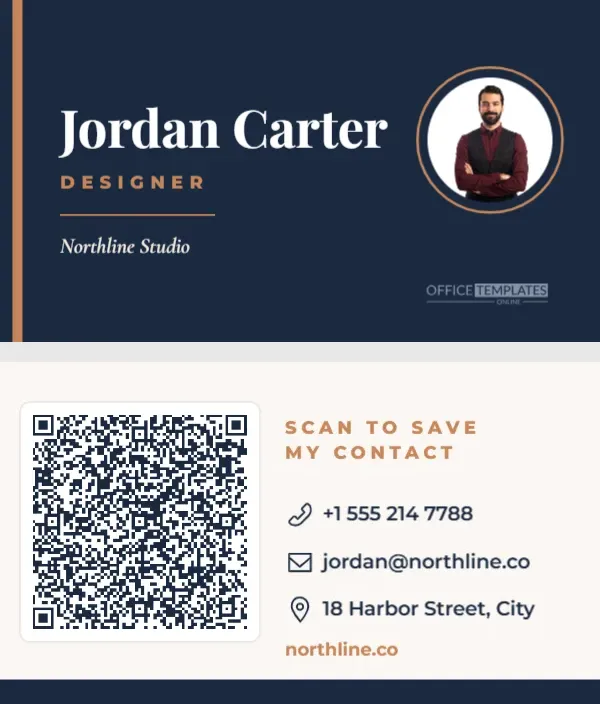
You hand someone your card; they say, I’ll add you, and the card ends up in a coat pocket for three months. A QR code that saves your details straight to their contacts closes that gap. One scan and you are in their phone, spelled correctly, with your number and email ready to use. This two-sided business card is built around that idea, with a classic, confident design that still looks like a proper card.
Two Sides, Two Jobs
The front is deep navy with a copper bar down the left edge. Your name is set in large white Playfair Display, your role in spaced copper capitals, a short copper rule, and your company in italic Cormorant Garamond. On the right, a round logo or portrait slot sits inside a thin copper ring. It is elegant, quiet, and readable at arm’s length.
The back is warm off-white. The QR code takes the left third of the card on a white plate with a soft outline. On the right, SCAN TO SAVE MY CONTACT is set in copper capitals, followed by your phone, email, and address, each with a small navy icon, and your website in copper. A navy strip along the bottom edge ties the back to the front.
The card is the standard 3.5 x 2 inch size, so it fits every card holder, wallet, and print shop template.
What a vCard QR Code Actually Does
Most QR codes on business cards just open a website. This one is different. It uses the vCard contact format, which stores your details inside the code itself. When someone scans it, their phone shows a contact preview with an Add to contacts option. No website, no app, and it works even without an internet connection.
The template’s code holds these fields:
- First and last name
- Company (organization) and job title
- Phone number
- Email address
- Website
Updating the Contact Inside the Code
- Turn to the back of the card and click the QR code.
- Click Edit Code. The drawer opens on vCard (Contact) with every field filled in.
- Replace the sample name, phone, email, organization, title, and website with your own.
- Press Update QR Code.
- Update the printed text on both sides to match, then scan the code on your screen to see the contact preview.
Keep It Short So It Scans
A vCard packs every character of your details into the code, so long entries make the code denser. The editor’s QR generator uses the highest error correction, which keeps codes readable when a corner is scuffed, but it also limits how much text fits: roughly 170 characters in total across all the fields. If you try to add more, the editor will refuse to build the code.
| Field | Longer version | Shorter version that scans better |
|---|---|---|
| Website | https://www.northlinestudio.com | northline.co |
| [email protected] | [email protected] | |
| Job title | Senior Creative Director, Brand | Designer |
| Phone | +1 (555) 214-7788 ext. 204 | +1 555 214 7788 |
Your printed card can still show the full details; only the code needs to be compact.
Logo, Portrait and Brand Colours
The round slot on the front is a photo slot. Select it and use Replace Image to add your logo or a professional headshot; it stays perfectly round. Freelancers and real estate agents often use a portrait, while companies use a logo. The navy and copper palette suits consultants, designers, lawyers, and agencies, but you can recolour the background, bar, and rule to your brand. Charcoal and gold, forest and brass, or white and black all work with the same layout.
Printing Cards That Feel Good in the Hand
Business cards are judged by touch as much as by look. Print on thick card, at least 350 gsm, with a matte or soft-touch finish; gloss can create glare that makes the code harder to scan under office lights. Print double-sided so the front and back line up. Most print shops accept a PDF at this exact size; ask them to add bleed if they need it. The QR code is a little over an inch wide, which is the comfortable minimum for a dense vCard on a card.
Always order a small test batch first and scan a printed card with two different phones before ordering hundreds.
Who Gets the Most From a Contact QR Card
Anyone who meets new people for work benefits, but some professions see the biggest difference. Real estate agents hand cards to buyers at open houses who want to call back later. Consultants and freelancers meet prospects at events where a saved contact matters more than a website visit. Tradespeople leave cards with homeowners who may need them months later, when the card is long lost, but the saved contact is still in the phone. Recruiters, sales representatives, and nonprofit fundraisers all rely on being easy to reach after a single conversation, and a contact code makes that effortless.
Networking With a QR Card
At conferences and meetings, offer the card back-side up and say, Scan this and I’m in your contacts. People appreciate the time saved, and the moment of scanning often starts a second, more relaxed conversation. You can also show the back of the card on your phone screen at virtual events, or add the image to your email signature.
Business Card Questions
Can I add my address or social links to the code?
The editor’s vCard form holds name, phone, email, organization, title, and website. Print your address and social handles on the card instead to keep the code easy to scan.
What if I change jobs?
Open the design, update the vCard fields and printed text, and reprint. The layout stays the same.
Does it work on every phone?
Modern iPhone and Android cameras recognise contact codes. Some older phones need a QR app, which most people already have.
Add your details to the code, drop in your logo or photo, and print a fresh batch. Your next new contact will have you saved before you have finished shaking hands.