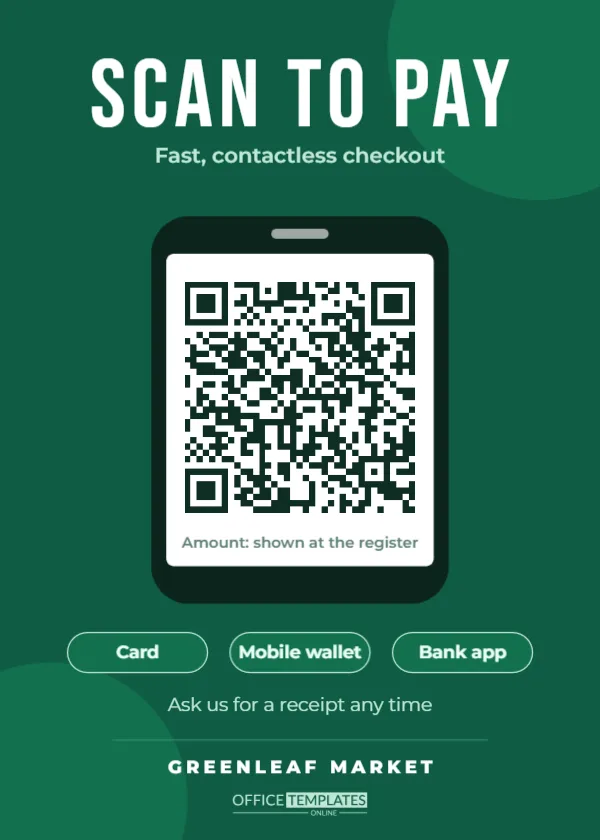
A customer wants to buy, but they have no cash and your card reader has just lost its signal. Moments like that are why small businesses, market traders, food trucks, and service providers keep a payment QR code on the counter. This sign makes yours impossible to miss and makes it clear, in two words, what the code is for.
Built to Be Read in Two Seconds
The 5 x 7 inch sign is a deep emerald green with soft darker circles in two corners. SCAN TO PAY runs across the top in tall white Bebas Neue capitals, with Fast, contactless checkout beneath in mint. The centre of the sign is a dark smartphone outline with a white screen, and the QR code sits on that screen, so even someone who has never paid this way understands they should use their phone. A small line on the screen reminds customers that the amount is shown at the register.
Three outlined pills underneath read Card, Mobile wallet, and Bank app, followed by Ask us for a receipt any time and your business name in spaced capitals at the bottom.
What the Code Should Open
The template’s QR code is a link (URL type), which is how almost every payment service works. The right link depends on the tool you already use.
| If you take payments with | Use this kind of link | Customer experience |
|---|---|---|
| A card terminal provider | The provider’s payment link or checkout page | Customer types the amount or sees a set price |
| A peer-to-peer payment app | Your personal or business profile link | App opens with your name ready to pay |
| An online shop | A checkout or invoice page | Customer pays on a secure web page |
| A bank that offers pay links | Your bank’s request-to-pay link | Customer approves the payment in their banking app |
Once you have the link, select the code, click Edit Code, paste it into the URL field, and press Update QR Code. Then pay yourself a small amount as a test before you open for the day.
Protecting Customers From Fake Codes
Payment QR codes have a known weak spot: someone can stick a fake code over yours and redirect payments. A few simple habits protect you and your customers.
- Keep the sign inside a holder or behind clear acrylic so nothing can be stuck on top.
- Glance at the sign when you open each day and check the code still opens your page.
- Show your business name on the sign, as this template does, so customers can check it matches the name on the payment screen.
- Tell staff to confirm the payment has arrived before handing over goods.
Training Staff in One Minute
New staff often hesitate when a customer asks to pay by QR code. A one-minute briefing avoids awkward pauses at the till. Show them the sign, scan it on their own phone so they see what the customer sees, and walk through the three checks: the customer sees your business name on the payment screen, the amount is right, and the payment notification arrives on the shop device before the goods leave the counter. Write those three checks on a sticky note inside the till drawer. After a week, it becomes second nature, and the sign quietly speeds up every queue.
Editing the Pills and Wording
The three pills describe how people can pay, so make them accurate. If you only accept one method, delete the other two pills or change their text to something useful, such as No app needed or Instant receipt. The phrase under the headline can also change: Pay in seconds, Tap, scan, done or Contactless only, thank you all fit the space. Replace Greenleaf Market with your trading name exactly as it appears to customers when they pay.
Colour, Contrast and the Phone Frame
The emerald background was chosen because green reads as go and money in most markets, but you can recolour the page, circles, and pills to match your brand. Two things should stay: the white phone screen behind the code, and a dark code colour. QR codes rely on contrast, and the editor warns you with QR Code May Not Scan if a colour choice makes the code hard to read. If your brand colour is very light, use it for the pills and text rather than the background.
Counter, Stall or Van: Placing the Sign
For shops, place the sign beside the till, angled toward the customer. Market traders often clip it to the front of the stall at waist height, where people naturally hold their phones. Food trucks do well with one sign at the ordering window and one at the pickup hatch. Tradespeople who invoice on site can print a smaller copy and keep it in the van to show customers after a job.
Print on heavy card and use a 5 x 7 acrylic stand, or laminate it for outdoor stalls. Download a PNG version too, so you can text the same image to customers who prefer to pay later, or add it to an emailed invoice for regular clients.
Payment Sign Questions
Can the code hold a fixed amount?
Some payment services let you create a link for a fixed price, such as a ticket or a set lunch. Paste that link, and the customer sees the amount as soon as they scan.
Do I pay a fee for using a QR code?
The code itself is free. Any fees come from your payment provider, the same as with any card or app payment.
Will it work without mobile data?
The customer’s phone needs an internet connection to open the payment page. In areas with weak signal, offer your Wi-Fi or keep a card reader as backup. A printed note with your Wi-Fi details next to the sign can help in a pinch.
Add your payment link, set the pills to match how you get paid, and print. Then the next customer who says I don’t have cash can pay in seconds.