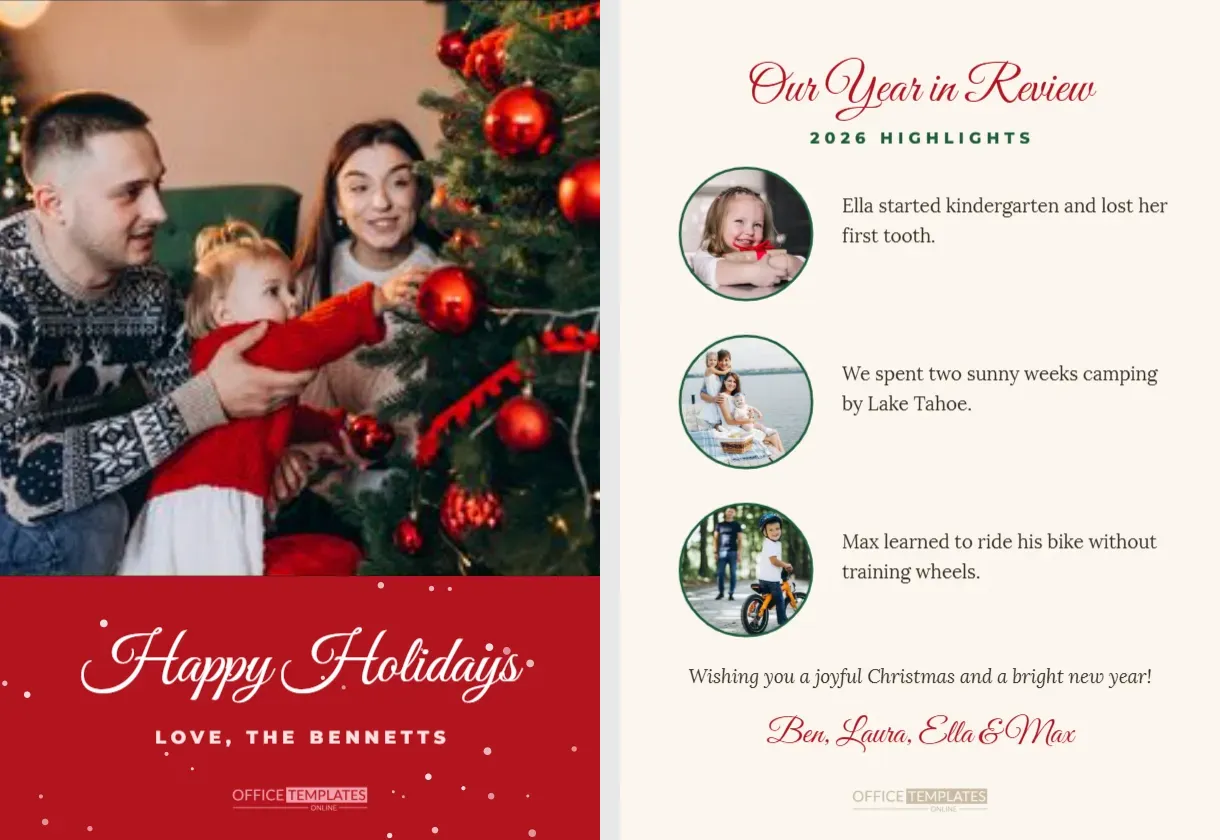
Some years are too full for a single photo. This two-sided 5 x 7-inch card combines a beautiful photo front with a year-in-review back. The front features a large photo filling the top two-thirds of the card, above a festive red band with soft snow, Happy Holidays in white script and LOVE, THE BENNETTS in small capitals. The back is cream, with Our Year in Review in red script, 2026 HIGHLIGHTS in green capitals, and three round photo frames, each paired with a short highlight of the year, followed by a warm wish and the family’s names.
Why a Year in Review Card Works
Many families once sent long Christmas letters to share their news. A year in review card captures the same spirit in a compact, visual format. Friends and relatives get a quick update on milestones and adventures, and the photos make the news feel personal and vivid. It is perfect for families who want to share more than a single picture without writing a full letter.
The Photo Front
The front photo frame fills the top of the card, so choose your best photo of the year, ideally a family portrait. Click the frame and use Replace Image to upload it. The red band below gives the greeting room without covering the photo, and the gentle snow adds a festive touch.
The Year in Review Back
The back has three round photo frames with green outlines, each beside a short text box. The sample highlights include starting kindergarten, a camping trip, and learning to ride a bike. Replace each photo and highlight with your own. Keep each highlight to one or two sentences so the page stays tidy.
Choosing Highlights for Your Year
Good highlights include milestones, trips, new jobs, new homes, sports achievements, hobbies, and pets. Choose a mix that represents everyone in the family. Light-hearted moments, such as a funny kitchen disaster or a new family tradition, make the card fun to read.
Printing a Two-Sided Card
Download both pages as a PDF and print double-sided on 5 x 7-inch card. Most print shops offer double-sided card printing. If you print at home, print the front first, then flip the paper and print the back, testing the orientation on plain paper first.
Editing the Family Names
Update LOVE, THE BENNETTS on the front and the signature on the back. You can write individual names, such as Ben, Laura, Ella and Max, or a family name. Matching the names on both sides ties the card together.
Changing the Band Colour
The red band can be changed to green, navy, or burgundy to match your photo. Select the band and choose a new colour. Keep the script white for contrast.
Round Photos on the Back
Round frames work well for close-ups and portraits. Crop each photo so the subject’s face sits in the centre of the circle. If a highlight has no photo, delete the frame and widen the text box.
Emailing Both Sides of the Card
Download both pages as JPGs and send them together by email or messaging, or combine them into a short post on social media. Relatives abroad will enjoy receiving the update instantly.
A Modern Alternative to the Christmas Letter
If you love writing longer updates, our collection also includes a Christmas family newsletter letter on US Letter paper with photos and sections. The year in review card is a shorter, more visual alternative.
Year in Review Cards for Couples
Couples can use the highlights to share trips, home projects, and milestones, such as an engagement or a new job. Replace the kids’ highlights with your own adventures as a pair.
Year in Review Cards for Grandparents
Grandparents can send their own year in review to children and grandchildren, sharing travels, hobbies, and family gatherings. It is a lovely way to keep the extended family connected.
Keeping the Back Readable
Use clear photos with simple backgrounds for the small circles, and keep text at a readable size. Avoid squeezing in too many words; a few warm sentences are more effective than a crowded page.
Year in Review Card Questions
Can I add a fourth highlight?
Yes. Duplicate a photo and text pair and adjust the spacing.
Can I print only the front?
Yes. Print page one alone for a single-sided card.
Can I change Happy Holidays?
Yes. Select the white script in the red band and type your words.
Writing Highlights That People Enjoy
The best highlights are specific and warm. Instead of we had a good year, try we finally learned to make proper sourdough, or Max scored his first goal and celebrated with a cartwheel. Small, vivid details make readers smile and feel connected. Keep each highlight positive and short, and save longer stories for phone calls and visits over the holidays.
Including Difficult Years Gently
Not every year is easy. If your family faced illness, loss, or change, you can acknowledge it gently; for example, this year taught us to treasure every moment together. Friends appreciate honesty, and a card that balances hard moments with gratitude often means more than one filled only with good news.
Year in Review Cards for Small Businesses
Small businesses can adapt the back to share their own year: a new location, a favourite customer event and a team milestone. Replace the family photos with photos of the shop, products or team, and use the front for a team photo. Customers enjoy seeing the people and story behind a local business.
Saving Your Year in Review Cards
Keep one printed copy each year in a folder. After a decade, the stack of highlights becomes a wonderful family history to read together at Christmas.
Year in Review Postage
Two-sided cards weigh the same as single cards, so standard card postage applies.
Share the Best of Your Year
Upload your photos, write your highlights, and print your two-sided cards. A photo front and a year in review back give friends and family a heartfelt glimpse into your year.