Black Friday videos are hugely popular: haul videos, deal round-ups, buying guides, and what I bought reviews. On YouTube, the thumbnail decides whether people click. It needs to be readable at a tiny size, bright enough to stand out, and clear about what the video offers. This 1280 x 720 pixel thumbnail template follows the proven formula: big words, a face, an arrow, and a bright background.
YouTube Thumbnail Design
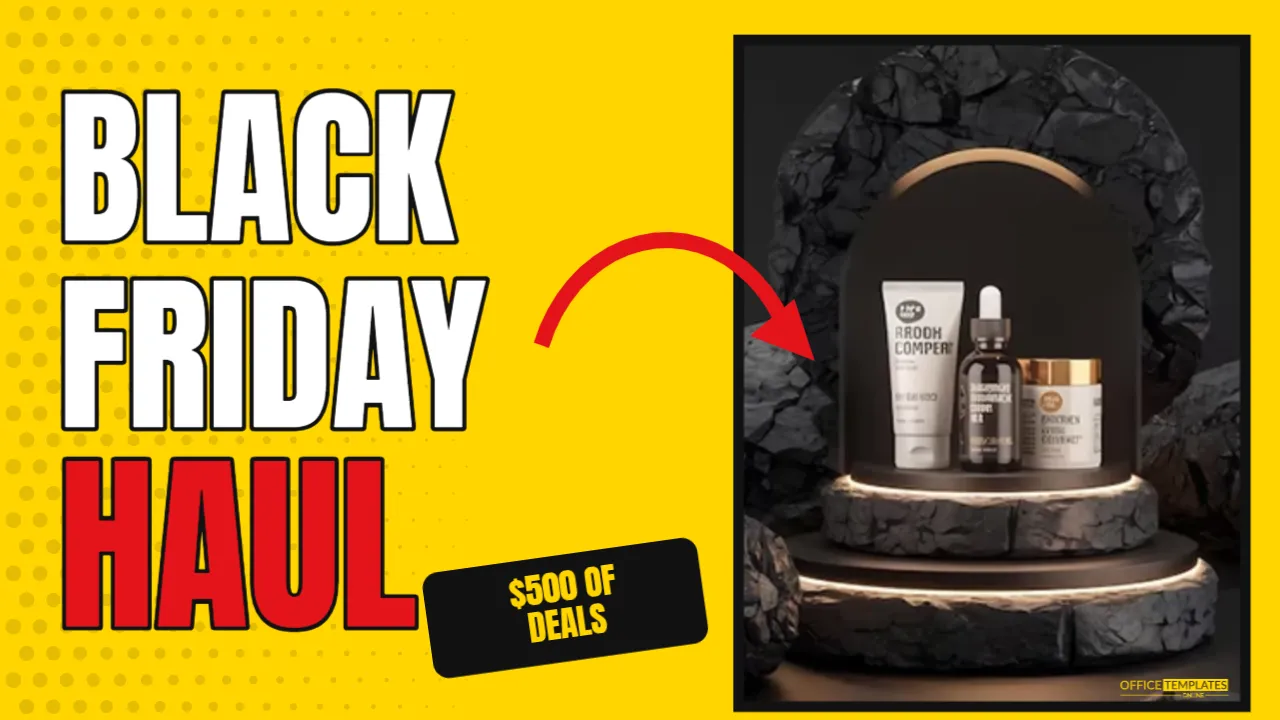
The thumbnail is 1280 x 720 pixels, the standard 16:9 size YouTube recommends. The background is bright yellow, with faint black halftone dots on the left. A rounded photo frame with a thick black border sits on the right, ready for a photo of the presenter or the products.
On the left, BLACK and FRIDAY are stacked in tall white Anton letters with thick black outlines, followed by HAUL in red with the same outline. A curved red arrow points from the text towards the photo. A tilted black tag reads $500 OF DEALS in yellow, adding a specific hook. A small logo mark sits in the corner.
Why This Thumbnail Formula Works
- Big, few words: three words are readable even on a phone’s small preview.
- Outlined letters: black outlines make white text readable on any background.
- A face or object: people notice faces and products quickly.
- An arrow: it directs attention and adds energy.
- A number: specific figures like $500 create curiosity.
Choosing the Thumbnail Photo
For haul and review videos, a photo of you holding a product with an expressive face often works well. For deal round-ups, a group of products or a pile of shopping bags can be effective. Take the photo against a plain background so it reads clearly at small sizes. Click the frame and choose Replace Image to add it.
Editing the Thumbnail Words
Keep the headline to three or four words. Change HAUL to suit your video: DEALS, TOP 10, WORTH IT?, TECH DEALS, or GIFT IDEAS. Update the tag with your hook, such as UNDER $50, 30 DEALS, or AMAZON PICKS. Avoid repeating the full video title in the thumbnail; they should work together.
Thumbnail and Title Pairings
| Time | Video title idea |
|---|---|
| BLACK FRIDAY HAUL | Everything I Bought on Black Friday (Worth It?) |
| TECH DEALS | The Best Black Friday Tech Deals Under $100 |
| GIFT IDEAS | 25 Black Friday Gift Ideas for Everyone on Your List |
| DON’T BUY | Black Friday Deals to Avoid This Year |
Testing Thumbnail Readability
Most viewers see thumbnails very small, on phones or in sidebars. After editing, zoom out until the thumbnail is about the size of a matchbox on your screen. If you can still read the words and see the face, it works. If not, make the text bigger or remove words.
Changing the Thumbnail Colours
Yellow is one of the most eye-catching colours on YouTube, which is often dominated by white and dark interfaces. Other strong choices are red, lime, cyan, or hot pink. Keep the outline black and the headline white or one bright colour, so the text stays readable.
Consistent Thumbnails for a Series
If you make several Black Friday videos, keep the same layout and change only the photo, the last word, and the colour. A consistent style helps viewers recognise your channel in search results and recommendations.
Uploading the Thumbnail
Download the thumbnail as a JPG or PNG under YouTube’s file size limit, then upload it as a custom thumbnail in YouTube Studio. Custom thumbnails may require a verified account. You can also use the same design as a cover image for TikTok, Instagram Reels, or a blog post.
Honest Thumbnails Build Trust
Your thumbnail should represent what is in the video. If the thumbnail promises $500 of deals, show them. Misleading thumbnails might get clicks, but viewers who feel tricked leave quickly, and that can hurt how YouTube recommends your videos.
Thumbnails for Businesses
Shops can make videos too: a walk-through of Black Friday deals, a staff picks round-up, or a gift guide. Use your shop owner or staff in the photo and your brand colour as the background. Videos with real people from the business often feel more trustworthy than adverts.
Thumbnail Accessibility
Strong contrast and large letters help everyone, including viewers with low vision. Make sure the video title and description also contain the key information, since thumbnails are images and not readable by screen readers.
Expressions and Poses That Work
Thumbnails with clear emotions tend to stand out: surprise, excitement, or a thoughtful look while holding a product. Look towards the product or the arrow, which guides viewers’ eyes. Keep the pose simple and the face large enough to read at a small size. Take several photos and test which one looks best in the frame.
Testing Thumbnails After Publishing
YouTube Studio shows how often people click your thumbnail when they see it. If the click rate is low after a day or two, try a new version with a different photo, word, or colour. Some channels test two or three versions and keep the best. Small changes can make a big difference.
Thumbnails for a Black Friday Series
If you post several videos, number them or use a consistent word, such as DEALS DAY 1, DAY 2, and DAY 3, so subscribers can follow the series easily.
Fonts for Readable Thumbnails
Tall, heavy fonts like Anton, Bebas Neue, and Bangers stay readable at small sizes. Avoid thin or script fonts for the main words, and stick to one or two fonts per thumbnail so the message stays clear.
YouTube Thumbnail Questions
Can I remove the arrow?
Yes, but arrows and circles often help focus attention. Try both and compare click rates.
Can I use a product cut-out instead of a photo?
Yes. A product on a transparent background placed over the yellow looks great.
What about Shorts?
Shorts use vertical video; create a 1080 x 1920 version for their cover image.
A great video deserves a thumbnail people cannot ignore. Add your photo, set your words, and get your Black Friday video clicked.