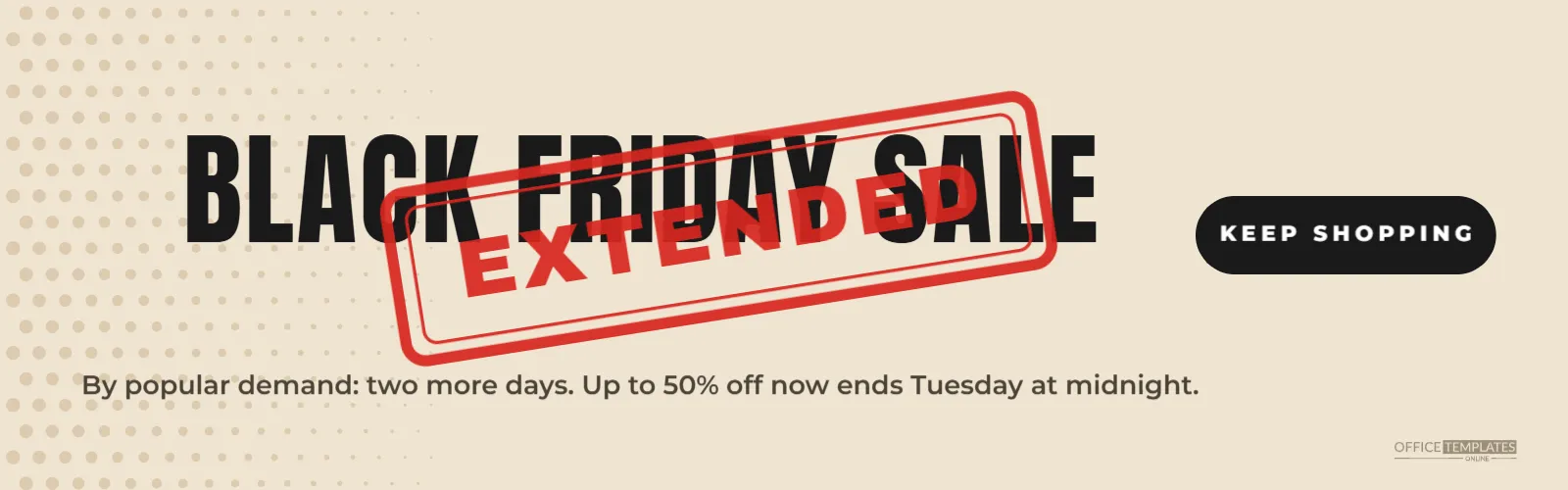
Sometimes a sale goes so well, or some stock remains, that extending it makes sense. Announcing an extension needs a clear, honest message: the sale was meant to end, and now it continues for a set time. This wide banner uses the look of a red rubber stamp slammed across the original headline, a familiar visual that tells everyone the plan has changed.
Extended Sale Banner Design
The banner is 1600 x 500 pixels, a wide strip for websites, emails, and social headers. The background is a warm kraft paper colour, with soft tan halftone dots on the left edge. BLACK FRIDAY SALE runs across the banner in tall black Anton letters.
A red rubber stamp is pressed across the headline at an angle: a rounded rectangle with a double outline and EXTENDED in heavy red capitals, slightly transparent like real stamp ink. Below, a line explains: By popular demand: two more days. Up to 50% off now ends Tuesday at midnight. A black pill on the right reads KEEP SHOPPING, and a small logo mark sits in the corner.
When to Extend a Black Friday Sale
- Stock remains that you would rather sell than store.
- Your website had technical problems during the original sale.
- Customers asked for more time, often due to delivery or payday timing.
- You want to bridge Black Friday into Cyber Monday or the following week.
Being Honest About Extensions
Customers appreciate extra time, but frequent extensions can make deadlines meaningless. Extend only when there is a real reason, give a clear new end date, and stick to it. Avoid announcing a last chance and then extending immediately as a planned tactic; customers notice patterns, and some regions have rules against misleading urgency claims.
Editing the Stamp and Message
The stamp is a grouped object; double-click it to change the word. EXTENDED is the clearest choice, but you could use 2 MORE DAYS, BONUS DAY, or STILL ON. Update the message line with the new end date and time. Change the button to SHOP NOW or SEE WHAT’S LEFT.
Writing the Extension Message
| Reason | Message idea |
|---|---|
| High demand | By popular demand: two more days |
| Website issues | Sorry for the hiccup: the sale continues until Tuesday |
| Stock left | A few favourites still left: extended until Wednesday |
| Bridging to Cyber Week | Black Friday prices now run all Cyber Week |
Where to Announce the Extension
Replace your homepage banner with this one as soon as the extension starts, send a short email to subscribers and post on social media. Customers who saw the original end date should hear about the extension in the same places they saw the sale.
Changing the Banner’s Colours
Kraft paper and red ink give a handmade, honest feel. You can switch the background to white or light grey for a cleaner look, or black with a white stamp for drama. Keep the stamp colour strong and slightly transparent so it looks printed rather than pasted.
Resizing for Email and Social Media
For email, change the width to 600 pixels and enlarge the headline and stamp so they stay readable on phones. For a square social post, stack BLACK FRIDAY SALE over two lines and place the stamp diagonally across the middle. The stamp effect works at any size.
Updating Prices for the Extension
Check that your store’s sale schedule is updated before the banner goes live. Many e-commerce platforms schedule sale prices to end automatically, so an extension needs a manual change. Test a product page and checkout to confirm the sale prices are still showing.
Extended Sale Stock Updates
An extension often means some sizes and products have sold out. Update your sale collection to hide sold-out items, so customers clicking the banner find products they can buy. A shorter list of available deals is better than a page full of unavailable items.
Turning the Stamp Into a Brand Element
The rubber stamp effect can become part of your sale identity. Use it for SOLD OUT on social posts, NEW on fresh stock, or BACK IN STOCK on restocked favourites. A consistent stamp style makes your updates instantly recognisable.
Extended Sale Accessibility
Add alt text such as Black Friday sale extended by popular demand, up to 50% off until Tuesday at midnight. Repeat the new end date in real text on your sale page, since the stamp’s angled text may be harder to read for some visitors.
Learning From an Extension
After the extension ends, compare its sales with the main weekend. If extension days sold well, consider planning a longer sale next year from the start, rather than extending at the last minute. Planned schedules are easier to staff and to communicate.
Telling the Team About the Extension
An extension affects staff as well as customers. Let the team know the new end date, which deals are still running, and whether shifts change. Update the signs in the shop, the till prompts, and any phone or chat scripts. When everyone gives the same answer, customers feel confident about the extra days.
Thanking Customers for the Response
An extension is a good opportunity to say thank you. A short line on your sale page or in the email, such as Thank you for making this our best Black Friday yet, turns the announcement into a warm moment. Customers enjoy feeling part of a success, and gratitude builds goodwill for the holiday season ahead.
Ending the Extension Cleanly
When the new end date arrives, take the banner down on time and post a simple sale closed note, so the final deadline is as clear as the first.
Extended Sale Banner Questions
Can I use the stamp on other designs?
Yes. Copy the stamp group and paste it onto any other template.
Can I change the stamp angle?
Select the stamp group and rotate it; slight angles look most natural.
Should I extend every year?
Only when there is a real reason. Regular surprise extensions can reduce trust in your deadlines.
When the sale deserves more time, say so clearly. Stamp your banner, set the new end date, and give your customers a fair second chance at the deals.