Organising a potluck for a church, school, office, or apartment building is a bit like conducting an orchestra where nobody has seen the music. Everyone wants to help, nobody wants to bring the same thing, and somebody always forgets the serving spoon. A clear sign-up sheet, pinned where people gather, solves most of it. This Thanksgiving Potluck Sign-up Sheet gives you a full-page table with room for twenty dishes.
The Organiser’s Plan in Five Steps
Step one: set the headcount
Estimate how many people will come. For a potluck, plan roughly one dish for every three to four guests, plus the main dish provided by the organiser or the venue.
Step two: decide the balance
Without guidance, potlucks drift towards desserts and bread rolls. Use the category chips on the sheet to steer people. A good balance for forty guests looks like this:
| Category | How many dishes | Examples |
|---|---|---|
| Main | 2 to 3 | Turkey, ham, vegetarian lasagne |
| Side | 6 to 8 | Stuffing, mashed potatoes, green beans, salads |
| Dessert | 3 to 4 | Pumpkin pie, apple crisp, brownies |
| Drink | 2 to 3 | Cider, lemonade, coffee |
Step three: fill in the first rows yourself
A blank sign-up sheet can sit untouched for days. Fill in the first two or three rows yourself, as in the sample, so people can see how it works and feel encouraged to add their names.
Step four: post it early
Put the sheet up two weeks before the event, in the break room, the church hall, the classroom door, or the building lobby. Share a photo of it in your group chat or newsletter too.
Step five: check it twice
Look at the sheet a week before and again three days before. If there are gaps, such as no vegetables or no drinks, ask a few people directly.
What the Potluck Sheet Looks Like
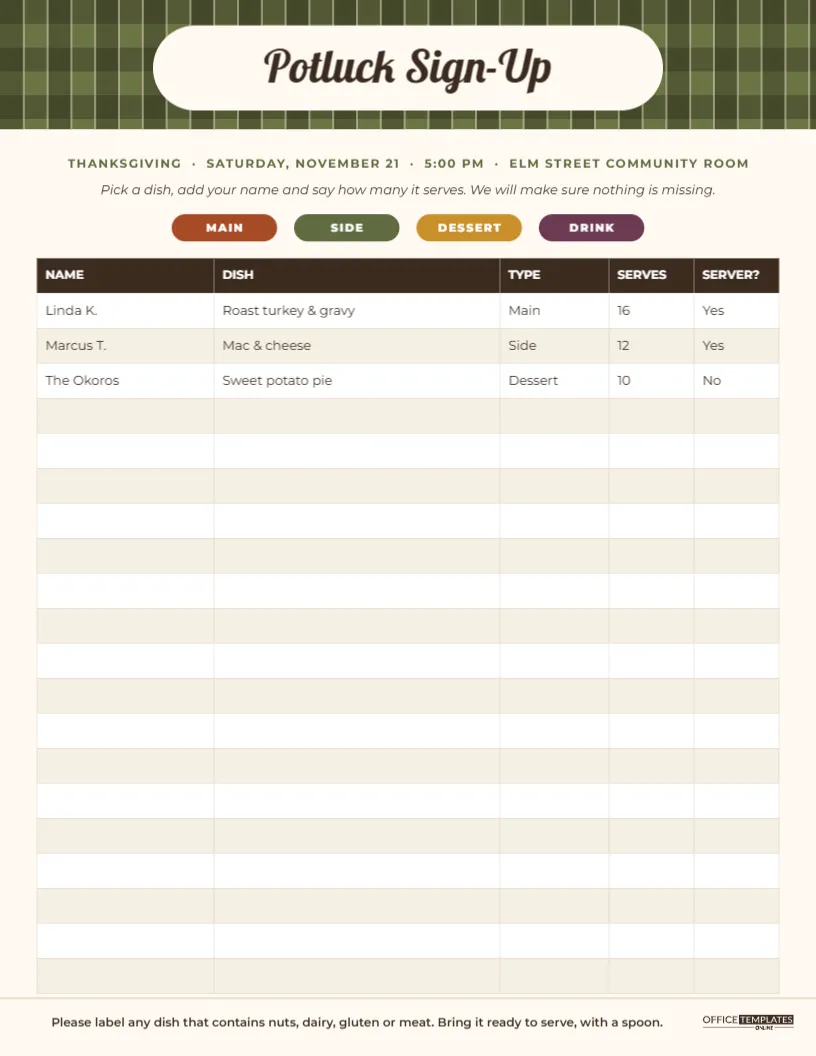
The sheet is US Letter, 8.5 x 11 inches, portrait. Across the top runs an olive and dark green buffalo-check plaid band, like a picnic blanket. A wide cream rounded label sits in the middle of it with “Potluck Sign-Up” in Lobster, a bold retro script. Below the band, an olive line of small capitals gives the event, date, time, and place, followed by an italic instruction. Four coloured chips in rust, olive, mustard, and plum label the categories MAIN, SIDE, DESSERT, and DRINK.
The main part of the page is a real editable table with five columns: NAME, DISH, TYPE, SERVES, and SERVER?, the last one asking whether the person is bringing a serving utensil. The header row is dark brown with white text, and the body rows alternate white and a warm cream. Three sample rows are filled in (Linda K. with roast turkey and gravy, Marcus T. with mac and cheese, and the Okoros with sweet potato pie), and seventeen rows are left empty for guests. A thin line near the bottom introduces a reminder to label dishes containing nuts, dairy, gluten, or meat, and the brand mark sits in the lower right corner.
Editing the Table for Your Event
The table is the editor’s Table object. Double-click it, or use Edit Table Data, to type into cells. You can clear the sample rows if you would rather start blank, or add your own pre-assigned dishes. To change the number of rows, use + Row or remove rows from the end. The column headings can be renamed; for example, change SERVER? to ALLERGENS if that matters more for your group.
The event line at the top is a normal text box. Replace THANKSGIVING · SATURDAY, NOVEMBER 21 · 5:00 PM · ELM STREET COMMUNITY ROOM with your own details, keeping the dots as separators.
Making the Category Chips Useful
The coloured chips are more than decoration. Ask people to write the category in the TYPE column, and at a glance you can see whether the sides outnumber the desserts. For an even clearer picture, highlight each filled row with a coloured pen that matches its chip after you take the sheet down.
Digital or Paper Sign-Up?
Paper works best in shared spaces where people pass by every day. For a scattered group, download the sheet as a PNG and post it to the group chat, then update the table in the editor as people reply, and repost. Some organisers do both: a paper sheet on the wall and a weekly photo in the chat.
Printing and Posting the Potluck Sheet
Download the PDF and print at actual size on regular Letter paper; people will be writing on it with ballpoint pens, so ordinary copy paper is perfect. Pin it at eye level, and tie a pen to the pin board with a piece of string. For a large group, print two copies and number the second sheet’s rows from 21 onwards.
Food Safety and Labelling Notes
The reminder at the bottom of the sheet asks guests to label dishes with nuts, dairy, gluten, or meat. Small folded tent cards beside each dish make this easy. Encourage people to bring hot dishes hot and cold dishes cold, and to bring food ready to serve, as oven space at a venue is usually limited.
On the Day: Using the Sheet as a Serving Plan
Take the filled-in sheet down the evening before and bring it to the event. It becomes your serving plan: you know which dishes are coming, roughly how many people each serves, and who is bringing a spoon. Arrange the serving table in category order, mains first, then sides, desserts and drinks at the end, and tick off dishes as they arrive. If a dish does not turn up, you will notice quickly and can fill the gap.
Potluck Sheet Questions
Can I use this for a Friendsgiving at home?
Yes. Change the event line to your address and send the sheet as an image to your friends.
Can I add a column for contact numbers?
Increase the column count in the table settings and narrow the DISH column a little to make space.
What if two people sign up for the same dish?
Let them know early and suggest a variation, such as one classic and one vegetarian stuffing. Two pies are rarely a problem.
A good potluck feels effortless to the guests because someone planned it well. Post your sign-up sheet early, fill the first few rows, and watch the table fill itself.