Help Patients Plan Ahead with a Clear Labor Day Clinic Closure Notice
Patients may need to know about a holiday closure before they schedule a visit, arrange transportation, or plan to contact your clinic. This Labor Day Clinic Closed Notice Template gives healthcare and medical offices a clear, ready-made way to announce that the clinic will be closed for Labor Day and tell patients exactly when normal business hours will resume.
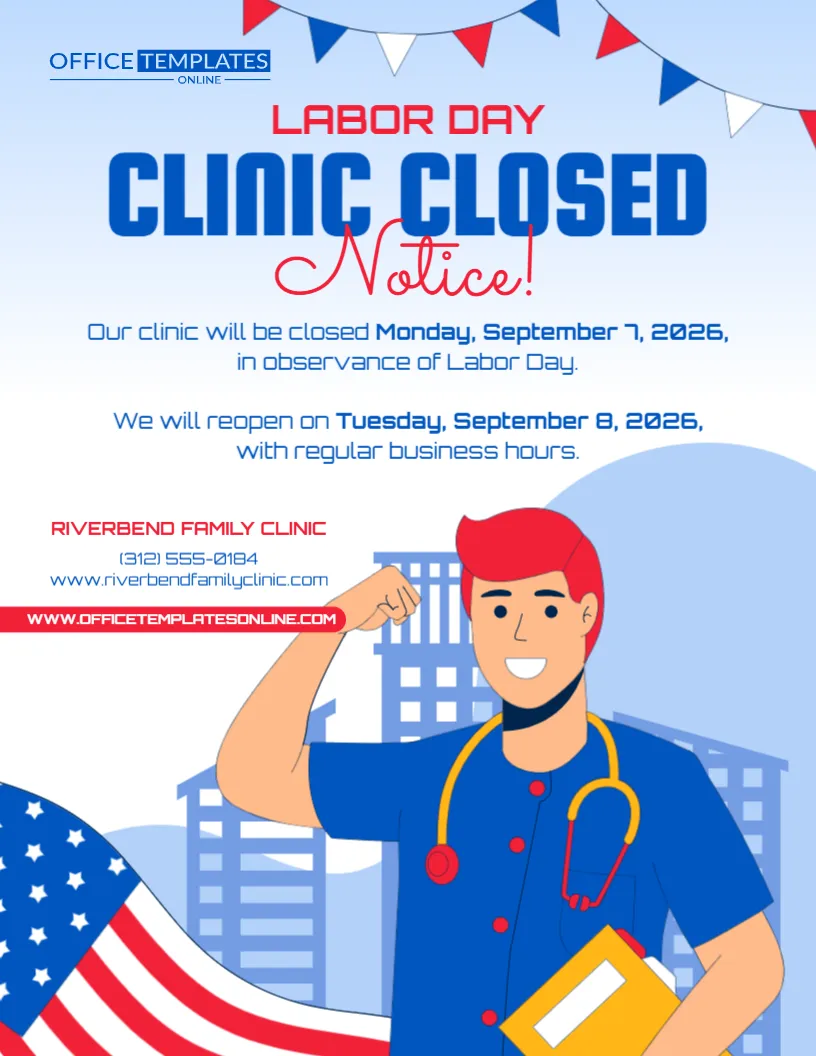
The design places “Clinic Closed” in large blue lettering near the top, making the purpose of the notice immediately recognizable. Directly below, there is space for the closure date, reason for closing, reopening date, and return to regular business hours. A separate area is provided for the clinic name, phone number, and website.
The template also has a distinctive healthcare-focused appearance. An illustrated medical professional wearing a stethoscope occupies the lower half of the design, while patriotic bunting and an American flag connect the notice visually with Labor Day.
You can personalize the template directly in our easy-to-use browser-based editor. There is no login required to start editing. Replace the sample information with your clinic’s actual holiday schedule and contact details, customize the available elements, and download your completed notice in PDF, PNG, or JPG format.
A Straightforward Way to Announce a Labor Day Clinic Closure
A clinic closure notice should not make patients search for the important details.
This template follows a simple information order:
Labor Day
Clinic Closed Notice
Closure Date
Reopening Date
Clinic Contact Information
The sample wording explains:
Our clinic will be closed Monday, September 7, 2026, in observance of Labor Day.
It then immediately tells patients:
We will reopen on Tuesday, September 8, 2026, with regular business hours.
This structure makes the notice useful for anyone who needs a quick answer about the clinic’s Labor Day availability.
Customize the Sample Information for Your Own Clinic
The clinic name, dates, phone number, and website shown in the sample design are placeholder information.
Before using the notice, replace them with your actual details.
The available editable content can be personalized with information such as:
- Clinic or medical practice name
- Labor Day closure date
- Day of the week
- Reopening date
- Reopening information
- Phone number
- Website
- Holiday message
- Other available text and design elements
Keeping these details together creates a self-contained announcement that patients can understand even when they see the notice away from your physical location.
Edit Online Without Creating an Account
There is no need to download complicated graphic-design software just to update your holiday closure dates.
Open this template in our online editor directly from your browser and personalize the available elements according to your needs.
No login is required to begin customizing the template.
The layout is already prepared, so you can focus on entering accurate information rather than designing the entire notice yourself.
Once your changes are complete, review the notice carefully and download the finished version in one of the available formats.
“Clinic Closed” Is the Main Message
The largest text in the upper section reads:
CLINIC CLOSED
This is intentional.
Someone walking past the notice or quickly viewing it on a screen should be able to understand the main message without reading every line.
The word “Notice!” appears underneath in a contrasting handwritten style, while “Labor Day” sits above the main headline.
Together, these elements clearly communicate:
The clinic has a closure notice specifically for Labor Day.
State the Exact Date of the Closure
The sample version specifies:
Monday, September 7, 2026
Including the complete date makes the announcement much clearer than simply saying:
Closed Monday
Patients may see the notice several days or even weeks before the holiday. The full date helps them identify exactly which Monday is affected.
If you reuse the design for another Labor Day, update the complete date and check that the day of the week is correct.
Tell Patients Exactly When the Clinic Will Reopen
A closure message is more useful when it also provides reopening information.
The sample says:
We will reopen on Tuesday, September 8, 2026, with regular business hours.
This lets patients know that the closure applies to Labor Day and that normal operations are expected to resume the following day.
You can adapt this wording to your actual schedule.
For example:
Regular Clinic Hours Resume Tuesday, September 8
Our Clinic Will Reopen Tuesday at 8:00 AM
We Will Resume Normal Business Hours on Tuesday
The Office Will Reopen Wednesday, September 9
Appointments Resume Tuesday Morning
Use only the wording that accurately reflects your clinic’s schedule.
Add the Reopening Time When Your Patients Need It
If your clinic has a specific reopening time, you can make the notice even more informative by including it.
For example:
We Will Reopen Tuesday at 8:00 AM
or:
Regular Hours Resume Tuesday, 9:00 AM–5:00 PM
This can be helpful for patients who may want to call or visit soon after the holiday.
If your usual business hours are already well known and will resume without changes, a simple statement that regular hours resume Tuesday may be sufficient.
Closed for the Entire Labor Day Weekend? Adjust the Dates
Some clinics may close for more than one day.
If your medical office will be unavailable throughout the Labor Day weekend, customize the wording to show the full closure period.
For example:
CLINIC CLOSED SEPTEMBER 5–7
CLOSED FOR LABOR DAY WEEKEND
OUR OFFICE WILL BE CLOSED SATURDAY THROUGH MONDAY
Then add a clear reopening statement:
REGULAR HOURS RESUME TUESDAY, SEPTEMBER 8
If the clinic does not reopen until Wednesday, make that equally clear.
The goal is to prevent patients from assuming that the closure affects only Monday when your actual schedule is different.
Include Your Clinic Name Prominently
The template includes a dedicated space for the medical practice or clinic name.
Replace the sample name with your own official business name.
For example:
Riverside Family Clinic
Downtown Medical Center
Westside Family Practice
Green Valley Health Clinic
Main Street Medical Group
Community Health Center
Using the recognizable clinic name is particularly important if the notice is shared digitally, where patients may see it without any other context.
Add a Phone Number for General Contact
The template includes room for a clinic phone number.
Use the main contact number patients normally call for general information.
Before publishing your notice, check every digit carefully.
A typo in the phone number can be especially inconvenient during a holiday closure, when patients may already be trying to confirm when normal service resumes.
Include Your Clinic Website
A website address can give patients another source of information while the physical clinic is closed.
Depending on your clinic, the website may contain information about:
- Regular office hours
- Appointment requests
- Clinic locations
- Provider information
- Patient resources
- General contact details
- Holiday announcements
If you have a dedicated location or contact page, you may use the most appropriate web address that fits comfortably within the design.
Add an Address if It Is Useful for Your Version
The sample focuses on the clinic name, phone number, and website, but you may want to add an address if the editable layout provides suitable space.
An address can be especially helpful for:
- Multi-location practices
- Family clinics
- Walk-in clinics
- Medical groups
- Specialty practices
- Community clinics
For organizations with several locations, clearly identify which clinic the holiday notice applies to.
Multiple Locations May Need Separate Notices
A medical group with several clinics may not use the same Labor Day schedule at every location.
One office might close for the entire day, while another could operate reduced hours.
If schedules vary, create a customized version for each location.
Each notice can contain the correct:
- Clinic name
- Location name
- Closure date
- Reopening date
- Phone number
- Website
- Address, where appropriate
This helps prevent a patient from applying one location’s holiday schedule to another.
Adapt the Heading for Different Healthcare Offices
Although the template uses the wording “Clinic Closed,” the layout can be adapted for other healthcare settings where appropriate.
You could change the main wording to:
MEDICAL OFFICE CLOSED
DENTAL OFFICE CLOSED
PRACTICE CLOSED
HEALTH CENTER CLOSED
THERAPY OFFICE CLOSED
CLINIC HOLIDAY HOURS
Choose terminology that accurately describes your organization and is familiar to your patients.
Suitable for Many Healthcare and Wellness Settings
With suitable customization, this template may work for:
- Family medicine clinics
- Primary care offices
- Dental offices
- Pediatric practices
- Physical therapy clinics
- Chiropractic offices
- Counseling practices
- Therapy offices
- Specialty clinics
- Community health centers
- Outpatient practices
- Wellness centers
- Private medical practices
- Other appointment-based healthcare offices
The editable format allows you to replace the sample clinic terminology and business information where necessary.
A Healthcare Illustration Makes the Purpose Easy to Recognize
The lower section features a large illustrated healthcare professional.
The character wears blue medical clothing and a stethoscope, creating an immediate visual connection with a clinic or medical setting.
A folder is held in one hand, while a simplified building scene appears in the background.
This gives the template a more specialized appearance than a generic Labor Day business-closure sign.
Labor Day Decorations Frame the Medical Theme
Although the design is healthcare-focused, it still clearly represents Labor Day.
A large American flag curves through the lower-left portion of the design.
Across the top is festive red, white, and blue bunting, while the overall palette uses several shades of blue alongside red accents.
These patriotic details establish the holiday theme without covering the important closure and reopening information.
The Light Background Helps the Message Remain Readable
Most of the central text appears against a clean white or very light blue background.
This gives the closure information plenty of visual space.
The large dark-blue Clinic Closed headline contrasts strongly with the background, while red is used to emphasize the holiday theme and supporting details.
The result is a notice that is decorative enough for Labor Day but still focused on practical information.
Display the Notice Before the Holiday Arrives
A clinic closure announcement is most helpful when patients see it before they make plans to visit.
Consider displaying the completed notice several days ahead of Labor Day.
Depending on your practice, appropriate locations may include:
- Clinic entrance
- Front door
- Reception desk
- Waiting room
- Check-in area
- Checkout desk
- Appointment counter
- Patient information board
- Building lobby
Early notice can be especially useful for patients who normally visit or contact the clinic on Mondays.
Use the Notice as a Patient Reminder
If patients have already been informed through another communication channel, the template can still serve as a final reminder.
You could change the wording to:
REMINDER: CLINIC CLOSED MONDAY
LABOR DAY CLOSURE REMINDER
PLEASE NOTE: OUR CLINIC IS CLOSED FOR LABOR DAY
REMINDER – REGULAR HOURS RESUME TUESDAY
A short reminder displayed close to the holiday can reinforce information patients may have received earlier.
Keep the Closure Message Consistent with Your Other Information
Your clinic may communicate holiday schedules in several places.
Once the closure and reopening dates are confirmed, check that the same schedule is reflected wherever your organization normally publishes business-hours information.
This could include:
- Clinic website
- Appointment information
- Patient emails
- Phone greeting
- Online business listings
- Printed notices
- Patient portal announcements
- Other official clinic communications
Using the same dates and reopening information helps reduce uncertainty.
Be Careful with Medical-Service Wording
This template is primarily intended to communicate business closure information.
Keep the notice focused on whether the clinic is open or closed and when normal business hours resume.
If your organization needs to provide instructions about urgent medical concerns, after-hours services, on-call arrangements, emergency care, prescription requests, or other healthcare matters, use wording that has been approved by the appropriate person within your organization.
Do not add medical instructions simply to fill space on the design.
If You Include an Alternate Contact, Make It Accurate
Some clinics may have an approved after-hours contact method or another office that remains available.
If your organization chooses to include such information, verify it carefully before publishing.
For example, you might have an officially approved line such as:
For After-Hours Information, Call [Approved Number]
or:
Visit Our Website for Holiday Contact Information
Only include alternate contact details that your clinic has authorized and confirmed.
Do Not Imply Services Are Available When They Are Not
If the physical clinic is closed, make sure additional wording does not accidentally suggest that normal appointments, walk-ins, or office services are still available.
Likewise, if certain administrative or online services remain available, describe them accurately.
Clear wording protects the usefulness of the notice.
For example:
Clinic Closed – Online Appointment Requests Remain Available
may be appropriate if that is genuinely how your system operates.
Otherwise, keep the announcement limited to the confirmed closure and reopening schedule.
Check Whether Scheduled Appointments Are Affected
Before publishing the closure notice, make sure the date agrees with your appointment calendar.
If appointments were previously scheduled for Labor Day, your clinic may need to contact those patients separately according to its normal procedures.
The public notice should reflect the same closure date used internally.
This avoids a situation where the sign says the clinic is closed while an appointment schedule suggests otherwise.
Proofread Every Date and Contact Detail
Before downloading the final design, carefully review:
- Clinic name
- Closure date
- Day of the week
- Reopening date
- Reopening time, if included
- Phone number
- Website
- Address, if added
- Holiday wording
- Spelling
- Any remaining placeholder information
Pay particular attention to the closure and reopening dates.
A simple date mistake could cause unnecessary inconvenience for patients.
Download the Completed Template as PDF, PNG, or JPG
Once your information has been entered and checked, download the finished Labor Day Clinic Closed Notice in PDF, PNG, or JPG format.
The different file options give you flexibility depending on how you plan to use your customized design.
Choose the format that best suits your intended method of printing, saving, or digital use.
How to Customize Your Labor Day Clinic Closed Notice
Preparing your own version is simple:
- Open the Labor Day Clinic Closed Notice Template in the online editor.
- Replace the sample clinic name with your own.
- Enter the correct Labor Day closure date.
- Add the correct reopening date.
- Include the reopening time if needed.
- Replace the sample phone number.
- Add your clinic’s website.
- Add a location or address if appropriate.
- Customize the closure message where necessary.
- Adjust other available editable elements.
- Check the design for remaining placeholder information.
- Verify all dates and contact details.
- Download the completed notice as PDF, PNG, or JPG.
The template can be customized online without logging in or creating an account.
Make Your Labor Day Closure Easy for Patients to Understand
A holiday closure notice works best when patients can find the essential information without effort.
This Labor Day Clinic Closed Notice Template combines a prominent Clinic Closed headline, clear closure and reopening dates, clinic contact information, a healthcare-themed illustration, and patriotic Labor Day decorations in one organized design.
Rather than creating a medical office holiday notice from scratch, open the template in the browser-based editor, personalize it without logging in, replace the sample information with your clinic’s actual Labor Day schedule, and download the finished design in PDF, PNG, or JPG format.
It gives your clinic a convenient way to communicate when the office will be closed, when regular business hours will resume, and how patients can identify or contact your practice for general information.