A Cloud Shaped Panel and Bright Balloons for a Family Party
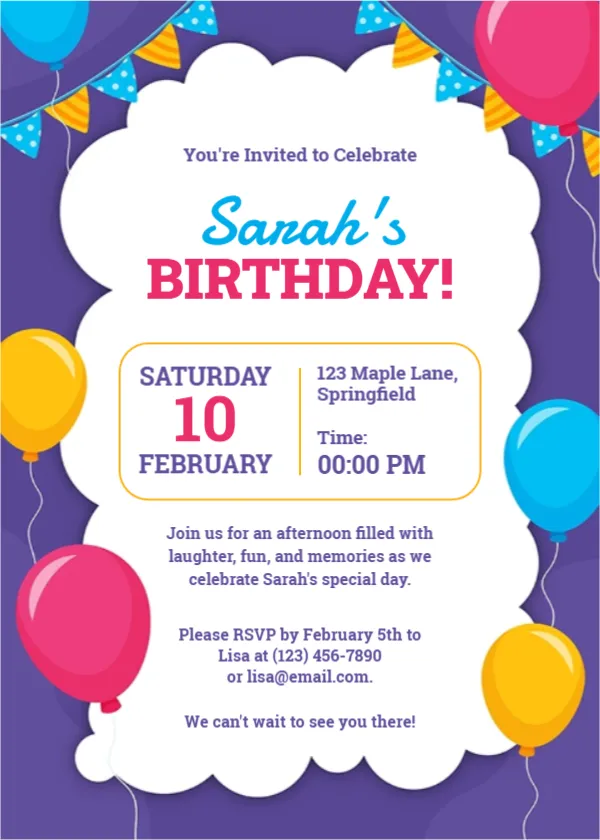
A purple page carries pink, yellow and blue balloons and strings of blue and yellow bunting. In the middle, a big white panel with puffy cloud edges holds the text. You’re Invited to Celebrate sits in purple, the name Sarah’s runs in a blue script and BIRTHDAY! follows in bold pink capitals. A rounded yellow box shows the date on the left and the address and time on the right. The card has plenty of words, so it suits families who want to give all the details on one page.
Cloud Panel, Date Box and Three Short Paragraphs
The card is 5 x 7 inches, portrait, one page. Under the date box sit a welcome paragraph, an RSVP paragraph with a name, phone and email, and a closing line, all in purple serif type.
Date, Address and Reply Details
The sample reads Saturday, 10 February, 123 Maple Lane, Springfield, Time 00:00 PM, and Please RSVP by February 5th to Lisa with a phone and email. February 10 is a Tuesday in 2026, so match the weekday to your year. The welcome line mentions an afternoon, so pick an afternoon time to match.
Filling In the Family Party Card
- Type the birthday person’s name.
- Fix the weekday and time.
- Retype the street and town.
- Change the RSVP name, phone and email.
- Keep or edit the welcome line.
One Card for Every Age
The design has no age number, so it fits a child, a teenager or a grandparent. Add the age to the title if you like, for example Sarah’s 70th Birthday.
Writing for Relatives
Family parties often include older relatives. Keep the address complete and add parking or access notes in the welcome paragraph, such as Step free entrance at the side door.
Five Days Between RSVP and Party
The sample asks for replies five days before the party. That is fine for a home party with simple food, but allow more time if you are booking a caterer.
Printing Purple Edges
The purple background fills the card edges. Print borderless or trim, and check that the purple text inside the cloud stays dark enough.
Sending the Family Birthday Card
Print and hand out at family events, or send as a PNG. Send it three weeks ahead.
Step by Step Editing of the Sarah Family Birthday Cloud Panel Design
- On the sarah family birthday cloud panel design, click the main headline and type your own words, keeping a similar length.
- Retype every name, date and contact line on the sarah family birthday cloud panel design, checking each against a trusted source.
- Search the sarah family birthday cloud panel design for the words Lorem and Company so that no placeholder remains.
- Click any logo or photo on the sarah family birthday cloud panel design, choose Replace Image and resize the new picture to fit.
- Zoom the sarah family birthday cloud panel design to full size and read each line aloud before you save it.
- Keep a clean master of the sarah family birthday cloud panel design without private details, so later versions start tidy.
Consider the birthday party celebration invitation. Similar designs include the father’s 63rd birthday invitation. Compare it with the craft birthday party invitation. Every sarah family birthday cloud panel style alternative sits in birthday party invitations.