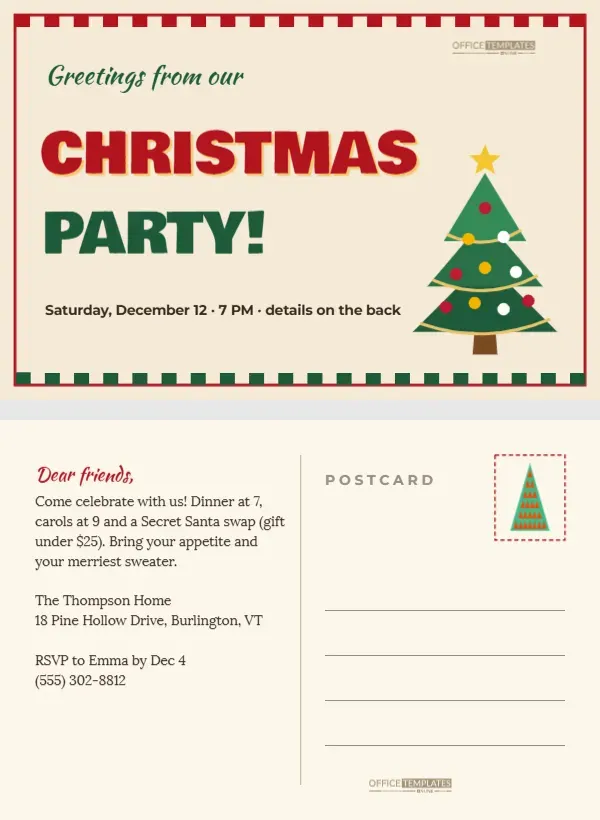
Postcards are cheerful, quick to send, and fun to receive. A postcard invitation skips the envelope and goes straight into the letterbox, where its bright front catches the eye immediately. This 6 x 4 inch two-page template is designed like a vintage holiday postcard. The front reads Greetings from our CHRISTMAS PARTY! in bold retro lettering with a decorated tree, framed by red and green stamp-style edges. The back is a real postcard layout with a handwritten-style message on the left, a stamp box, and address lines on the right.
The Vintage Postcard Front
The front has a warm cream background with a red border and a row of red and green rectangles along the top and bottom, like the decorative edge of an old postcard or a stamp. Greetings from our is written in green Kaushan Script, a nod to classic Greetings from postcards. CHRISTMAS is set in large red Bowlby One with a gold offset shadow, and PARTY! in green below it. A line at the bottom gives the date and time and points to the back for details. A decorated tree with a gold star stands on the right side.
The Postcard Back
The back follows the standard postcard layout. A vertical line divides the card. On the left, Dear friends, in red script introduces a message in Lora: an invitation to dinner at 7, carols at 9, and a Secret Santa swap, with the address, RSVP name, deadline, and phone number. On the right, POSTCARD appears in small spaced capitals at the top, a dashed stamp box with a small tree sits in the top right corner, and four lines provide space for the recipient’s address.
Mailing Postcard Invitations
Postcards can usually be posted without an envelope, at postcard rates where they are available. Check your postal service’s size and thickness rules for postcards; 6 x 4 inches is a common postcard size in many countries. Print on heavy card stock so the postcard survives the mail, and leave the stamp area clear for postage. Write the address clearly on the lines, or print address labels. Remember that postcards are not private, so avoid including sensitive information; for a home party, the address on the back is usually fine for friends and family.
Editing Both Sides
The editor opens on the front; use the page navigation to switch to the back. On the front, change the date line and recolour the title or tree if you like. On the back, edit the message, address, and RSVP details. Keep the message to the left side so the address side stays clear for postal use. The tree in the stamp box is a small editable vector.
Printing Double-Sided Postcards
Download both pages as a PDF and print them double-sided on 6 x 4 inch card, or print four postcards per letter or A4 sheet and cut them out. Many print shops offer postcard printing with full bleed and a matte or uncoated back, which is easier to write on. Test the orientation with a plain paper print first, so the back is the right way up when you turn the card over.
Postcard Invitation Wording Ideas
The message on the back is short and warm. You can adapt it: Wish you were here, well, you can be! Join us for our Christmas party; or The Thompsons request the pleasure of your company for festive cheer; or Pack your merriest sweater and join us for an evening of food, carols and gifts. Keep it short so it fits the left side.
Why Postcards Are Memorable
Postcards feel personal and a little nostalgic. They often end up pinned to fridges and notice boards, which keeps your party in sight until the big day. The vintage Greetings from style brings a smile, and the bold CHRISTMAS lettering is visible from across the room.
Sending a Digital Postcard
Download the front as a JPG to share in messages and on social media, with the details from the back in your message text. Digital postcards are useful for guests who live far away or when time is short.
Postcards for Businesses
Businesses can use postcard invitations for customer events, such as a Christmas open evening in a shop or a client celebration. Add the business name and logo to the back, and use the front as is. Postcards are also an affordable way to reach many local customers by mail.
Collectable Party Postcards
If you host a Christmas party every year, consider making the postcard a tradition, with the same layout and a different colour palette or tree each year. Friends may start collecting them.
Christmas Party Postcard Questions
Can I add a photo to the front?
Replace the tree with a rectangle from the Elements panel and use Replace Image, framed like a vintage photo.
What size is the postcard?
6 x 4 inches, landscape, two pages: front and back.
Can I use only the front?
Yes. Print the front alone as a flat card and send it in an envelope with a note.
Addressing and Stamping Postcards
Gather your guest addresses before printing so you can address the postcards in one sitting. Write clearly in dark ink on the address lines, keeping the postcode on its own line where your postal service prefers it. Add a festive Christmas stamp in the dashed stamp box; many postal services sell seasonal stamps in November that suit the design perfectly. If you are sending many postcards, print the addresses directly onto the back from a spreadsheet using a mail merge, or use small clear labels. Post them three to four weeks before the party so guests have time to plan, and keep a few spares for last-minute invitations.
Postcard Colour Variations
The red, green and gold palette is classic, but the postcard also looks lovely in icy blue and silver for a winter theme, or in soft pink and cream for a vintage feel. Change the title, border and stripe colours together for a consistent look.
Greetings From Your Party
Fill in the message and details, print both sides, and drop them in the post. A cheerful postcard in the letterbox is a lovely way to invite friends to celebrate Christmas.