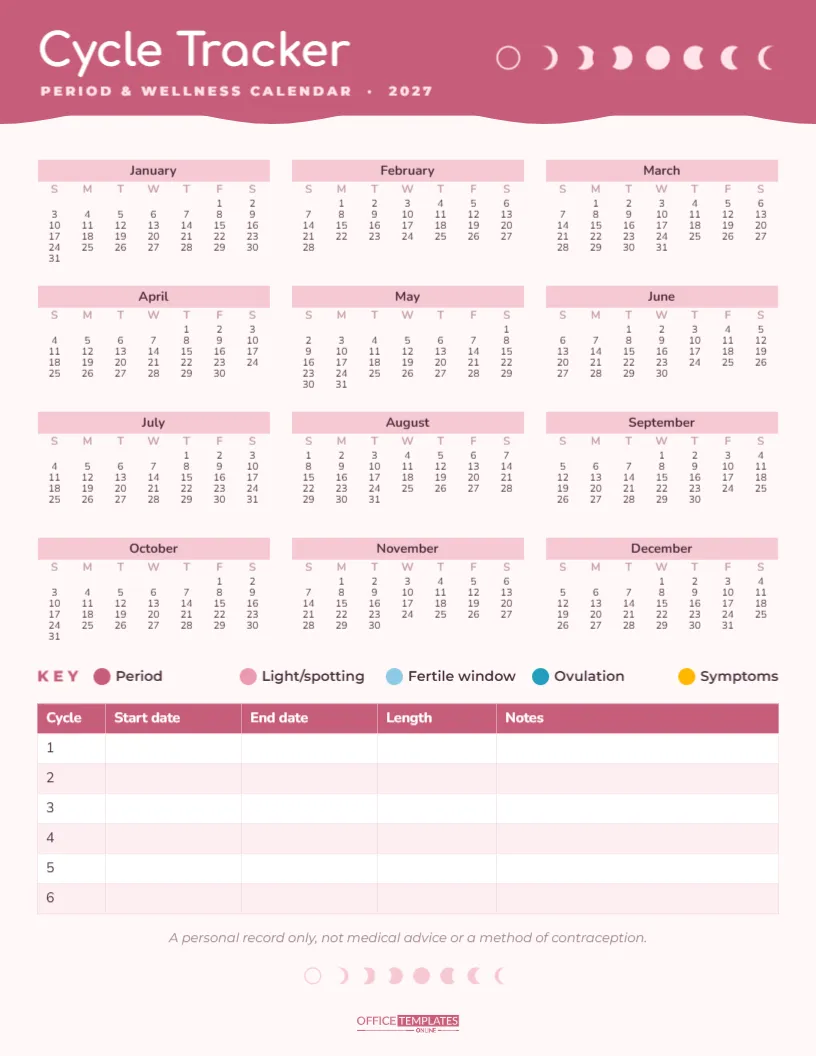
Apps are not for everyone. Some people prefer to keep health information on paper, at home, where no one else can read it. This printable Period and Cycle Tracker gives you a full year on one page, a simple colour key, and a cycle log table. Start with the setup checklist, read the common questions in the middle, and finish with the monthly routine.
Cycle Tracker Setup Checklist
- Print the page and keep it somewhere private but easy to reach.
- Choose five pens or pencils that match the colour key.
- Mark the first day of your most recent period on the year calendar.
- Write that date in the Start date column of cycle 1 in the log.
- Decide what you will count as a symptom (cramps, headaches, mood changes, acne).
- Set a reminder to update the page on the first day of each period.
What the Tracker Page Looks Like
The page is US Letter portrait on a very pale blush background. A deep rose header with a soft wave along its lower edge carries Cycle Tracker in white Comfortaa, a rounded and friendly font, with PERIOD & WELLNESS CALENDAR · 2027 underneath. On the right of the header, a row of eight moon phases, from new moon to full and back again, quietly echoes the idea of a monthly cycle. A smaller row of moon phases appears again near the bottom of the page.
The middle of the page holds the whole of 2027 as twelve mini months, three across and four down, with pink month bars and plenty of white space between dates for colouring. Below the calendar is the key, then a cycle log table with columns for Cycle, Start date, End date, Length, and Notes, and rows for six cycles. A short line reminds you that the tracker is a personal record only, and the OTO logo sits at the foot.
Reading the Colour Key
| Colour | Meaning | When to use it |
|---|---|---|
| Deep rose | Period | Days of regular or heavy flow |
| Soft pink | Light or spotting | Light days at the start or end |
| Light blue | Fertile window | Days you estimate as fertile |
| Deep blue | Ovulation | Your estimated ovulation day |
| Yellow | Symptoms | Cramps, headaches, mood changes, and similar |
Colour a small dot or circle the date rather than filling the whole cell, so the number stays readable and you can use more than one colour on the same day.
Common Questions About Paper Cycle Tracking
How do I work out cycle length?
Count from the first day of one period to the day before the next period starts. For example, if one period starts on January 4 and the next on February 1, the cycle is 28 days. Write the number in the Length column. After a few cycles, you will see your average and how much it varies.
Can this tracker predict my fertile days?
It can help you notice patterns, but a paper calendar is not a reliable way to predict ovulation or prevent pregnancy. That is why the page says it is not a method of contraception. If you are trying to conceive or avoid pregnancy, talk to a doctor, nurse, or pharmacist about suitable methods.
Why track symptoms?
Symptoms often follow the cycle: headaches before a period, low mood in the second half, or tiredness on heavy days. Seeing them on the calendar helps you plan around them and gives useful information to a health professional if symptoms are severe or change.
What counts as irregular?
Cycle length naturally varies a little. If your periods are very far apart, very close together, very heavy, very painful, or suddenly different from normal, it is worth speaking to a doctor. Your filled-in tracker makes that conversation easier.
Monthly Cycle Tracking Routine
- On day one of your period, colour the date and start a new row in the log.
- Colour each period day and any spotting days as they happen.
- Add symptom dots whenever something notable happens.
- When the period ends, write the end date in the log.
- When the next one starts, count back and write the cycle length.
- Add a short note: stress, travel, illness or medication changes can all affect a cycle.
Customising the Cycle Calendar
The year calendar is the editor’s Calendar object in Full Year style. Open Calendar Options to change the year, start the week on Monday, or adjust colours and font. The log is the editor’s Table object, so you can add rows for all twelve or thirteen cycles of the year, or add columns such as Pain level or Flow. The key colours, labels and moon phases are separate shapes and text, so you can recolour them to suit your pens. Fonts are Comfortaa and Nunito, both Google Fonts.
Tracker Ideas for Teens and Parents
A paper tracker is a gentle way for teenagers to learn about their cycles. Parents can print a copy and explain the key together, keeping it simple and judgement-free. It is especially useful in the first year or two, when cycles are often irregular, and it is reassuring to see the pattern settle over time.
Printing and Keeping It Private
Download the PDF and print at home on plain paper. Keep the page in a journal, a folder, or a drawer rather than on a shared wall. If you prefer, print a fresh copy each year and keep the old ones together; several years of records can be very helpful when talking to a doctor about changes over time.
Bringing the Tracker to an Appointment
When you see a doctor or nurse about your periods, they will often ask when your last period started, how long your cycles usually are, and how many days you bleed. With the tracker in your bag, you can answer from real records instead of guessing. Point out any symptoms that keep returning at the same point in the cycle, and any months that looked very different. A few months of honest notes can make a short appointment much more useful.
A year of cycles on one page, private and simple. Colour, count, and notice what your body is telling you.