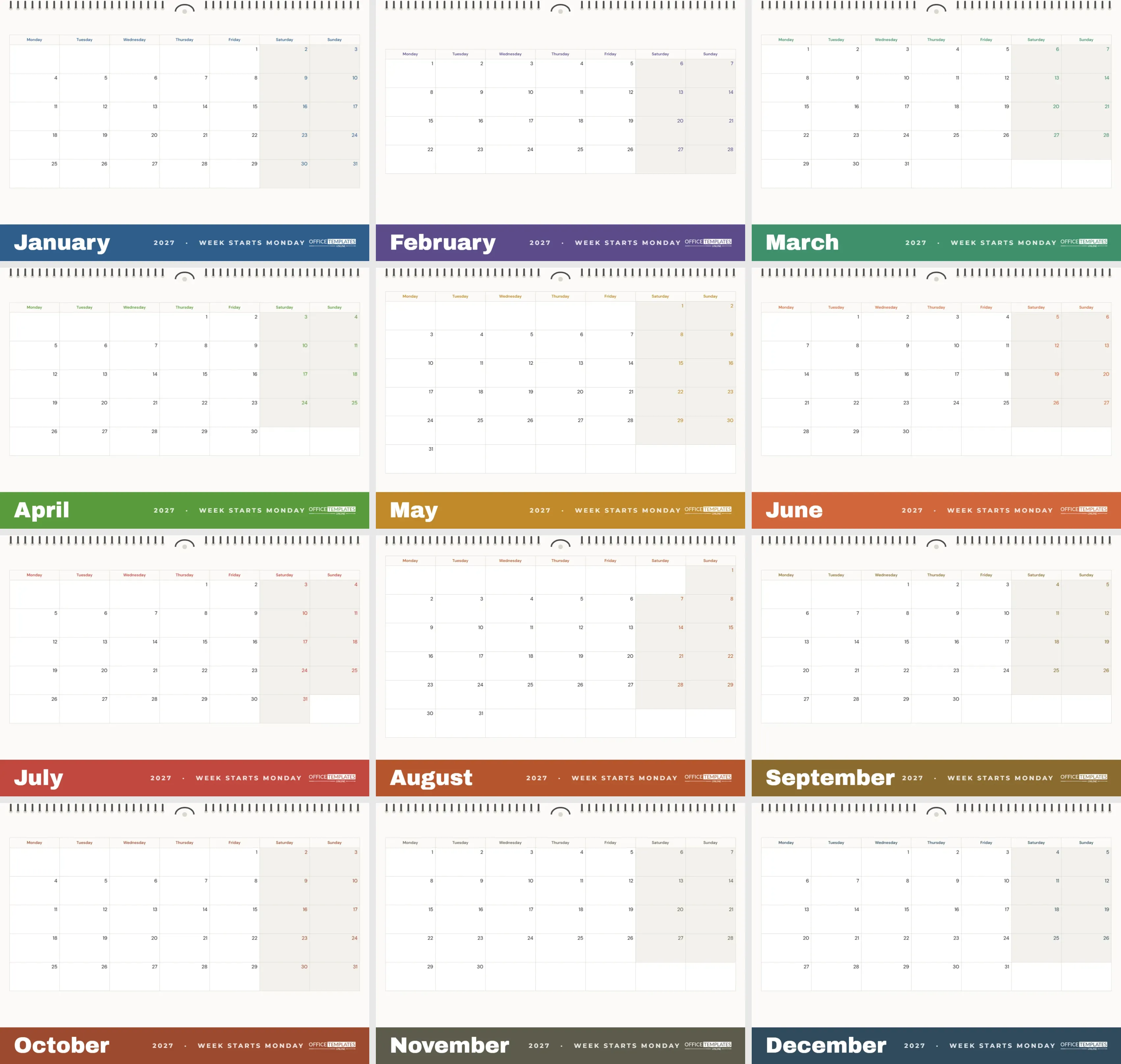
In the UK, most of Europe, and much of the world, the week begins on Monday. A calendar that starts on Sunday puts the weekend in two places and makes planning awkward. This set fixes that: twelve A4 landscape pages for 2027, each with Monday in the first column and Saturday and Sunday together at the end. Here is the full specification, followed by notes on why the design works the way it does.
Monday-First Calendar Specification
| Feature | Detail |
|---|---|
| Paper size | A4 landscape, 297 x 210 mm |
| Pages | 12, January to December 2027 |
| First day of the week | Monday |
| Weekday labels | Full names, Monday to Sunday |
| Weekend | Saturday and Sunday shaded together on the right |
| Date position | Top-right corner of each box |
| Fonts | DM Sans for the grid, Archivo Black for the month name |
| Colour | One seasonal colour per month in the footer band and weekday labels |
| Editable | Month, year, week start, colours and font in Calendar Options |
Designer’s Notes: The Wire Binding Across the Top
The top edge of every page shows a row of punched holes with small dark wire loops and a hanger hook in the middle, like a bought wall calendar. It is a quiet visual cue that this is a proper hanging calendar rather than a loose printout, and it frames the page without taking space from the grid. The binding is one grouped object, so if you do not want it, you can delete it in a single click.
Designer’s Notes: Why the Month Name Sits at the Bottom
Most calendars put the month name at the top. Here, it lives in a solid colour band along the bottom of the page, in heavy white Archivo Black, with 2027 · WEEK STARTS MONDAY beside it and the OTO logo on the right. Putting the heavy element at the foot leaves the top of the page light and gives the grid more height, which means bigger boxes to write in. On a wall, the coloured band also tells you the month from across the room.
Designer’s Notes: A Colour for Every Season
Each month has its own band colour, chosen to follow the seasons: a cold steel blue for January and a dusky violet for February, fresh greens for March and April, warm ochre and orange through May and June, a poppy red in July, burnt orange and amber in late summer, rust for October, a stony olive-grey for November and a deep winter blue for December. The weekday names and weekend date numbers pick up the same colour, so the whole page feels coordinated without any decoration in the grid itself.
Designer’s Notes: Writing Space First
The grid fills almost the whole page. On A4 landscape, each date box is roughly 4 cm wide, enough for two or three short entries in normal handwriting. The dates sit in the top-right corner so that your notes start at the top-left, where the eye naturally begins reading. Grid lines are a soft warm grey rather than black, so your writing stands out more than the lines.
Who Benefits from a Monday Start
- People in countries where the working week and school week begin on Monday.
- Anyone who thinks of the weekend as one block, not split across two edges of the page.
- Offices planning in working weeks, where ISO week numbering starts on Monday.
- Shift workers and students whose timetables run Monday to Friday.
Switching Months, Years or Back to Sunday
Every grid is the editor’s Calendar object. Click it and open Calendar Options to change the month, year or first day of the week; the dates rebuild instantly. If someone in your household prefers Sunday first, you can switch any page in seconds. You can also change the colours of the weekday row, weekends and borders, or pick a different Google font. Each page has its own calendar, so to move the whole set to 2028, change the year on all twelve pages.
Recolouring the Footer Bands
The footer band is a plain rectangle. Select it and choose a new fill colour to match a room, a brand, or a personal palette. For a calm, minimal set, use one neutral tone such as charcoal or sage for all twelve months, and change the weekday colour in Calendar Options to match.
Printing on A4 and Letter
Download the PDF and print at 100% on A4 paper in landscape. The layout also fits US Letter with fit to page, leaving a slightly larger margin. Heavier paper, around 120 to 160 gsm, keeps the pages flat on the wall. To bind them, punch two holes at the top centre or take the set to a print shop for real wire-o binding, which will line up neatly with the printed binding at the top.
Ideas for Using the Big Boxes
Use the generous space for a family calendar with one colour pen per person, a meal plan written into each evening, a training log with distances, or a work calendar showing deadlines and meetings. Because Saturday and Sunday sit side by side, weekend plans are easy to see and to protect.
Designer’s Notes: Keeping the Grid Calm
There are no icons, stickers, or patterns inside the date boxes on purpose. A wall calendar is read dozens of times a day, and every decoration inside the grid competes with the appointments you write. All of the personality lives at the edges: the binding at the top and the colour band at the bottom. The middle stays quiet, which is exactly what a working calendar needs. If you want some colour inside the grid, use coloured pens or small stickers for birthdays and holidays rather than adding artwork in the editor.
Weekends Side by Side: A Planning Advantage
With a Sunday-first layout, Saturday sits on the far right and Sunday on the far left of the next row, so a single weekend is split across two lines. Monday-first calendars keep Saturday and Sunday next to each other at the end of each row. Weekend trips, visits, and sports fixtures become one visible block, and it is easy to count how many free weekends are left in a month. Many people who switch to a Monday start find they plan their weekends better simply because they can see them.
Start every week on Monday, keep the weekend together, and give yourself room to write. That is the whole idea of this calendar.