Managers and HR teams ask the same questions every year about tracking staff holidays. This page answers them, one question per section.
What Is an Annual Leave Planner?
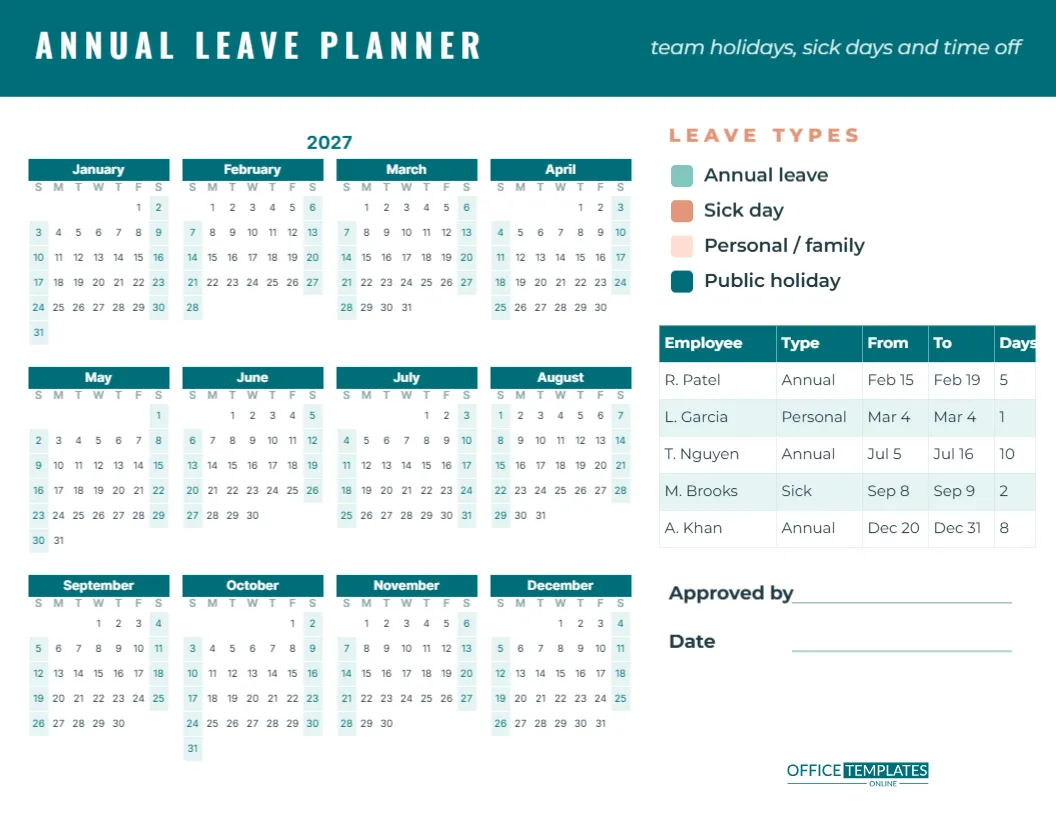
It is a single page that shows the whole year and everyone’s time off. Instead of searching through emails and spreadsheets, a manager can glance at the planner and see who is away when, spot clashes, and plan cover. This template is US Letter landscape, 11 x 8.5 inches, with a teal header that reads ANNUAL LEAVE PLANNER in white Oswald capitals and team holidays, sick days, and time off in italics on the right.
What Does the Planner Include?
On the left, the full year of 2027 is laid out as twelve mini months, four across and three down, with teal month bars, single-letter weekday initials and pale aqua weekends. On the right, a LEAVE TYPES key shows four colour swatches: soft teal for annual leave, coral for sick days, peach for personal or family leave, and deep teal for public holidays. Below the key, a leave request table has columns for Employee, Type, From, To, and Days, filled with five sample requests. Two lines at the bottom record Approved by and the date, and the OTO logo sits in the corner.
How Do I Mark Leave on the Year Calendar?
Print the planner and use highlighters in the four leave colours to mark each person’s days off on the year calendar. If several people share the planner, add each person’s initial in tiny letters next to the highlighted dates. For a digital version, you can place small coloured shapes over dates in the editor, but remember they are separate from the calendar and would need moving if the year changes.
How Do I Use the Leave Request Table?
The table is the editor’s Table object. Click a cell to type, and use the Table options to add rows as requests come in. The sample shows realistic entries:
| Employee | Type | From | To | Days |
|---|---|---|---|---|
| R. Patel | Annual | Feb 15 | Feb 19 | 5 |
| L. Garcia | Personal | Mar 4 | Mar 4 | 1 |
| T. Nguyen | Annual | Jul 5 | Jul 16 | 10 |
| M. Brooks | Sick | Sep 8 | Sep 9 | 2 |
| A. Khan | Annual | Dec 20 | Dec 31 | 8 |
Count only working days in the Days column, excluding weekends and public holidays.
How Do I Roll the Planner Over to 2028?
The year calendar is a single Calendar object in the editor’s Full Year style. Open Calendar Options and set the year; all twelve months rebuild with the correct dates and the title updates. You can also start the week on Monday, which suits most workplaces, and change the colours or font.
How Many People Can One Planner Track?
For small teams of up to about eight people, one planner works well with initials on the calendar. Larger teams can use one planner per department, or keep the year calendar for public holidays and blackout periods and track individual requests in the table, adding as many rows as needed. For a big organisation, print the planner at tabloid size for more room.
What Leave Types Should I Track?
The four types on the key cover most needs, but rename or add types to match your policy: parental leave, study leave, bereavement leave, unpaid leave, or time off in lieu. Keep the colours distinct so the year calendar stays readable. Some teams also mark blackout periods, such as year-end or peak season, when leave is restricted.
How Can I Avoid Leave Clashes?
Ask staff to submit summer and Christmas leave requests early, by a set date such as January 31. Mark the requests on the planner as they arrive, first come, first served, and check for overlaps with people who cover each other. Publishing the planner in a shared space means staff can check availability before asking, which saves everyone time.
Is This Planner Suitable for HR Records?
It is a useful planning and overview tool, but most organisations also keep official leave records in their HR or payroll system. Use the planner alongside your official records, and make sure the approval line is signed and dated for each period it covers. Store completed planners securely, as they contain employee information.
Can I Recolour the Planner to Match Our Brand?
Yes. Recolour the header and the key swatches, change the year calendar’s colours in Calendar Options and the table’s colours in the Table Options. Fonts are Oswald and Inter, both Google Fonts, and any other Google font can be chosen.
How Should I Print and Share It?
Download the PDF and print in landscape for a team noticeboard, or share a PNG with the team each time it is updated. Many managers keep one master copy in a plastic sleeve and update it with highlighters as requests are approved.
What About Part-Time Staff and Carry-Over Days?
For part-time staff, record leave in hours rather than days, or note the working pattern next to the name, such as “Mon to Wed”. Add a column to the table for hours if you need it. For carry-over days from the previous year, add a row at the top of the table for each person with the carried-over amount and the date it must be used by. Many policies require carried-over leave to be used by the end of March, so circle that date on the year calendar as a reminder.
When Should Leave Requests Be Approved?
Set a clear response time, such as within five working days of a request. Fast answers help staff book travel at good prices and reduce frustration. Sign and date the approval line when the planner is reviewed, and tell staff about any refusal with a reason and an alternative date where possible.
Can the Planner Show Public Holidays?
Yes. Highlight public holidays in the deep teal swatch colour so everyone can see them. Remember that public holidays differ by country and region, so check your local list before marking them. Teams spread across several countries can list each office’s holidays in the table with a note showing which location they apply to.
Set the year, add the requests, and approve with confidence. Everyone deserves a well-planned holiday.