Turn a Full Month of Teaching Ideas into One Clear, Easy-to-Follow Plan
Planning one lesson is fairly simple. Keeping track of an entire month of lessons can be much harder. This Monthly Lesson Planner Template gives teachers a convenient visual layout for organizing up to five weeks of Monday-to-Friday teaching plans on a single page.
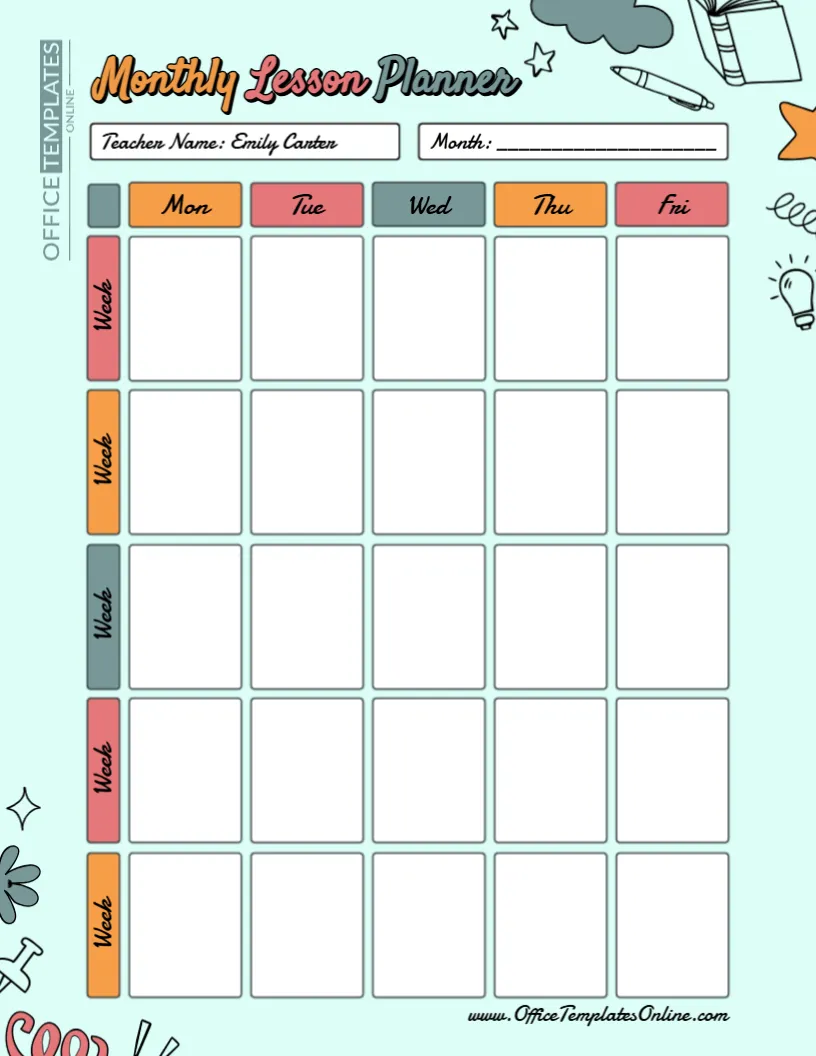
The planner uses a simple grid: weekdays run across the top, while five weekly rows run down the page. This creates 25 individual planning spaces, allowing you to see how lessons, subjects, activities, assignments, or learning goals are spread across the month.
At the top, you can add the teacher’s name and month so every completed planner is easy to identify.
Better still, the template is fully customizable through our easy-to-use online editor. You can personalize it directly in your browser with no login required. When your monthly plan is ready, simply download it as a PDF, PNG, or JPG.
A Monthly View That Makes Long-Term Lesson Planning Easier
Daily and weekly planners are useful when you need detailed information about the immediate teaching day. A monthly planner serves a slightly different purpose: it lets you zoom out and look at several weeks together.
This can be especially helpful when lessons form part of a longer unit.
Suppose you are teaching a topic over four or five weeks. Instead of looking through several separate daily plans, you can use this monthly layout to map out when the topic will begin, how it will progress, when important activities will take place, and when you plan to review or assess the material.
The result is a simple visual overview that can help you understand where you are starting, where you are going, and how your teaching plans connect from week to week.
How the Monthly Lesson Planner Is Organized
This template uses a clear grid rather than a traditional dated calendar.
Across the top are five weekday columns:
Mon | Tue | Wed | Thu | Fri
Down the left side are five separate Week sections.
Each week-and-day combination has its own large blank box. You can therefore enter different information for Monday through Friday across as many as five teaching weeks.
Because dates are not permanently printed inside the boxes, the template is not tied to a particular calendar month or year. You can enter the month at the top and customize the planning spaces according to your own schedule.
25 Flexible Boxes – You Decide What Goes in Them
One of the most useful features of this monthly lesson planning template is its flexibility. The boxes do not contain fixed subjects, times, or lesson categories.
That means you can use them for whatever information is most important to your teaching.
For example, you could add lesson topics, subject names, learning activities, assignments, homework, quizzes, tests, projects, revision sessions, reading activities, presentations, practical work, or important classroom reminders.
A teacher covering several subjects might use each box for a short summary of the day’s lessons. A subject teacher could instead use the planner to show how one particular course or unit develops throughout the month.
A tutor or homeschool educator could use the same layout to plan learning activities across several weeks.
The structure is already provided; the content is entirely up to you.
Plan Lessons Across Five Teaching Weeks
The inclusion of five weekly rows is useful because not every month fits neatly into four school weeks.
You can use all five rows when needed, or simply leave unused spaces blank during shorter teaching periods. The layout also gives you flexibility for months affected by school holidays, teacher training days, examinations, or other schedule changes.
For each week, you might plan a different stage of a learning unit. For example:
Week 1: Introduce the topic and key ideas
Week 2: Guided practice and supporting activities
Week 3: Independent or group work
Week 4: Review and reinforcement
Week 5: Assessment, project work, or revision
This is only one way to use the planner. Its blank structure means you can organize the five weeks according to your own curriculum and classroom needs.
Quickly Spot Busy and Quiet Parts of the Month
A grid-based monthly lesson planner provides another practical advantage: it can make patterns in your schedule easier to notice.
When several tests, projects, presentations, or demanding activities appear close together, you can see that concentration of work on the same page. You can then decide whether the schedule works well or whether some activities should be moved.
Likewise, a blank or lightly planned area can remind you that a particular day or week still needs attention.
This visual approach can be particularly useful when you want a high-level teaching overview rather than a detailed hour-by-hour schedule.
Use It for Different Subjects and Grade Levels
There are no grade names, curriculum standards, or subject-specific headings built into this template. That makes it suitable for a wide range of educational uses.
An elementary teacher might add several subjects to each daily box. A middle or high school teacher could use the entire monthly planner for one subject or class. Tutors may use it to organize upcoming sessions, while homeschooling families can adapt the grid around their own learning schedule.
The template can therefore be useful for teachers, tutors, instructors, student teachers, homeschooling parents, teaching assistants, and other educators who want an uncomplicated monthly planning tool.
A Colorful Teacher Planner Without a Cluttered Layout
A planner needs to be functional first, but a friendly design can make it more enjoyable to use.
This template combines a light background with colorful weekday and week labels. School-themed illustrations—including books, a pencil, stationery, and a light bulb—add personality around the edges while leaving the main planning grid clean and spacious.
The individual white boxes are clearly separated, so it is easy to identify where information for each day belongs.
This balance makes the planner suitable for teachers who want something more colorful than a plain spreadsheet-style grid while still keeping the actual planning area simple.
Edit the Monthly Lesson Planner Directly in Your Browser
You can personalize this template without having to recreate its grid or design from scratch.
Open the template in our online editor and customize it according to your teaching plans. There is no need to sign up or log in, making it quick to get started.
You can add your teacher name, specify the month, and enter the lesson information you want to appear in each planning area. This gives you a ready-made design while still allowing the finished planner to reflect your own schedule.
You also don’t need specialized design experience to get started. The editor is built to make template customization straightforward and accessible.
A Simple Way to Fill Out Your Monthly Lesson Plan
Start with the two fields at the top. Add your name in the Teacher Name area and enter the month you are planning.
Next, look at your curriculum, teaching schedule, or upcoming learning goals and decide what needs to happen during each week.
Add short entries to the appropriate Monday-to-Friday boxes. Since this is a monthly overview, concise descriptions can make the planner easier to scan. For example, you might enter:
Fractions – Introduction
Plant Life Cycle Activity
Chapter 4 Reading
Vocabulary Quiz
Project Presentations
Unit Review
More detailed instructions can be kept in a separate daily lesson plan if required, while this monthly planner acts as your at-a-glance overview.
Monthly, Weekly, or Daily Lesson Planner – Which One Should You Use?
The best format depends on how much detail you need.
A daily lesson planner is useful for closely organizing one teaching day. A weekly lesson planner provides a broader picture of several consecutive days. This monthly lesson planner goes one level further by allowing you to see up to five weeks together.
You do not necessarily have to choose only one. For example, you could first map out major lessons and activities using this monthly planner, then use weekly or daily templates to add more detail as each lesson approaches.
This can create a simple planning system that moves from the big picture to the finer details.
Download Your Completed Planner as PDF, PNG, or JPG
Once your monthly lesson plan has been customized, you can download the finished version in PDF, PNG, or JPG format.
PDF is a practical option if you plan to print the completed planner, keep it in a teaching binder, or store it with other lesson-planning documents.
PNG and JPG are convenient when you want to save the planner as an image for digital reference.
You can choose whichever format works best for your preferred planning method.
Start Planning the Month with a Clearer View
When several weeks of teaching need to work together, seeing the bigger picture can make planning much more manageable. This free editable Monthly Lesson Planner Template gives you one organized page for mapping out Monday-to-Friday lessons across as many as five weeks.
Use its 25 planning spaces for lesson topics, classroom activities, assignments, assessments, projects, reminders, or other teaching priorities. Add your name and month, personalize the template using the online editor without creating an account, and download the completed planner in PDF, PNG, or JPG format.
Whether you use it for an entire class, one subject, a tutoring schedule, or homeschool planning, this template provides a simple way to turn a month of teaching ideas into a clear visual plan.