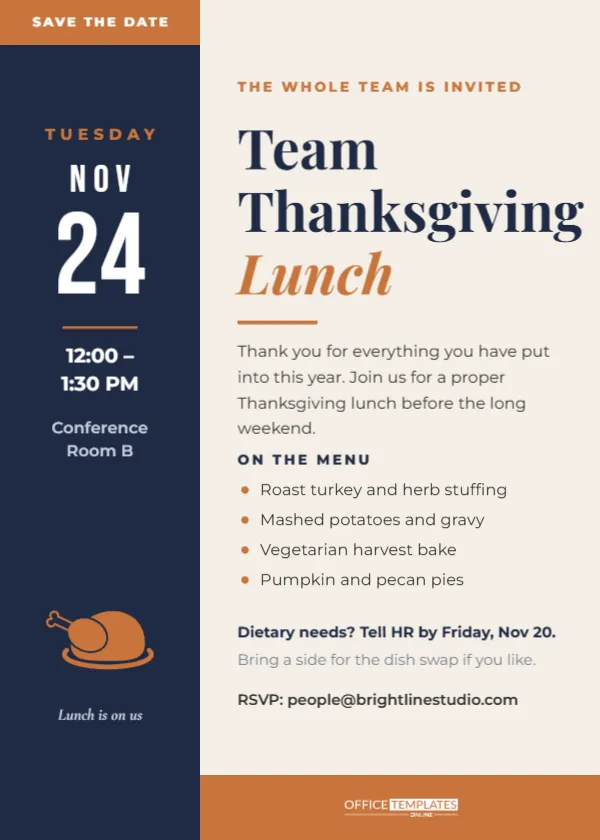
A workplace Thanksgiving lunch is one of the few company events people actually look forward to. It is short, it involves food, and it usually lands right before a long weekend. The invitation for it has to work in an inbox, on a break-room noticeboard, and on a shared screen in a stand-up meeting. This template is designed for exactly those places: clean, confident, and easy to read from across a room.
Office Lunch Invitation at a Glance
| Feature | Detail |
|---|---|
| Size | 5 x 7 inches, portrait |
| Palette | Navy, copper, and warm off-white |
| Typefaces | Playfair Display for the title, Bebas Neue for the date, Montserrat for body text |
| Main structure | Full-height navy sidebar on the left, text column on the right |
| Artwork | Copper roast turkey icon, editable vector |
| Photo slots | None |
| Downloads | PDF, PNG, JPG |
Designer’s Notes on the Navy Sidebar
The left third of the card is a solid navy column that runs top to bottom. A copper tab caps it with SAVE THE DATE in white capitals. Below the tab, the date is stacked like a desk calendar: TUESDAY in spaced copper letters, NOV in white, then a huge white 24 in Bebas Neue, the tallest thing on the card. A short copper rule separates the date from the time (12:00 to 1:30 PM) and the room (Conference Room B), and near the bottom a copper roast turkey on a platter sits above a small italic line that says Lunch is on us.
The point of stacking the date this way is speed. In a hallway or on a busy Teams screen, people read the number first. Everything else can wait.
Designer’s Notes on the Message Column
The right side is a calm off-white. A small copper line at the top reads THE WHOLE TEAM IS INVITED. The title follows on three lines: Team and Thanksgiving in bold navy Playfair Display, and Lunch in copper italic, which gives the stack a bit of personality without being cute. A short copper bar sits under the title.
Then comes a two-sentence thank-you, which matters more than it seems. A lunch invitation is a chance to say, in writing, that the year’s work was noticed. The sample reads: Thank you for everything you have put into this year. Join us for a proper Thanksgiving lunch before the long weekend.
An ON THE MENU heading introduces four bullet points with small copper dots: roast turkey and herb stuffing, mashed potatoes and gravy, a vegetarian harvest bake, and pumpkin and pecan pies. Under the menu are two practical lines (a dietary-needs deadline and an optional dish swap) and an RSVP email address. A solid copper band runs along the bottom of the text column with the brand mark in white.
What to Write for Your Workplace
Every office is different, so here are alternatives for the key lines.
Kicker line
- THE WHOLE TEAM IS INVITED
- ALL HANDS, ALL APPETITES
- FROM THE LEADERSHIP TEAM
- REMOTE FOLKS, WE WILL SHIP YOU PIE
Thank-you sentence
- We grew, we shipped, we survived the migration. Let’s eat.
- A small thank-you for a big year.
- Before everyone scatters for the holiday, let’s sit down together.
Practical lines
- Catered by Rosie’s Kitchen. Vegan and gluten-free plates available.
- Remote staff: a lunch voucher is on its way to your inbox.
- Bring a side for the dish swap if you like; recipes go in the shared folder.
Editing Tips for the Office Version
The date numerals are a single text box, so changing 24 to 25 takes a second. If your lunch falls on a two-digit date starting with 1 or 2, the big numerals stay centred; Bebas Neue is narrow enough that any day of the month fits the sidebar width.
The copper turkey icon is an editable vector. Select it to see its colour swatch and change it, or swap it for another icon from the Elements panel if your office prefers pie to poultry. The menu bullets are separate text boxes with copper dots beside them; to add a fifth item, copy the last bullet and its dot together and move them down.
Company colours are easy to apply. Change the navy sidebar to your brand’s primary colour and the copper tab, rule, bullets, and foot band to your accent. Keep the title in the darker of the two colours so it stays readable on the light background.
Sending It Around the Office
For email, download a PNG and paste it into the body of the message rather than attaching it; people are more likely to see it. Add the time, room, and RSVP link as plain text under the image too, because screen readers and some mail apps will not read text inside a picture.
For noticeboards and lift lobbies, print the PDF at full Letter size. The card is proportional, so scaling it up keeps every element in place, and the big date is readable from several metres away. For a calendar invite, attach the PNG to the meeting so it appears in everyone’s reminder.
Running a Smooth Team Lunch
- Set the dietary deadline at least four working days before the lunch so the caterer has time to plan.
- Block the room for an extra thirty minutes for setup and cleanup.
- Plan a remote option: a voucher, a delivery credit, or a video call at the same time.
- Keep speeches short. One thank-you from the team lead is plenty.
- Have takeaway boxes ready; people love leftover pie at 4 PM.
Office Lunch Questions
Can I use this for a Friendsgiving at work instead?
Yes. Change Team Thanksgiving Lunch to Office Friendsgiving and the menu to a potluck list.
Is there room for a company logo?
The copper band at the bottom of the text column is the natural spot. Add your logo there in white or replace the band with a lighter colour and use your full-colour logo.
A good office lunch takes an hour and leaves goodwill that lasts much longer. Put your date in the sidebar, write a sincere thank-you, and send it out early.