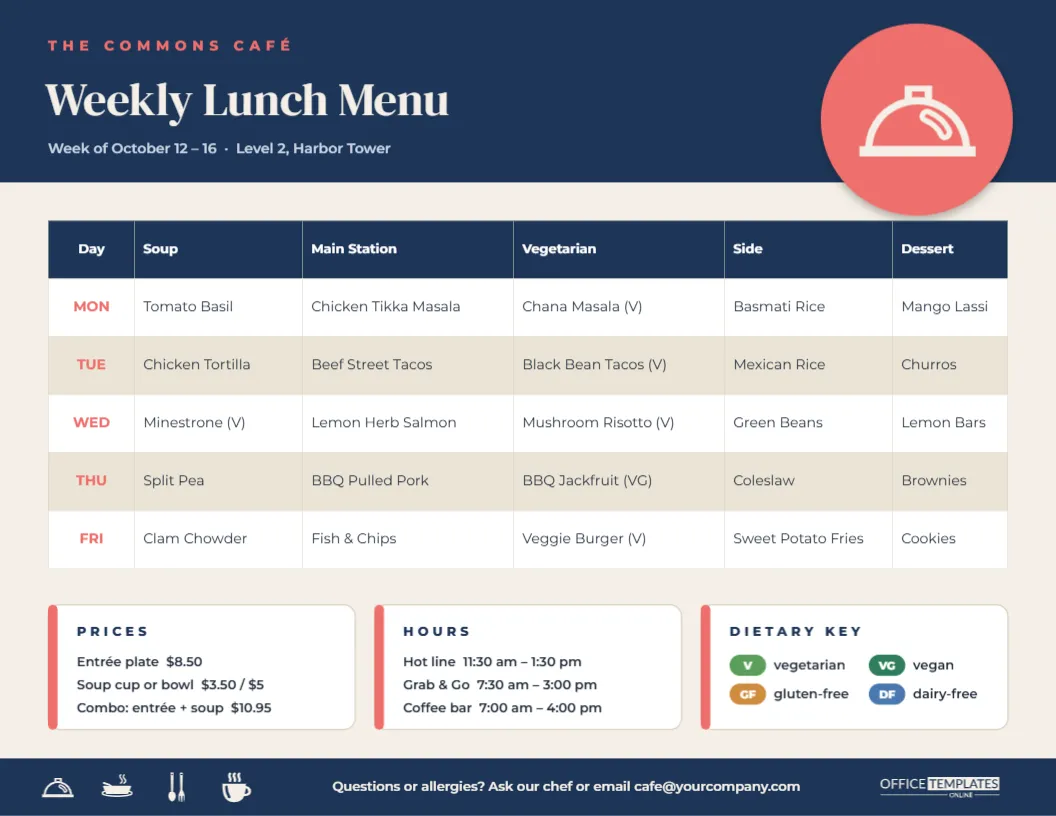
In an office, hospital, university, or factory, the cafeteria menu is read by hundreds of people every week, often in a hurry, standing by the lifts or scrolling the intranet at 11:45. They want to know one thing: what’s for lunch today? This Office Cafeteria Weekly Lunch Menu Template answers that clearly. The whole working week sits in one table with a column for every station, and prices, hours, and a dietary key sit in neat cards underneath.
Anatomy of the Weekly Board
The template is landscape US Letter, 11 x 8.5 inches, a good shape for noticeboards, digital screens and email. The design has four layers:
- A navy header with THE COMMONS CAFÉ in small coral capitals, Weekly Lunch Menu in a warm DM Serif Display, and a line for the week’s dates and the café’s location. On the right, a coral disc holds a cream serving-cloche icon and overlaps the header’s lower edge.
- The weekly table: a navy header row with Day, Soup, Main Station, Vegetarian, Side, and Dessert, then one row for each weekday (MON to FRI in coral). Rows alternate white and sand, and the sample dishes range from chicken tikka masala to fish and chips, with vegetarian and vegan dishes marked (V) and (VG).
- Three white information cards, each with a coral edge: PRICES (entrée, soup, combo), HOURS (hot line, grab-and-go, coffee bar) and a DIETARY KEY of coloured chips for vegetarian, vegan, gluten-free and dairy-free.
- A navy footer strip with a row of small cream icons (a cloche, a soup bowl, cutlery and a coffee cup), a line inviting questions about allergies with the café email, and our logo.
Who Does What Each Week
A weekly menu is only useful if it is accurate and up to date. In most workplace cafés, a few people share the job. A simple routine like this keeps it running smoothly:
| Task | Who usually does it | When |
|---|---|---|
| Plan dishes and stations | Head chef or catering manager | Previous Wednesday |
| Check allergens and dietary labels | Chef with the food safety lead | Previous Thursday |
| Update the table and dates in the template | Café supervisor or office admin | Previous Thursday |
| Proofread prices and hours | Café manager | Previous Friday morning |
| Print for noticeboards and post on the intranet | Office admin or internal comms | Previous Friday afternoon |
| Swap in last-minute changes | Café supervisor | Any day, as needed |
Because the menu is saved in the editor, next week’s version starts from this one. Change the dates, update the rows that change, and download.
Editing the Table and Cards
- Weekly dishes: double-click the table or choose Edit Table Data. Type dishes directly, or paste a whole week from your planning spreadsheet with Import CSV.
- Stations: rename the columns to match your café, for example, Grill, Deli, Salad Bar, or Global Kitchen. Add a column from the table settings, or remove one if you run fewer stations.
- Dates and location: retype the line under the heading each week.
- Prices and hours: each card line is ordinary text. If meals are subsidised or free, say so in the Prices card.
- Dietary key: each chip is a coloured shape with a label. Recolour a chip or add one, such as H for halal or N for contains nuts.
- Branding: change the navy and coral to your company colours. The header, footer, and table header each change with a click, and the cloche icon recolours from its colour swatches.
Making the Menu Inclusive
Workplaces serve people with very different needs, and a good cafeteria menu shows it at a glance:
- Always offer a vegetarian option each day, as the template’s dedicated column does, and mark vegan dishes separately.
- Use the dietary key consistently. The same letters on the menu, the serving labels, and the intranet page avoid confusion.
- Point people to allergen information. The footer invites questions. Most organisations also keep detailed allergen sheets at the counter.
- Plan for cultural and religious needs. A halal or kosher marker, or a note about meals during fasting periods, shows staff they have been considered.
Feedback That Improves Next Week’s Menu
The weekly menu is also a good way to hear from the people who eat there. Add a short line to the footer inviting comments, or a QR code from the editor’s QR tool linking to a one-question survey such as Which dish should come back? Track which dishes sell out and which come back to the kitchen, then use the table’s rows to repeat the hits every few weeks. A regular favourite, such as taco Tuesday or a Friday fish dish, gives colleagues something to look forward to and makes planning easier for the kitchen.
Getting the Menu Seen
Print copies for lift lobbies, kitchen noticeboards and the café entrance. Landscape Letter fits standard poster frames and clipboards. For large sites, a print shop can enlarge the PDF to 17 x 11 or 24 x 18 inches for a café entrance stand. For digital channels, download a PNG and post it on the intranet, in a Monday team email, in chat channels or on lobby screens. The landscape shape suits most monitors and TVs.
Questions From Workplace Caterers
Can I show breakfast too?
Add a Breakfast column to the table, or use Add Page to create a breakfast version with the same header and footer.
What if the menu changes midweek?
Edit the affected cell, download a fresh copy, and replace the printouts. Adding Menu subject to change in the Hours card manages expectations.
Does it work for schools, hospitals or care homes?
Yes. Rename the columns for your services, for example, Main, Soft diet, and Dessert in a care home, and adjust the header text.
Can the table show two weeks?
Two weeks usually makes text too small. Use Add Page for week two, and download both pages together as one PDF.
Lunch, Sorted for the Week
Fill in the week’s dishes, confirm the prices and dietary labels, and post the menu everywhere your colleagues look. Next week, change the dates and a few rows, and it’s done again.