Schools share lunch menus in many ways: emailed PDFs, website pages, apps, and printed sheets in book bags. Before choosing, it is worth comparing what each format does well, because the best answer for most schools is a combination.
Printed Lunch Menu or Online Menu?
| Need | Printed monthly menu | Website or app |
|---|---|---|
| Parents see it every day | On the fridge all month | Only if they look it up |
| Children can read it themselves | Yes, at home and in class | Rarely |
| Plan packed lunch days | Easy at a glance | Needs scrolling |
| Last-minute changes | Needs a reprint | Instant |
| Accessible to every family | Yes, no device needed | Depends on internet access |
The printed menu wins for visibility and fairness; the online version wins for updates. This template is designed to be both: print it for book bags and noticeboards, and upload the same file as a PDF or PNG to the school website.
A Lunch Menu That Looks Like Lunch
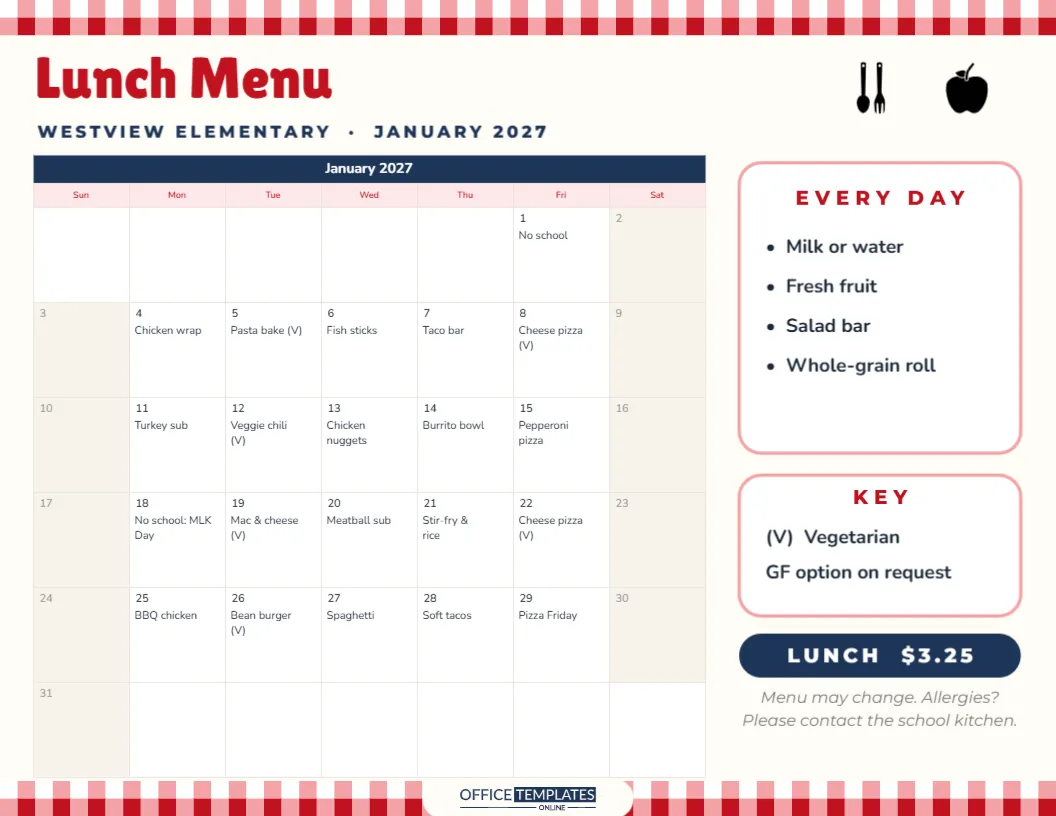
The menu is US Letter landscape on a warm cream background. A red-and-pink gingham strip, like a picnic tablecloth, runs along the top and bottom edges. Lunch Menu is written in bold red Lilita One, with WESTVIEW ELEMENTARY · JANUARY 2027 in navy capitals beneath it (the school name is a placeholder). A spoon and fork and a red apple sit on the top right. The gingham strips, the cutlery and the apple make the page instantly recognisable on a crowded fridge door.
Every School Day’s Meal in Its Date
The calendar is the editor’s Task Calendar, with a navy title row and pink weekday labels. Each school day holds that day’s main dish, such as Chicken wrap, Pasta bake (V), Taco bar, and Pizza Friday. January 1 and January 18 read No school and No school: MLK Day, so families can see the days when no lunch is served. Weekends are greyed slightly, keeping attention on the school week. A month’s menu has around twenty entries, and each one stays short so it fits the date box.
The Every-Day and Key Cards
To the right of the calendar, a white card titled EVERY DAY lists what comes with every lunch: milk or water, fresh fruit, a salad bar, and a whole-grain roll. Below it, a KEY card explains that (V) means vegetarian and that a gluten-free option is available on request. A navy pill shows the lunch price, $3.25 in the sample, and a small italic note asks families with allergies to contact the school kitchen. Listing sides once, rather than on every date, keeps the calendar clean and readable.
Writing a Menu Children Want to Read
Children read the menu more than adults expect, and they use it to decide whether to take a packed lunch. Use names they recognise (Mac & cheese rather than Macaroni gratin), keep a predictable rhythm such as Pizza Friday or Taco Tuesday, and mark new dishes so they feel like an event. A short vegetarian or meat-free day each week is easy to show with the (V) mark.
Entering Your School’s Menu
Select the calendar, open Calendar Options, and click Manage Notes/Tasks. Each date of the month appears with its own box; type the main dish for each school day, mark closures, and apply. Change the month and year in the same panel for each new menu. If your menu runs on a two- or three-week cycle, enter the first cycle, then repeat the dishes across the month. Update the school name, price, and every-day items with a click on the text.
Allergies and Dietary Labels
Allergy information matters more than any other part of a lunch menu. Use the KEY card to explain your labels: (V) for vegetarian, (VG) for vegan, (GF) for gluten-free, or allergen letters agreed with your catering team. Keep the line encouraging families to contact the kitchen, and make sure full allergen details are available from the school office, since a calendar cell has room only for a dish name.
Restyling for Your School Colours
The red gingham suits a classic canteen feel, but the strips are grouped shapes, so you can recolour them in your school colours: green and yellow, blue and white, or purple and gold. Change the title row and weekday colours in Calendar Options to match. The spoon, fork and apple are editable vector illustrations, recolourable from their colour swatches. Fonts are Lilita One and Nunito, both Google Fonts, and both clear for young readers.
Sending the Menu Home
Print the PDF in landscape at the end of each month and send it home in book bags or with the newsletter. Pin a large copy outside the dining hall and by the school entrance. Post the PNG on the school website and social media on the same day, so families who prefer digital have it too. Keep each month’s menu on file; it is useful for planning next year’s cycle and answering questions from inspectors or governors.
Planning a Balanced Month of Lunches
A printed month makes it easy to check the balance of the menu before it goes out. Look across each week: is there at least one fish dish, one vegetarian main and plenty of vegetables? Are pizza and fried foods limited to once a week? Is any dish repeated too often? Catering managers often colour-code a draft copy by food group to spot gaps, then adjust before printing the final version. Families appreciate seeing variety, and children are more willing to try something new when they know a favourite is coming later in the week.
Seasonal produce also helps. Soups, stews and baked dishes suit winter months; salads, wraps and cold pasta suit late spring. Swapping two or three dishes each term keeps the menu fresh without rewriting the whole cycle.
Beyond Schools
The same layout works for nurseries, daycare centres, summer camps, care homes and workplace canteens. Replace the school name, adjust the price and sides, and fill in the dishes. A monthly menu on the wall reassures parents, residents and staff that someone has planned balanced meals in advance.
One page, one month of lunches, and no more what’s for lunch today? at the breakfast table.