A clean home rarely comes from a big weekend blitz. It comes from small, regular jobs that never get the chance to pile up. Yet most cleaning schedules fail within a few weeks. This page starts with the mistakes that make cleaning routines collapse, and then shows how this calendar is designed to avoid them.
Cleaning Routine Mistakes That Make Schedules Fail
- Trying to clean everything at once: A six-hour Saturday clean is exhausting, so it gets postponed, and then the house is worse than before.
- No fixed day for each job:I’ll do the bathroom sometime this week turns into next week.
- Forgetting the monthly jobs: Ovens, windows, and fridges get cleaned only when they become disgusting.
- One person doing everything: Resentment builds, and the routine breaks down.
- No rest day: A schedule with no breaks feels like a punishment and is quickly abandoned.
- A plan that lives in your head: If no one can see it, no one else can help.
One Job Per Day: How the Calendar Fixes Mistakes 1 and 2
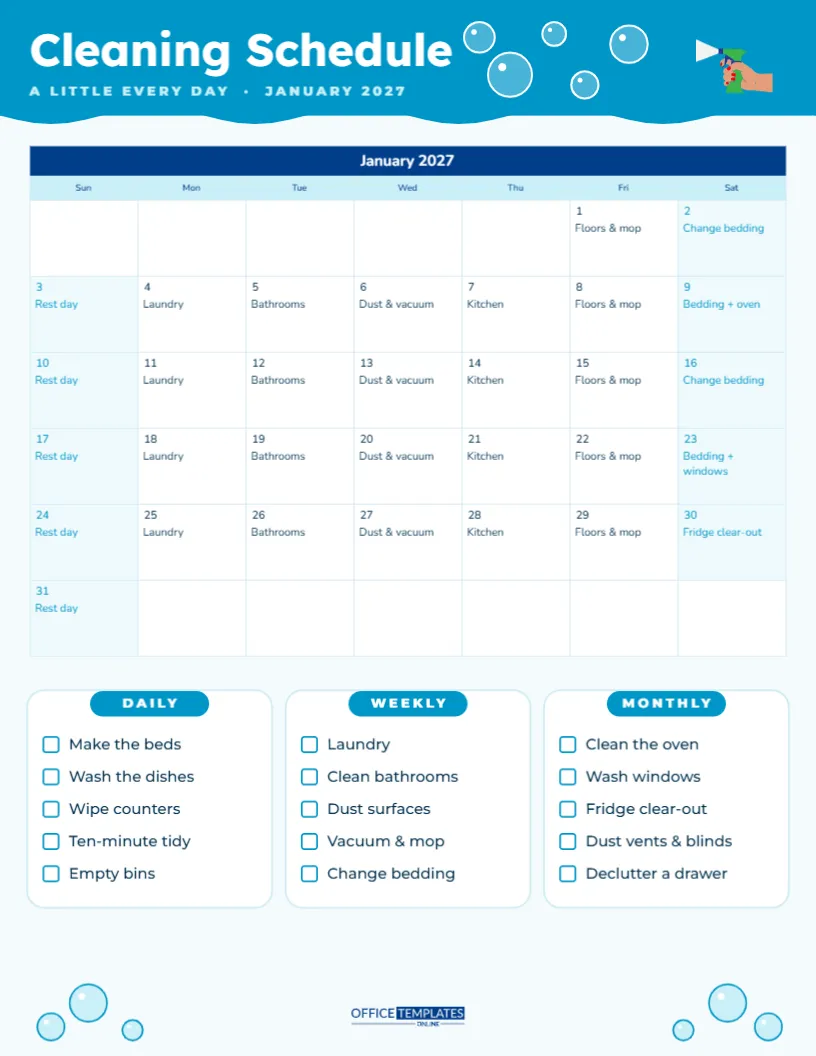
The page is US Letter portrait. A bright aqua header with a wavy lower edge reads Cleaning Schedule in white Lexend, with A LITTLE EVERY DAY · JANUARY 2027 underneath, a cluster of soap bubbles and a small spray bottle illustration on the right. Below it, a month calendar has a navy title row, a pale aqua weekday row, and white date boxes, and every single date already has its job written in.
| Day | Job | Roughly how long |
|---|---|---|
| Monday | Laundry | 30 minutes of active work |
| Tuesday | Bathrooms | 20 to 30 minutes |
| Wednesday | Dust and vacuum | 30 minutes |
| Thursday | Kitchen | 20 minutes |
| Friday | Floors and mop | 20 minutes |
| Saturday | Change bedding | 15 minutes |
| Sunday | Rest day | None |
Each job is small enough to finish in one go, and you always know what today’s job is without thinking.
Monthly Deep-Clean Days: Fixing Mistake 3
Some Saturdays carry an extra job. In the sample month, January 9 reads Bedding + oven, January 23 reads Bedding + windows, and Saturday the 30th is set aside for a fridge clear-out. Spreading the bigger jobs across the month means none of them takes over a whole weekend. Add other occasional jobs the same way: descaling the kettle, washing pillows, cleaning the extractor fan or flipping the mattress.
The Three Checklist Cards
Under the calendar, three white cards with aqua pill-shaped labels list the routine at three speeds:
- Daily: make the beds, wash the dishes, wipe counters, a ten-minute tidy, empty bins.
- Weekly: laundry, clean bathrooms, dust surfaces, vacuum and mop, change bedding.
- Monthly: clean the oven, wash windows, fridge clear-out, dust vents and blinds, declutter a drawer.
Each item has a tick box. Print a fresh page each month and tick the monthly jobs as you complete them.
Sharing the Work: Fixing Mistake 4
Pin the calendar somewhere everyone can see it, like the fridge or the inside of a cupboard door, and assign jobs. You can write initials next to each date, or edit the notes so they read Laundry (Sam) or Kitchen (kids). Children can take on age-appropriate jobs: dusting, setting the table, sorting socks, or watering plants. When the plan is visible, everyone can see who has done what, and arguments drop.
Sunday Off: Fixing Mistake 5
Every Sunday on the calendar says Rest day. It is there on purpose. A routine that includes rest is one you can keep for years. If Sunday suits you better for a job, move the rest day to another day of the week by editing the notes.
Editing the Jobs on Your Cleaning Calendar
The calendar is the editor’s Task Calendar. To change any job, select the calendar, open Calendar Options, and click Manage Notes/Tasks, then edit the text for any date. To use the schedule for another month, change the month in Calendar Options and update the notes for the new dates. Monday-first weeks and new colours are set in the same panel. The checklist items are ordinary text, so click and retype any of them.
Restyling the Bubbles and Colours
The aqua and navy palette feels fresh and clean, but you can recolour the header, calendar, and labels to suit your kitchen. The bubbles in the header and the small bubble clusters in the bottom corners are grouped shapes that can be moved, recoloured, or removed. Fonts are Lexend and Nunito, both Google Fonts.
Printing the Schedule
Download the PDF and print on letter paper at the start of each month. Put it in a clear plastic sleeve on the fridge and tick off jobs with a dry-erase marker, or simply use a pen and print a new copy each month. Keeping last month’s page for a while is a nice reminder of how much has been done.
Mistake 6 Solved: Putting the Plan Where It Is Seen
The last mistake on the list, keeping the plan in your head, is solved simply by printing it. A cleaning schedule on the fridge does two jobs: it reminds you what today’s task is, and it shows everyone else in the household that there is a plan. Visitors often ask about it, and family members are more likely to offer help when they can see the job for the day. Tick each date when the job is done; a page full of ticks at the end of the month is surprisingly satisfying.
Adapting the Schedule for Small Homes and Big Families
In a studio flat, several daily jobs can be combined, so you might do bathroom and kitchen on the same day and have two rest days. In a large family home, split bigger jobs by area, such as upstairs bathrooms on Tuesday and the downstairs toilet on Friday. People who work long shifts can move jobs to their days off. The schedule is a starting point, not a rulebook, so adjust it until it fits the way your household actually lives.
Fifteen to thirty minutes a day, one rest day a week, and a home that stays clean. That is the whole idea.