Co-parents ask a lot of the same practical questions when they set up a shared schedule. This page works through them one by one, using this custody calendar template as the example.
What Does This Co-Parenting Calendar Show?
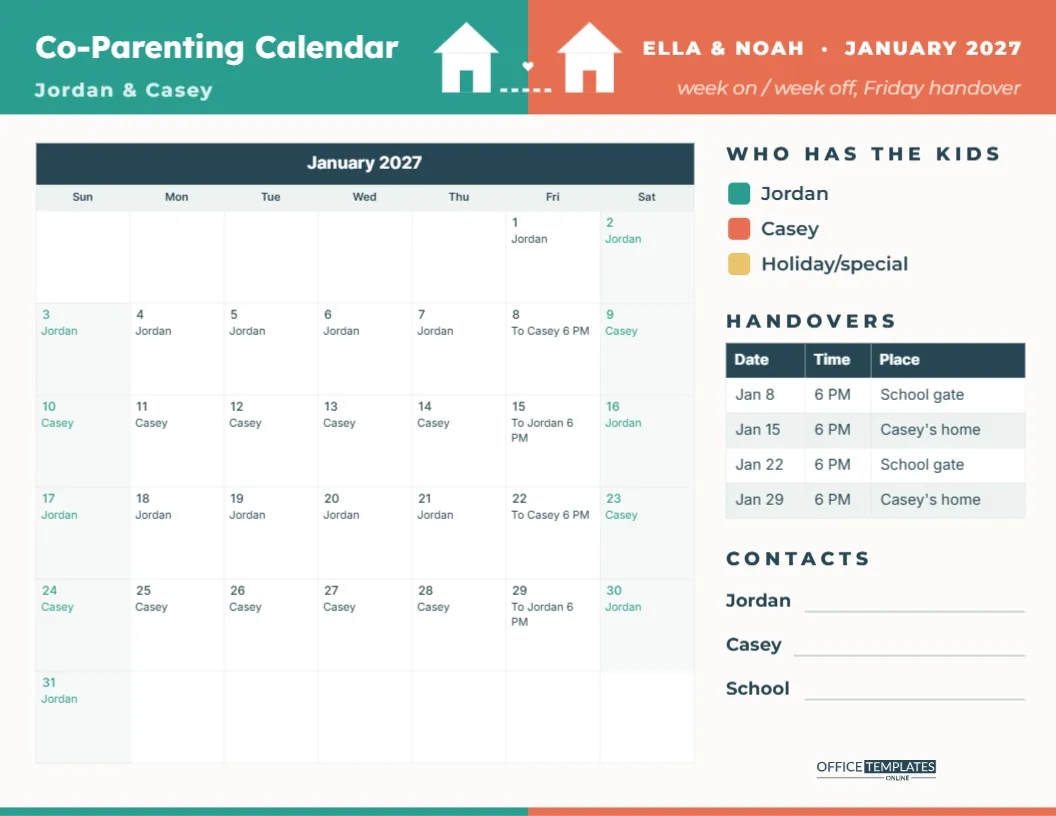
It shows, for every day of the month, which parent’s home the children are staying in, and when the handovers happen. The template is US Letter landscape. The header is split into two colours: teal on the left for one parent and coral on the right for the other, joined in the middle by two little white houses, a dashed path, and a small heart. The left side reads Co-Parenting Calendar with the parents’ names (the sample uses Jordan & Casey); the right side shows the children’s names and the month (ELLA & NOAH · JANUARY 2027) and the schedule type, week on/week off with a Friday handover.
How Is Each Day Marked?
The month grid is the editor’s Task Calendar, so each date can hold a short note. In the sample, every day carries the name of the parent the children are with, and the handover days say To Casey 6 PM or To Jordan 6 PM. A colour key on the right (teal for Jordan, coral for Casey and yellow for holidays or special days) lets you shade the days by hand with highlighters after printing, so the pattern is visible from across the room.
How Do I Enter Our Own Schedule?
Select the calendar, open Calendar Options, and click Manage Notes/Tasks. You will see every date of the month with a text box beside it. Type the parent’s name for each day and a short handover note where needed, then apply. Change the names in the header and the key at the same time. The sample uses a simple week-on, week-off pattern, but any arrangement can be written in.
Which Custody Schedules Can It Handle?
| Schedule | Pattern | How to write it |
|---|---|---|
| Week on/week off | Seven days with each parent | One name per week, handover note each Friday |
| 2-2-3 | Two days, two days, three days, alternating | Names change every two or three days |
| 2-2-5-5 | Fixed weekdays plus alternating weekends | Same weekdays each week, weekends alternate |
| Every other weekend | One main home, alternate weekends away | Main home all week, other parent on weekends |
| Custom or holiday | Agreed special arrangements | Write the arrangement on the day, shade it yellow |
Whatever schedule you use, follow the arrangement agreed between you or set by a court order. The calendar records the plan; it does not change it.
What Goes in the Handovers Table?
The HANDOVERS table on the right lists the date, time, and place of each changeover. In the sample, handovers are at 6 PM on Fridays, alternating between the school gate and Casey’s home. Writing the place down avoids confusion, especially when plans change. The table is the editor’s Table object, so you can add a column for Who drives or Notes, or add rows for extra handovers.
Why Include Contact Lines?
Under the table, three lines hold phone numbers for each parent and the school. Grandparents, babysitters, and new partners often need to reach the right person quickly, and having the numbers on the same sheet as the schedule saves a search through messages.
Should Each Home Have a Copy?
Yes. Print one for each home and keep them identical. Children feel more secure when they can see where they will be sleeping and when they will see the other parent. Many families pin it on the fridge at both homes and let the children colour in the days. Older children may like their own copy in their bedroom.
How Do We Handle Holidays and Birthdays?
Holidays usually follow a separate agreement, such as alternating Christmas or splitting the day. Write the arrangement on the date and shade it yellow from the key. Birthdays, school events, and trips can be added as notes too. Plan holiday months early and print them as soon as both parents agree.
What If the Schedule Changes?
Update the notes in the editor and reprint both copies, so neither home has an old version. Keep a record of agreed changes, for example by writing the date of the agreement on the back of the page. A calendar that both parents can see and trust reduces arguments and keeps the focus on the children.
Can I Change the Colours and Fonts?
Yes. The two header halves and the key swatches are simple shapes, so pick any two colours that are easy to tell apart. Calendar colours change in Calendar Options and table colours in the Table options. Fonts are Lexend for the title and Inter for the rest, both Google Fonts. You can also open Calendar Options to change the month and year, or start the week on Monday.
How Can the Calendar Help Children Adjust?
Young children often struggle to understand time, so a visual calendar helps them see when the next change is coming. Count the days to the next handover together, and let them put a sticker on each day that passes. Point out fixed things that do not change between homes, like school, after-school clubs, and visits to grandparents. For teenagers, sharing the calendar digitally as a PNG means they can check it on their phone and plan their own activities around both homes.
What Should We Avoid Writing on It?
Keep the calendar factual and neutral, since children will read it. Write names, times, and places, not complaints or reminders about disagreements. If something needs discussing, do it privately between the adults. A calm, simple calendar sends children the message that both parents are working together for them.
How Should We Print It?
Download the PDF and print in landscape on letter paper. Colour printing makes the two-tone header clear, but the names in every date mean the calendar still works in black and white. Print the next month a week before it starts, so both homes have it ready.
Two homes, one clear plan. A shared calendar keeps everyone, especially the children, on the same page.