Turn Every Lesson into an Opportunity to Improve the Next One
A lesson does not necessarily end when the class is over. Taking a few minutes afterward to think about what happened, what worked, what could be improved, and what should happen next can provide useful information for future teaching.
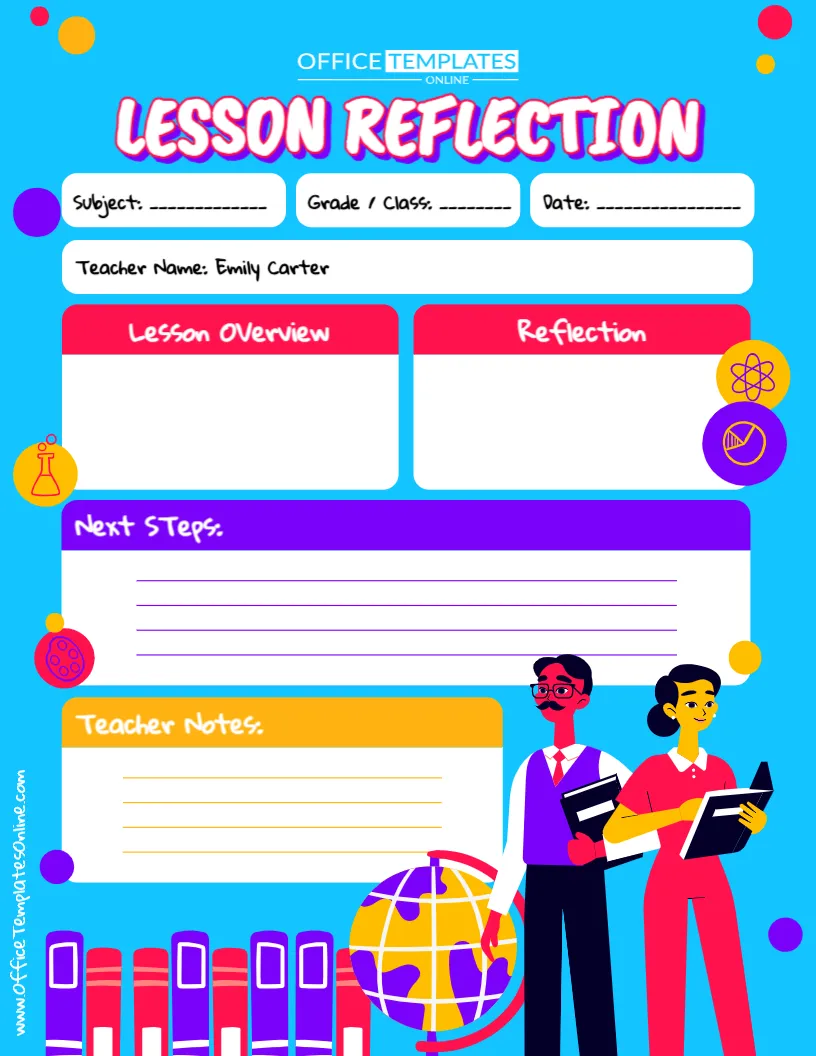
This Lesson Reflection Template gives teachers a simple, structured space for doing exactly that. Instead of facing a blank page and wondering what to record, you have clearly defined sections for the Lesson Overview, Reflection, Next Steps, and Teacher Notes. Fields for the subject, grade or class, date, and teacher name provide useful context for each completed reflection.
You can customize the template using our online editor directly in your browser, with no login required. Once you have finished editing it, download your personalized lesson reflection sheet as a PDF, PNG, or JPG for printing or digital use.
What Can You Record on This Lesson Reflection Sheet?
The template separates reflection into several manageable areas, helping you keep your thoughts organized rather than writing everything in one large text box.
At the top, you will find fields for:
- Subject – Identify the subject or learning area covered.
- Grade / Class – Record the class or grade level.
- Date – Add the date on which the lesson was delivered.
- Teacher Name – Identify the teacher completing the reflection.
- Lesson Overview – Summarize what the lesson covered.
- Reflection – Think about how the lesson went and record your observations.
- Next Steps – Decide what should happen after this lesson.
- Teacher Notes – Keep additional reminders, observations, or ideas.
Together, these sections turn the template into a practical post-lesson reflection form that can be completed after individual lessons whenever reflection is useful.
Start with a Quick Lesson Overview
The Lesson Overview section gives you a place to briefly describe what was taught.
You do not need to rewrite your complete lesson plan here. Instead, record enough information to remind yourself what the lesson was about when you look back at the reflection later.
For example, you could mention the lesson topic, main learning objective, classroom activity, teaching method, or key concept.
A short entry such as “Introduction to fractions using visual examples and group practice” may be enough to provide context for the reflection that follows.
This is especially helpful if you keep several completed reflection sheets and want to review them later.
Think About How the Lesson Actually Went
Planning tells you what you intended to happen. Reflection gives you space to consider what actually happened.
Use the dedicated Reflection box to write down your thoughts about the lesson. Depending on what you want to evaluate, you might consider questions such as:
Did students understand the main idea?
Which activities worked particularly well?
Was anything more difficult than expected?
Did the lesson move at an appropriate pace?
Were students engaged with the activity?
Is there anything I would teach differently next time?
You do not need to answer every question every time. They are simply useful prompts for deciding what information might be worth recording.
The aim is to create a short, meaningful record that can help with your future planning.
Move from Reflection to Action with the “Next Steps” Section
Reflection becomes more useful when it helps you decide what to do next.
That is why this template includes a prominent Next Steps area rather than stopping at general observations.
Suppose your reflection shows that students understood most of a topic but struggled with one particular concept. Your next step might be to review that concept at the beginning of the following lesson.
If an activity worked especially well, you might plan a similar activity for the next stage of the unit. If students are ready to progress, your next step could simply be to introduce the next topic.
Possible entries might include “Review vocabulary before the next activity,” “Provide additional practice questions,” “Continue to the next chapter,” or “Revisit this concept with visual examples.”
This helps turn observations into clear follow-up actions.
Keep Extra Observations in Teacher Notes
Some thoughts may be useful but may not fit naturally under Lesson Overview, Reflection, or Next Steps.
The Teacher Notes section gives you a separate place for these details.
You could use it for reminders about teaching materials, ideas you want to try later, changes to an activity, questions to revisit, general classroom observations, or points you want to remember when preparing a similar lesson in the future.
Because this area is flexible, there is no single correct way to use it. It is simply additional writing space for information that matters to you.
Why Keep a Lesson Reflection Record?
It is easy to rely on memory immediately after a lesson. A few days or weeks later, however, small but useful details may be harder to recall.
Writing down key observations can create a reference for future planning. When teaching a similar topic again, you can look back at your previous reflection and remind yourself which activities were effective, where difficulties appeared, and what changes you wanted to make.
A completed reflection can also help you identify patterns over time. For example, you may notice that certain explanations work better, particular activities need more time, or some topics regularly require additional practice.
This template provides a consistent place to capture those observations without requiring a lengthy written report after every class.
A Reflection Template That Keeps Things Simple
Teacher reflection does not have to involve pages of writing.
This template has been designed around a small number of clearly labeled sections so you can focus on the information that is most useful. The large writing areas provide flexibility, while the separate headings prevent your notes from becoming one unstructured block of text.
Its bright educational design also makes the form visually engaging. Colorful sections help distinguish different parts of the reflection sheet, while school and science-themed illustrations give it a friendly classroom feel.
Most importantly, the actual writing areas remain clearly visible and easy to understand.
Useful for Different Subjects and Teaching Situations
Because there are no subject-specific questions built into the design, this teacher lesson reflection template can be adapted to many educational settings.
A mathematics teacher could reflect on how well students understood a new method. A language teacher might record observations about a reading or speaking activity. A science teacher could evaluate how effectively a practical activity worked. An elementary teacher might reflect on an entire lesson involving several learning activities.
The same format may also be useful for tutors, student teachers, trainee teachers, instructors, homeschooling educators, and other people responsible for teaching or delivering learning activities.
Simply change the subject, class, and reflection content to suit the lesson being reviewed.
How to Complete Your Lesson Reflection
A useful reflection does not need to take a long time. You can follow a straightforward process after the lesson.
First, enter the subject, grade or class, date, and teacher name. Then write a brief overview so you can easily identify what was taught.
Next, use the Reflection section to capture the most important observations. Try to be specific. Instead of simply writing “Lesson went well,” you might note “Students understood the examples but needed more support during independent practice.”
Then turn that observation into an action in Next Steps, such as “Begin tomorrow with five additional practice questions.”
Finally, add any remaining reminders to Teacher Notes.
This approach gives you a record of not only what happened, but also what you intend to do with what you learned from the lesson.
Edit the Template Online – No Login Needed
You can personalize this Lesson Reflection Template without installing additional software or creating an account.
Open it in our browser-based online editor and customize the editable elements according to your needs. The editor is designed to be straightforward, so you do not need advanced design skills to prepare your own version.
There is no login required to customize the template, allowing you to get started quickly.
You can adapt the content for a particular subject, class, lesson, or teaching situation and prepare a fresh reflection sheet whenever needed.
Download Your Finished Reflection as PDF, PNG, or JPG
When your customized template is ready, you can download the finished version as a PDF, PNG, or JPG.
Choose PDF if you want a convenient document for printing, filing, or keeping with other teaching records. Choose PNG or JPG if you prefer to save your lesson reflection as an image for digital use.
You could keep completed reflections alongside your lesson plans so that the original plan and your post-lesson observations are easy to refer to together.
Plan, Teach, Reflect, and Improve
A lesson plan helps you prepare for what you want to happen in the classroom. A lesson reflection helps you capture what you learned after delivering that plan.
This free editable Lesson Reflection Template provides a clear framework for recording the lesson overview, evaluating how the lesson went, deciding on next steps, and keeping additional teacher notes.
Customize the template online without signing in, complete the sections that are useful for your teaching practice, and download your finished reflection sheet as a PDF, PNG, or JPG. It is a simple way to make reflection a practical part of the lesson-planning process rather than another complicated task.