Let Diners Know You’re Open This Labor Day—and Exactly When to Visit
Labor Day can bring a change in routine, and customers planning lunch, dinner, or a family meal may want to know whether their favorite restaurant is open. This Labor Day Restaurant Hours Template gives restaurants a simple and attractive way to publish their special holiday schedule without creating a notice from scratch.
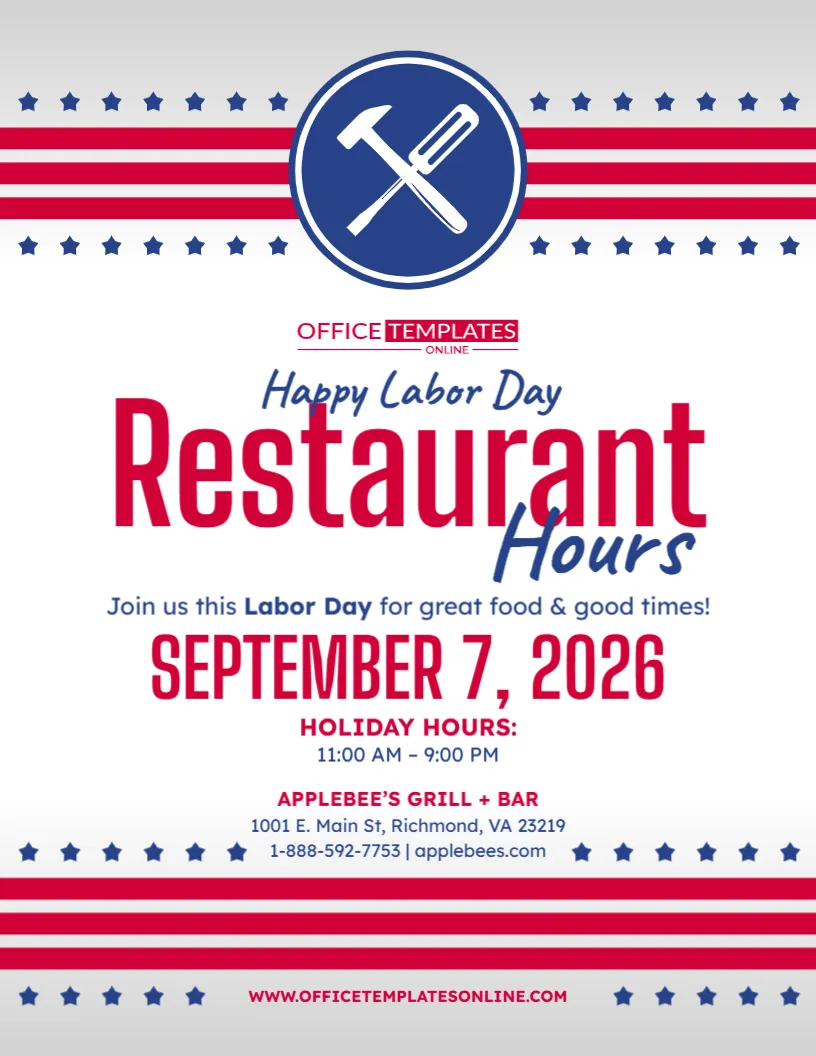
The design puts “Restaurant Hours” front and center, followed by a large area for the Labor Day date and the restaurant’s special opening and closing times. Below that, there is space for the restaurant name, address, phone number, and website, giving diners the essential information they may need before visiting.
Its red, white, and blue theme combines stars, stripes, and a crossed fork-and-knife symbol to create a design that feels both patriotic and restaurant-specific.
You can personalize the template directly in our easy-to-use browser-based editor. There is no login required to customize it. Once your restaurant’s Labor Day information is correct, download the finished design in PDF, PNG, or JPG format.
Made for Restaurants with Special Labor Day Hours
Holiday operating hours can be different from a restaurant’s regular Monday schedule.
You might open later, close earlier, offer dinner service only, or remain open for your usual hours. Whatever your plan, clearly displaying the actual times makes it easier for guests to decide when to visit.
The sample design includes:
- Happy Labor Day greeting
- Restaurant Hours headline
- Labor Day invitation
- Holiday date
- Special holiday hours
- Restaurant name
- Street address
- Phone number
- Website
- Restaurant-themed icon
- Patriotic stars and stripes
The information is already organized into a clear hierarchy, so you mainly need to replace the sample content with your own details.
Make Your Holiday Hours the Information Diners Notice First
For a restaurant-hours announcement, the opening and closing times are more important than a lengthy holiday message.
This template keeps them near the center of the design.
The sample displays:
HOLIDAY HOURS:
11:00 AM – 9:00 PM
Replace those times with your actual Labor Day schedule.
For example:
8:00 AM – 2:00 PM
11:00 AM – 8:00 PM
12:00 PM – 10:00 PM
4:00 PM – 11:00 PM
Giving customers exact hours is more useful than simply saying that your restaurant will operate on a “modified schedule.” Clear holiday notices typically work best when they state the specific date and exact operating hours.
Edit the Restaurant Hours Template Online—No Login Needed
You do not need professional design software to personalize this notice.
Open the template in our online editor directly from your browser and change the available elements to suit your restaurant. You can begin customizing without creating an account or signing in.
Depending on the editable elements available in the design, you can personalize:
- Restaurant name
- Labor Day date
- Opening time
- Closing time
- Address
- Phone number
- Website
- Main headings
- Holiday message
- Text
- Colors
- Other available design elements
The layout is already prepared, allowing you to spend less time designing and more time making sure your restaurant information is correct.
Change the Sample Restaurant Information Before Using the Design
The business details shown in the sample are placeholders.
Before displaying or publishing your customized version, replace them with information for your own restaurant.
Add your:
Restaurant Name
Street Address, City, State, ZIP
Phone Number | Website
Including these details is especially helpful when customers see the notice online rather than at your restaurant. They can immediately identify which location the hours apply to and have a way to get additional information.
If your restaurant has multiple locations, consider adding a location name as well.
For example:
Downtown Location
Westside Restaurant
Airport Location
Main Street Location
This can prevent customers from assuming that every branch follows the same Labor Day schedule.
The Large Date Makes the Holiday Schedule Easy to Understand
The sample design prominently displays:
September 7, 2026
Placing the date directly above the holiday hours helps prevent a common misunderstanding: customers mistaking temporary holiday hours for the restaurant’s normal schedule.
When you use this template for a different year, update the date along with the operating hours.
The final notice should make three things immediately clear:
Which holiday? Labor Day.
Which date? The date shown on the design.
What hours? Your opening and closing times.
This simple combination gives diners the information they need to plan their visit.
Open Only for Lunch or Dinner? Say So Clearly
Some restaurants do not operate a continuous schedule on holidays.
For example, you may decide to offer only brunch, lunch, or dinner service on Labor Day.
In that case, customize the schedule with more descriptive wording such as:
LABOR DAY BRUNCH: 9:00 AM – 2:00 PM
LUNCH HOURS: 11:00 AM – 3:00 PM
DINNER SERVICE: 4:00 PM – 10:00 PM
OPEN FOR DINNER: 5:00 PM – 11:00 PM
This can be more informative than displaying times alone.
It also helps customers understand what type of dining experience will be available when they arrive.
Split Service? Show Both Time Periods
Restaurants with separate lunch and dinner services can adapt the template accordingly.
For example:
LUNCH: 11:00 AM – 2:30 PM
DINNER: 5:00 PM – 10:00 PM
Or:
BRUNCH: 9:00 AM – 2:00 PM
DINNER: 4:00 PM – 9:00 PM
If you add multiple service periods, keep the text short and easy to scan.
Avoid squeezing too much information into the hours section. If your holiday schedule is complicated, use the design to communicate the key hours and direct guests to your website for full details.
Closed Instead? Turn It into a Labor Day Restaurant Closure Notice
Plans can change, and not every restaurant chooses to open on Labor Day.
If your restaurant will be closed, you can adapt the same template rather than searching for an entirely different design.
Replace the sample hours with wording such as:
CLOSED FOR LABOR DAY
RESTAURANT CLOSED SEPTEMBER 7
CLOSED MONDAY – REOPENING TUESDAY
CLOSED FOR THE LABOR DAY HOLIDAY
WE WILL REOPEN SEPTEMBER 8
When a restaurant is closed, stating that fact directly is better than leaving the hours blank.
Add Reopening Information When Your Restaurant Is Closed
If you adapt the design into a closure notice, tell guests when you will welcome them back.
You could add:
Regular Hours Resume Tuesday
We Reopen Tuesday at 11:00 AM
See You Tuesday for Lunch!
Normal Dining Hours Resume September 8
This extra information can prevent customers from wondering whether the closure extends beyond Labor Day.
Use the Holiday Greeting to Make the Notice Feel Welcoming
At the top of the main content, the design includes:
Happy Labor Day
This gives the restaurant-hours notice a warmer, more inviting tone.
You can keep the original greeting or personalize it with something that better suits your restaurant.
For example:
Happy Labor Day from Our Team!
Celebrate Labor Day with Us!
Join Us This Labor Day!
Labor Day Dining Starts Here!
Enjoy Labor Day with Great Food!
We’re Open and Ready to Serve You!
A restaurant-hours announcement can communicate practical information while still sounding welcoming.
Add a Simple Invitation to Encourage Customers to Visit
The sample design includes the line:
Join us this Labor Day for great food & good times!
This is a useful addition because it turns a basic schedule notice into a light promotional message.
You can customize it according to your restaurant concept:
Join Us for Labor Day Brunch!
Celebrate the Long Weekend with Your Favorite Meal!
Bring the Family and Dine with Us This Labor Day!
Make Labor Day Delicious!
Spend Your Holiday with Great Food and Great Company!
Keep this message short so it supports rather than overshadows the operating hours.
Promote a Labor Day Special When You Have One
If your restaurant is offering something special for the holiday, you may want to use an editable text area to mention it.
Possible additions include:
Labor Day Brunch Specials Available
Holiday Menu Available All Day
Labor Day Family Specials
Special Lunch Menu
Holiday Dinner Specials
Limited-Time Labor Day Menu
Only include a promotion that genuinely applies to your restaurant.
The operating hours should still remain one of the most prominent pieces of information.
Reservations Available? Add a Short Call to Action
Restaurants expecting a busy Labor Day may want customers to reserve ahead.
If reservations are available, a concise call to action could make the notice more useful.
Examples include:
Reserve Your Table Today
Reservations Recommended
Call Now to Reserve
Book Your Labor Day Table
Reserve Online
Holiday-hours communications can be particularly useful when they pair the date and exact hours with a clear next action, such as reserving or ordering ahead.
Takeout and Delivery Hours May Need Their Own Note
Your dining room, takeout service, and delivery operation do not necessarily have to follow the same schedule.
If Labor Day service differs by type, make that distinction clear.
For example:
DINE-IN: 11 AM – 9 PM
TAKEOUT: 11 AM – 8:30 PM
or:
DINING ROOM: 12 PM – 8 PM
DELIVERY: 12 PM – 9 PM
This can prevent a customer from assuming that a 9:00 PM restaurant closing time also means orders can be placed until 9:00 PM.
If your schedule is too detailed for the design, direct customers to your website for service-specific hours.
A Fork-and-Knife Icon Makes the Purpose Immediately Recognizable
One feature that separates this design from a general Labor Day business-hours notice is the large fork-and-knife symbol at the top.
The crossed utensils appear inside a dark-blue circular emblem.
This immediately introduces a dining theme before viewers even reach the word “Restaurant.”
It is a simple visual choice, but it helps make the template feel specifically designed for restaurants rather than adapted from a generic store-hours poster.
Patriotic Stars and Stripes Frame the Restaurant Information
The design uses rows of red stripes and blue stars across both the upper and lower portions.
These decorative elements create a recognizable Labor Day theme without placing busy graphics behind the central information.
Most of the main content appears against a clean, light background.
That helps the large red Restaurant heading, blue Hours lettering, holiday date, and operating times remain easy to distinguish.
The overall look is festive but still practical enough to function as a restaurant-hours notice.
A Clean Layout Keeps Important Details Together
The template uses a centered layout that guides the viewer from the headline down to the business information.
The reading order is approximately:
Happy Labor Day
Restaurant Hours
Holiday Invitation
Labor Day Date
Holiday Hours
Restaurant Name
Address
Phone Number and Website
Keeping these details together reduces the amount of searching a customer has to do.
This is particularly useful when the notice is viewed quickly at an entrance or on a phone screen.
Suitable for Many Types of Restaurants and Food Businesses
The template is not limited to one style of restaurant.
You can personalize it for:
- Family restaurants
- Casual dining restaurants
- Fine dining restaurants
- Diners
- Cafés
- Coffee shops
- Bakeries
- Pizzerias
- Bar and grill restaurants
- Breakfast restaurants
- Brunch restaurants
- Fast-casual restaurants
- Takeout businesses
- Food service businesses
- Local eateries
- Independent restaurants
You can also change “Restaurant Hours” to another heading when appropriate, such as “Café Hours,” “Holiday Hours,” “Labor Day Hours,” or “Special Hours.”
Helpful for Independent Restaurants and Individual Locations
For an independent restaurant, the template provides room for all the basic information needed to create a self-contained holiday-hours announcement.
For multi-location restaurants, it can be customized separately for each branch.
This is important because different locations may have different staffing levels, local demand, or operating schedules.
Instead of publishing one generic graphic for every restaurant, create location-specific versions when necessary.
Each version can include the appropriate:
- Location name
- Address
- Phone number
- Holiday hours
- Website or location page
This gives customers more accurate information.
Display the Notice Where Guests Make Dining Decisions
A customized restaurant-hours notice can be useful in several places.
For physical display, consider:
- Restaurant entrance
- Front door
- Window
- Host stand
- Reception area
- Takeout counter
- Pickup area
- Menu display area
- Customer noticeboard
Publishing the notice before the holiday can be particularly useful because it gives regular customers time to plan their Labor Day meal.
Restaurant-focused holiday-hours templates are commonly designed specifically to help guests know when they can visit during a holiday schedule.
Consider Sharing the Same Information Digitally
Customers may check your restaurant’s hours before leaving home.
Where appropriate, make sure your Labor Day schedule is also reflected across your customer-facing digital information.
That could include your:
- Restaurant website
- Online reservation information
- Online ordering page
- Customer emails
- Relevant social channels
- Business listings
The exact hours shown online should match the hours on your customized notice.
If your sign says 11:00 AM – 9:00 PM but another customer-facing source shows your regular schedule, diners may not know which information is current.
Keep Your Holiday Hours Simple and Specific
Avoid making customers interpret vague phrases.
Instead of:
Special Hours Apply
use:
LABOR DAY HOURS: 11 AM – 9 PM
Instead of:
Closing Early
use:
OPEN 11 AM – 4 PM
Instead of:
Limited Service
explain what is actually available whenever practical.
Specific information makes the notice more useful and can reduce unnecessary questions about whether your restaurant is open and when service ends.
Double-Check AM and PM Before Publishing
Opening-hours mistakes can be surprisingly easy to make.
Before downloading the final design, verify:
- Labor Day date
- Opening time
- Closing time
- AM and PM
- Restaurant name
- Address
- Phone number
- Website
- Location name
- Holiday message
- Any remaining placeholder information
If your restaurant opens at 11:00 AM and closes at 9:00 PM, check both time markers carefully.
Also confirm that the address and phone number belong to the location whose hours are being advertised.
Download Your Finished Restaurant Hours Notice as PDF, PNG, or JPG
When the design looks right and all information has been checked, download your customized template in PDF, PNG, or JPG format.
Having multiple download options makes the completed design more flexible for different uses.
Choose the file format that best suits your intended purpose, whether you plan to save the design, use it digitally, or prepare it for an appropriate printing method.
Customize Your Labor Day Restaurant Hours in a Few Easy Steps
Creating your own version is straightforward:
- Open the Labor Day Restaurant Hours Template in the online editor.
- Replace the sample date if necessary.
- Enter your actual Labor Day opening and closing times.
- Add your restaurant name.
- Replace the sample address with your location.
- Enter the correct phone number and website.
- Customize the Labor Day greeting or invitation if desired.
- Add reservation or holiday-special wording if appropriate.
- Adjust other available text, colors, or editable elements.
- Check the entire design for accuracy.
- Download the finished template in PDF, PNG, or JPG format.
You can customize the design without logging in or creating an account.
Give Guests One Less Thing to Wonder About This Labor Day
People deciding where to eat on a holiday often have one basic question: Are you open, and until what time?
This Labor Day Restaurant Hours Template helps you answer that question in a clear, attractive format. It combines a large restaurant-hours headline, prominent holiday date, dedicated opening and closing times, business contact details, restaurant-themed utensil icon, and patriotic stars and stripes in one organized design.
Instead of building a holiday-hours announcement from the beginning, open the template in the browser-based editor, personalize it with no login required, add your restaurant’s actual Labor Day schedule and contact information, and download the finished design as PDF, PNG, or JPG.
It is a practical way to help diners know when they can visit, where your restaurant is located, and how to contact you while planning their Labor Day meal.