Make Your Labor Day Office Closure Clear Before Visitors Reach the Door
When your office is closed for Labor Day, a clear notice can save customers, clients, employees, delivery personnel, and other visitors from unnecessary confusion. This Labor Day Office Closed Sign Template gives you a ready-made way to announce the closure while maintaining a professional and holiday-appropriate appearance.
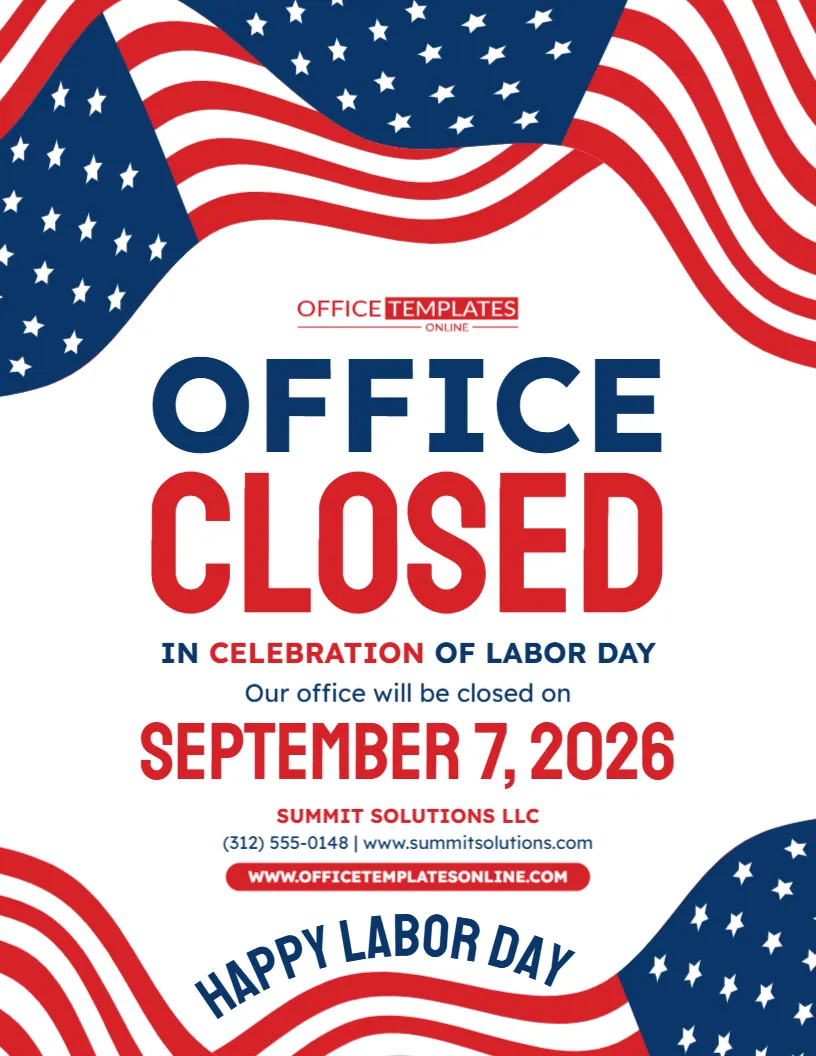
The design immediately communicates its purpose through the oversized “Office Closed” headline. Directly below it, the wording explains that the closure is in celebration of Labor Day, followed by a highly visible area for the closure date. There is also dedicated space for your company name, phone number, website, and a closing Labor Day greeting.
Large flowing American flag graphics frame the design from the top and bottom. The red, white, and blue color scheme creates a recognizable patriotic look while leaving a clean white center for the information people actually need to read.
Best of all, you can personalize this template using our easy-to-use online editor directly in your browser. You do not need to log in or create an account to customize it. When your notice is ready, download the completed sign in PDF, PNG, or JPG format.
The Main Message Is Difficult to Miss
A closure notice should communicate its purpose within seconds.
That is exactly what this design is built to do.
The words “Office Closed” are the largest elements on the page, with “Office” shown in dark blue and “Closed” displayed in bright red. Even someone who only gives the sign a quick glance can understand the essential message.
The supporting wording then explains the reason for the closure:
In Celebration of Labor Day
This simple information hierarchy helps viewers understand:
- That the office is closed
- Why it is closed
- The date of the closure
- Which company or office the notice belongs to
- How to contact or learn more about the business
There is no need for visitors to read a long paragraph to find the information they need.
What You Can Personalize in This Template
The sample sign provides a complete layout, but the information can be changed to suit your own office or organization.
You can use the available editable areas to personalize details such as:
- Office closure wording
- Labor Day message
- Closure date
- Company or organization name
- Phone number
- Website address
- Closing greeting
- Text
- Colors
- Other available design elements
This makes the template useful whether you run a small local office, manage a larger company location, or simply need a professional holiday notice for visitors.
Edit the Office Closed Sign Online with No Login
You do not have to install design software or create the entire notice yourself.
Simply open the template in our browser-based online editor and make the changes you need. No login is required, so you can begin personalizing the sign without first registering for an account.
The basic design has already been completed for you. Instead of spending time choosing a layout, arranging text, adding patriotic graphics, and deciding where the closure date should appear, you can concentrate on replacing the sample information with your own.
This is especially convenient when Labor Day is approaching and you need to prepare a professional closure notice quickly.
Give the Closure Date the Attention It Deserves
The sample template displays:
September 7, 2026
The date is positioned below the main closure message and shown in large red lettering so visitors can easily identify the exact day affected.
For 2026, Labor Day falls on Monday, September 7. Labor Day is observed in the United States on the first Monday in September, so its calendar date changes from year to year.
If you use this template in a different year, remember to replace the sample date with the correct one before downloading your finished sign.
Closed for More Than One Day? Change the Wording
Not every office follows the same Labor Day schedule.
Some businesses close only on Monday. Others may close for several days around Labor Day weekend. The editable format allows you to change the message so it accurately reflects your own schedule.
For example, you might use:
Office Closed September 7
Closed for Labor Day Weekend
Our Office Will Be Closed September 5–7
Closed Monday in Observance of Labor Day
Labor Day Holiday Closure
If your closure lasts for several days, use a date range rather than displaying only Labor Day itself.
The most important thing is to ensure the final sign matches your actual operating schedule.
Consider Telling Visitors When You Will Reopen
The sample design focuses on the closure date, but reopening information can make a holiday notice even more useful.
If appropriate, you can modify the available text to tell customers when normal business hours will resume.
Examples include:
We Will Reopen Tuesday, September 8
Normal Office Hours Resume Tuesday
Closed Monday – Open Again Tuesday
We Look Forward to Serving You After the Holiday
This can reduce uncertainty, especially for clients or visitors who need to know when they can call, visit, or expect a response.
If you add reopening information, check the date carefully before publishing the notice.
Add Your Business Name So Visitors Know Who the Notice Belongs To
A generic “Office Closed” sign may be enough for a private office, but adding your business name makes the notice more complete.
The sample template includes a dedicated company-name area below the closure date.
Replace the placeholder business name with your own:
Company Name
Office Name
Department Name
Organization Name
Practice Name
Agency Name
This is particularly helpful in shared office buildings, business centers, medical complexes, and other locations where several organizations operate near one another.
Provide a Phone Number and Website for More Information
The template also gives you space for basic contact information.
The sample layout includes a phone number and website directly below the business name. You can replace these placeholders with your actual details.
A visitor who arrives while the office is closed may still want to:
- Visit your website
- Check online information
- Find your normal business hours
- Call and leave a message
- Use an online service
- Find another way to contact your organization
Providing a website or phone number can therefore make the closure notice more useful than a simple “Closed” message.
Only include contact methods that remain relevant while your office is unavailable.
Patriotic Flag Graphics Create an Immediate Holiday Connection
One of the most noticeable features of this template is its use of large American flag-inspired graphics.
At the top, flowing red and white stripes combine with blue fields containing white stars. A similar treatment returns at the bottom of the page, framing the central content.
Rather than filling the entire background with detailed graphics, the design keeps the middle section white.
This is an important visual choice because the central area contains the information visitors need most: the closure announcement, holiday name, date, company details, and contact information.
The result combines patriotic decoration with practical readability.
Red and Blue Typography Creates a Strong Visual Hierarchy
The template makes careful use of its patriotic color palette.
“Office” appears in dark blue.
“Closed” appears in red.
The supporting Labor Day wording mixes blue and red, while the closure date uses large red lettering.
This variation helps separate the different parts of the notice without requiring boxes around every section.
The white background also provides strong contrast, making the text easier to distinguish from the decorative flag graphics around the edges.
A Friendly “Happy Labor Day” Message Completes the Design
The bottom portion of the poster includes a curved:
Happy Labor Day
This gives the closure notice a friendlier ending.
Rather than simply telling visitors that the office is unavailable, the sign also acknowledges the holiday in a positive way.
Depending on the tone of your organization, you can keep this wording or replace it with another closing message, such as:
Have a Safe and Happy Labor Day
Wishing You a Happy Labor Day
Enjoy the Labor Day Holiday
Happy Labor Day from Our Team
Thank You and Have a Wonderful Holiday
This small customization can help the sign better match the voice of your business.
Suitable for Many Offices and Professional Settings
Although the template says “Office Closed,” it can be adapted for many different organizations.
Possible users include:
- Corporate offices
- Small business offices
- Accounting firms
- Law offices
- Real estate agencies
- Insurance offices
- Medical offices
- Dental offices
- Consulting businesses
- Administrative departments
- Schools and educational offices
- Nonprofit organizations
- Government offices
- Community organizations
- Property management offices
- Professional service providers
If “office” is not the term your customers normally use, you can customize the wording where the available editable elements allow.
For example, a business might prefer “Business Closed,” “Store Closed,” “Clinic Closed,” or another description that better matches its location.
Place the Notice Where Visitors Naturally Look
A well-designed closure sign only helps when people can actually see it.
Depending on your workplace, consider placing the completed notice in a visible area such as:
- Main entrance
- Front door
- Reception desk
- Lobby
- Office window
- Waiting area
- Customer service area
- Building noticeboard
- Employee information area
You can also use the downloaded design in suitable digital communications if the file dimensions and platform requirements fit your intended use.
For a physical office, placing the notice before the holiday can give regular visitors advance warning rather than surprising them when they arrive.
Useful for Advance Notice and Day-of Closure Information
You do not have to wait until Labor Day morning to display the sign.
Putting the notice up several days in advance can help customers and visitors adjust their plans.
For example, someone who normally visits your office on Monday may see the notice earlier in the week and decide to come on Friday instead.
On the holiday itself, the same sign provides confirmation to anyone who arrives at the location.
This makes the template useful both as an advance holiday closure announcement and as a day-of closed office sign.
Make Sure Your Other Business Information Matches
Your office door is only one place customers may check your Labor Day schedule.
If your operating hours change for the holiday, consider making sure your other customer-facing information is consistent with the sign.
That may include your:
- Website
- Business-hours page
- Appointment information
- Phone greeting
- Email auto-response
- Customer notices
- Relevant online business listings
Consistent information can help prevent situations where the office sign says one thing while another source shows normal operating hours.
Keep the Notice Short and Practical
It can be tempting to add extra information when customizing a template, but an office closure sign usually works best when it stays concise.
A visitor primarily needs to know:
What happened?
The office is closed.
Why?
Labor Day.
When?
The displayed date or date range.
Which office?
Your company or organization.
Where can I find more information?
Your phone number or website.
If you want to explain your full holiday schedule or provide detailed customer-service instructions, your website may be a better place for that information.
Download Your Finished Sign as PDF, PNG, or JPG
Once the design has been personalized and proofread, you can download it in PDF, PNG, or JPG format.
The different download options give you flexibility depending on how you intend to use the completed sign.
You may choose PDF when you need the design in that format, while PNG or JPG provide convenient image versions for digital use.
Always check the requirements of your intended printing method or digital platform before choosing the final file.
From Template to Finished Office Notice in Minutes
The customization process is straightforward:
- Open the Labor Day Office Closed Sign Template in the online editor.
- Confirm or change the “Office Closed” wording.
- Update the Labor Day closure date.
- Add a reopening date if you want to provide one.
- Replace the sample company name with your own.
- Enter the correct phone number and website.
- Personalize the Happy Labor Day message if desired.
- Adjust other available text, colors, or editable elements.
- Proofread the completed sign.
- Download it as PDF, PNG, or JPG.
You can complete these changes without logging in or creating an account.
One Final Check Can Prevent Holiday Confusion
Before displaying the sign, verify every detail related to your office schedule.
Pay particular attention to the closure date and reopening information. A wrong date can cause more confusion than having no sign at all.
Also check:
- Company name
- Phone number
- Website address
- Spelling
- Holiday wording
- Any remaining placeholder text
If you plan to reuse the design next year, do not simply print the old version again. Labor Day’s numerical date changes, so update and proofread the template first.
A Clearer Way to Say “Our Office Is Closed”
A Labor Day closure notice does not need a complicated design or lengthy explanation. It needs to tell visitors what they need to know quickly while still looking appropriate for your workplace.
This Labor Day Office Closed Sign Template does exactly that with a prominent Office Closed headline, clear holiday wording, large closure date, business identification, contact information, patriotic flag graphics, and a friendly Happy Labor Day message.
Instead of creating your notice from scratch, customize the template online in your browser with no login required, replace the sample details with your own information, and download the finished sign in PDF, PNG, or JPG format.
You will have a clear, personalized notice that helps visitors understand that your office is closed for Labor Day, which date is affected, and where they can find additional information while you are away.