Show the Whole Labor Day Schedule in One Clear, Customer-Friendly Sign
Holiday schedules can become confusing when a business is closed for more than just Labor Day itself. This Labor Day Holiday Hours Sign Template solves that problem by giving you space to show customers a day-by-day holiday schedule, along with your reopening information and business contact details.
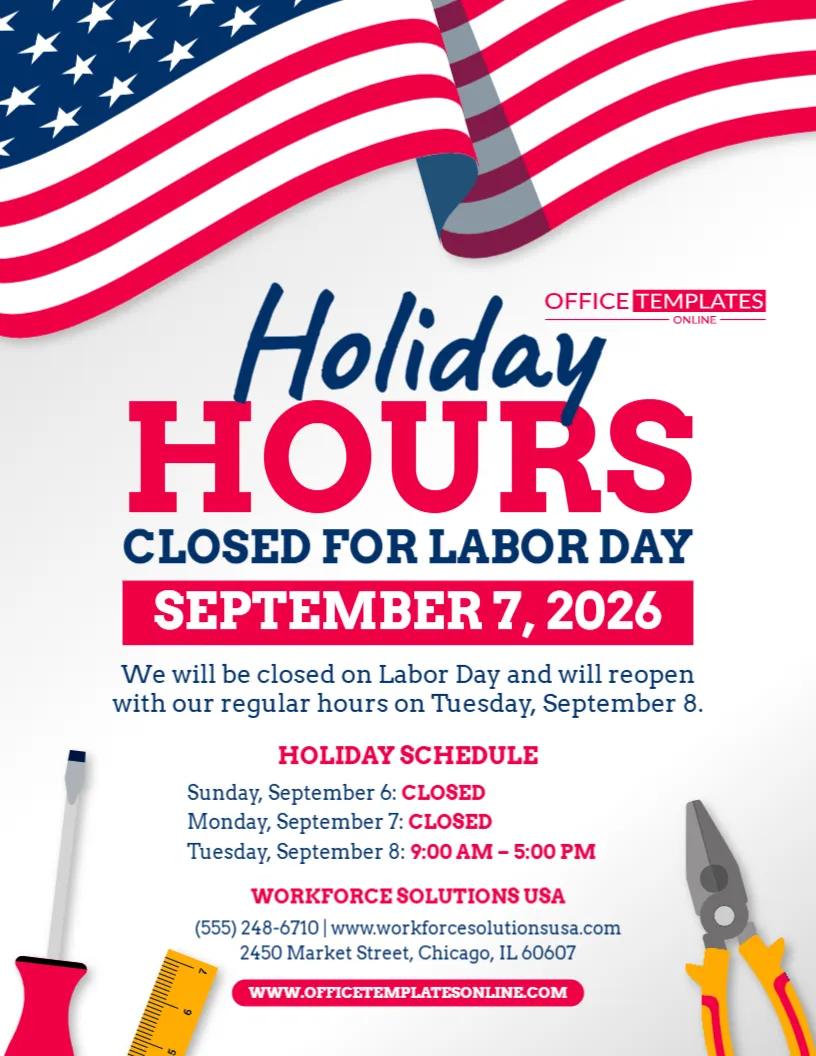
The sample design does more than say “Closed for Labor Day.” It prominently announces Holiday Hours, identifies the Labor Day closure date, explains when regular hours will resume, and includes a separate Holiday Schedule section where individual days can be marked as closed or assigned specific operating hours.
That makes this template particularly useful for businesses that close for part of Labor Day weekend and then reopen on a different schedule.
A large waving American flag, patriotic stars and stripes, and work-related tools around the bottom give the sign a distinctive Labor Day appearance. Meanwhile, the clean white center keeps the important schedule information easy to find.
You can personalize this template using our easy-to-use online editor directly in your browser. There is no login required to start customizing. Once your holiday schedule and business information are correct, download the finished sign in PDF, PNG, or JPG format.
More Than a “Closed” Sign: Show Customers Your Complete Holiday Schedule
A simple closed sign works when a business is unavailable for only one day.
But Labor Day often affects an entire weekend.
Your normal Saturday or Sunday hours may change. You might close on Sunday and Monday, then reopen Tuesday at your regular time. Another business might operate shorter weekend hours before closing Monday.
This template gives you room to explain those changes.
The sample includes a schedule structured like this:
Sunday, September 6: CLOSED
Monday, September 7: CLOSED
Tuesday, September 8: 9:00 AM – 5:00 PM
This day-by-day format helps customers understand exactly when they should—or should not—visit.
Clear holiday-hours signage is useful for avoiding uncertainty about whether a business is open, and displaying both closure and reopening information can make a notice more helpful.
What Is Included in the Ready-Made Layout?
The design already provides dedicated areas for the information a useful holiday-hours sign may need.
You can personalize:
- Holiday Hours heading
- Closed for Labor Day message
- Labor Day closure date
- Reopening statement
- Day-by-day holiday schedule
- Opening and closing times
- Business or organization name
- Phone number
- Website
- Street address
- Other available text and design elements
This structure saves you from having to decide how to organize several dates and operating hours on your own.
Customize Everything Online Without Logging In
Preparing a professional Labor Day schedule does not have to involve complicated design software.
Open this template in our browser-based online editor, select the available elements you want to change, and replace the sample information with your own.
There is no login or account creation required to customize the template.
You can update your dates, opening and closing times, business information, wording, and other available editable elements while keeping the professionally arranged layout as your starting point.
When you are satisfied with the result, simply download your completed design.
Use the Main Headline for Immediate Recognition
The words “Holiday Hours” are among the largest elements on the sign.
“Holiday” appears in a handwritten-style blue typeface, while “Hours” uses oversized red lettering.
Immediately below it is:
CLOSED FOR LABOR DAY
This creates a useful two-part message.
The first part tells customers that your operating schedule is different.
The second tells them why.
A viewer does not need to read the entire poster to understand that the business has special Labor Day hours.
Make the Main Closure Date Impossible to Overlook
The sample template prominently displays:
SEPTEMBER 7, 2026
The date appears in large white lettering inside a strong red rectangular area, separating it clearly from the surrounding information.
This is especially useful because a holiday-hours sign may remain displayed for several days.
Someone viewing it on Saturday or Sunday can immediately see that the main closure announcement refers to Labor Day on Monday, September 7.
When using the design for another year, replace the sample date with the Labor Day date that applies to your schedule.
Explain When Regular Hours Will Resume
Directly beneath the closure date, the sample includes a reopening statement:
We will be closed on Labor Day and will reopen with our regular hours on Tuesday, September 8.
This sentence answers the question many customers will have after seeing that you are closed:
When can I come back?
You can change this section to fit your business.
For example:
Regular Business Hours Resume Tuesday
We Will Reopen Tuesday at 9:00 AM
Normal Hours Resume September 8
We Will Reopen Wednesday, September 9
Regular Service Resumes After Labor Day
Adding a reopening date is a simple way to make a closure notice more informative. Labor Day signage commonly combines closure information with details about when a business will reopen.
The Day-by-Day Schedule Is the Standout Feature
What makes this Labor Day Holiday Hours Sign especially useful is its dedicated schedule section.
Instead of limiting you to one closure date, the template allows customers to see how your hours change across several days.
For example:
Saturday, September 5: 9 AM – 3 PM
Sunday, September 6: CLOSED
Monday, September 7: CLOSED
Tuesday, September 8: 9 AM – 5 PM
Or:
Saturday: Regular Hours
Sunday: 10 AM – 2 PM
Labor Day Monday: CLOSED
Tuesday: Regular Hours Resume
This approach is particularly useful when your business operates seven days a week or normally has weekend hours.
Show Reduced Hours Instead of “Closed” When Appropriate
Your business may not close completely during Labor Day weekend.
If you are simply reducing your operating hours, replace “Closed” with the actual schedule.
For example:
Sunday, September 6: 10:00 AM – 3:00 PM
Monday, September 7: 9:00 AM – 1:00 PM
Tuesday, September 8: Regular Hours
Exact opening and closing times are usually more useful to customers than a vague statement such as “modified hours.” Keeping holiday schedules accurate and consistent across customer-facing places can also help avoid confusion.
Customize the Schedule Around Your Actual Labor Day Weekend
There is no single Labor Day schedule that works for every business.
A retail store may remain open throughout the weekend.
A professional office may close Saturday through Monday.
A service business may work Saturday, close Sunday and Monday, and return Tuesday morning.
A restaurant may remain open but shorten its hours.
Use the template to reflect your real operating schedule, not the example shown in the sample design.
The schedule is useful precisely because it can be adapted to different situations.
Add Your Business Name Below the Schedule
After customers understand your holiday hours, they need to know which business the notice belongs to.
The lower section of the template includes a dedicated area for the business or organization name.
Replace the sample company name with your own:
Business Name
Company Name
Office Name
Store Name
Organization Name
Branch or Location Name
If you operate inside a shared commercial building, clearly identifying your business becomes even more important.
Include a Phone Number, Website, and Address
The template also provides room for your basic contact information.
You can add your:
- Phone number
- Website
- Street address
- City
- State
- ZIP code
These details make the sign more useful, particularly if a customer sees it somewhere other than directly outside your business.
A website can give customers another place to check information while your physical location is closed.
Running Multiple Locations? Create a Schedule for Each One
Businesses with several branches should avoid assuming that every location follows the same Labor Day schedule.
One store might close Sunday and Monday, while another remains open on Sunday.
A downtown office may reopen Tuesday at 8:00 AM, while another location may not reopen until 10:00 AM.
If schedules vary, customize a separate version for each location.
You can identify each one with its:
Location Name
Holiday Schedule
Address
Phone Number
Website or Location Page
This can reduce the chance of a customer applying one branch’s holiday hours to another.
Patriotic Styling Makes the Holiday Immediately Recognizable
The upper part of the template is dominated by a large waving American flag.
The familiar blue field with white stars and flowing red and white stripes establishes a patriotic theme before the viewer reaches the main headline.
Additional red stripes and blue stars appear throughout the design, reinforcing the visual connection with Labor Day.
The main information area, however, remains mostly white.
This prevents the patriotic graphics from interfering with the schedule and keeps the sign practical as well as decorative.
Work Tools Give the Design a Distinct Labor Day Look
Around the lower portion of the template are illustrations of work tools, including a screwdriver, measuring tool, and pliers.
These elements help give the sign a workforce-related theme.
They also differentiate it visually from generic American holiday signs that rely only on stars and stripes.
The tools sit primarily around the edges, leaving the center available for your holiday schedule, business name, and contact details.
Suitable for More Than One Type of Business
Although the design has a strong work-inspired theme, it is flexible enough for many types of businesses and organizations.
You could customize it for:
- Retail stores
- Professional offices
- Construction companies
- Repair shops
- Hardware stores
- Service businesses
- Auto repair businesses
- Warehouses
- Workshops
- Corporate offices
- Medical offices
- Dental practices
- Real estate offices
- Salons
- Restaurants
- Local businesses
- Community organizations
Holiday-hours templates are commonly used by stores, offices, restaurants, and other customer-facing businesses to communicate temporary schedule changes.
Display It Before Labor Day Weekend Starts
A holiday-hours sign is most useful when customers see it before their planned visit.
If your schedule changes on Sunday, for example, consider displaying the notice several days earlier.
That gives regular customers time to plan around the closure.
Depending on your business, the completed sign could be displayed at:
- Main entrance
- Front door
- Store window
- Reception area
- Customer service desk
- Checkout counter
- Waiting room
- Office lobby
- Service counter
- Business noticeboard
Choose a location where customers naturally look for operating-hours information.
Use the Notice to Answer “Are You Open Monday?”
Labor Day weekend often creates a simple but important customer question:
Are you open on Monday?
Your customized sign should answer that question immediately.
If the answer is no:
Monday, September 7: CLOSED
If the answer is yes:
Monday, September 7: 10 AM – 3 PM
If you are appointment-only:
Monday, September 7: BY APPOINTMENT ONLY
If only certain services are available:
Monday: OFFICE CLOSED – ONLINE SERVICE AVAILABLE
Specific wording helps customers make better decisions.
Tell Customers About Services That Remain Available
Your building may be closed while some parts of your business remain accessible.
For example, customers may still be able to:
- Shop online
- Place an order
- Submit a form
- Request an appointment
- Access an account
- Leave a message
- Use a customer portal
If appropriate, add a short note such as:
Our Online Store Remains Open
Online Services Available 24/7
Visit Our Website While Our Office Is Closed
Appointments Can Still Be Requested Online
Only include these statements when they accurately describe your operations.
Keep Your Holiday Schedule Consistent Everywhere Customers Look
Your door sign should not be the only place where customers can find your Labor Day hours.
If you publish operating hours through other customer-facing channels, consider updating those as well.
Holiday-hours information that differs between a physical sign, website, and online listing can create unnecessary uncertainty. Guidance on business-hours communication similarly emphasizes keeping hours consistent when holiday schedules change.
Depending on your business, you may need to review your:
- Website
- Contact page
- Business-hours page
- Phone greeting
- Appointment system
- Customer emails
- Relevant online business listings
Use the finalized schedule on your customized sign as a reference so the dates and times match.
Keep the Schedule Easy to Scan
A holiday schedule should not feel like a paragraph.
The day-by-day section works best when each date or day is followed by a short status.
For example:
SATURDAY: 9 AM – 5 PM
SUNDAY: CLOSED
MONDAY: CLOSED
TUESDAY: 9 AM – 5 PM
This format is easier to understand than burying several schedule changes inside one long sentence.
When possible, use the same time format throughout the notice.
For example, avoid mixing:
9 AM
with:
5:00 p.m.
A consistent format makes the schedule look cleaner and easier to read.
Do Not Forget to Update the Reopening Statement
If you change the day-by-day schedule, remember to update the sentence above it as well.
For example, it would be confusing if the notice said:
We will reopen Tuesday
but the schedule below said:
Tuesday: CLOSED
Whenever you change one part of the holiday schedule, check every other reference to your opening and closure dates.
This is especially important if you reuse the template in a future year.
Check Every Date and Time Before Downloading
Before publishing the final version, verify:
- Labor Day date
- Weekend dates
- Closed days
- Opening times
- Closing times
- Reopening date
- AM and PM
- Business name
- Phone number
- Website
- Address
- Any remaining placeholder information
Holiday-hour errors can be particularly frustrating because customers may plan a special trip based on the information you provide.
Take an extra moment to read the completed schedule from top to bottom.
Download Your Finished Sign in PDF, PNG, or JPG
Once your schedule and business information are ready, download the completed design in PDF, PNG, or JPG format.
The available formats give you flexibility for different uses.
PDF can be convenient when you need the finished design in document form, while PNG and JPG provide image versions suitable for many digital uses.
Choose the format that best fits where and how you intend to use your customized sign.
How to Personalize Your Labor Day Holiday Hours Sign
Getting your notice ready takes only a few straightforward steps:
- Open the Labor Day Holiday Hours Sign Template in the online editor.
- Update the main Labor Day closure date.
- Change the reopening statement to match your schedule.
- Edit each day listed under Holiday Schedule.
- Mark individual days as Closed or enter the correct operating hours.
- Replace the sample business name with your own.
- Add your phone number, website, and address.
- Customize other available text, colors, or design elements as desired.
- Review all dates and times for consistency.
- Remove any remaining sample or placeholder information.
- Download your finished sign as PDF, PNG, or JPG.
You can complete the customization online without creating an account or logging in.
Give Customers the Full Picture Before the Long Weekend
When several days of operating hours change around Labor Day, one clear schedule can be more helpful than several separate announcements.
This Labor Day Holiday Hours Sign Template brings the essential information together in a single design: a prominent holiday-hours headline, Labor Day closure date, reopening statement, day-by-day schedule, business contact details, patriotic flag graphics, and work-themed illustrations.
Rather than creating a holiday schedule sign from scratch, open the template in the browser-based editor, customize it without logging in, enter your actual closed days and operating hours, and download the finished design as PDF, PNG, or JPG.
The result gives customers a simple place to find out which days you are closed, when you reopen, and what hours they can expect before and after Labor Day.