Give Parents a Clear Labor Day Reminder Before They Make Their Childcare Plans
When a daycare closes for a holiday, parents and guardians need plenty of notice. A missed closure announcement can affect work schedules, transportation, appointments, and alternative childcare arrangements. This Labor Day Daycare Closed Notice Template gives childcare providers a friendly and highly visible way to communicate the holiday closure before Labor Day arrives.
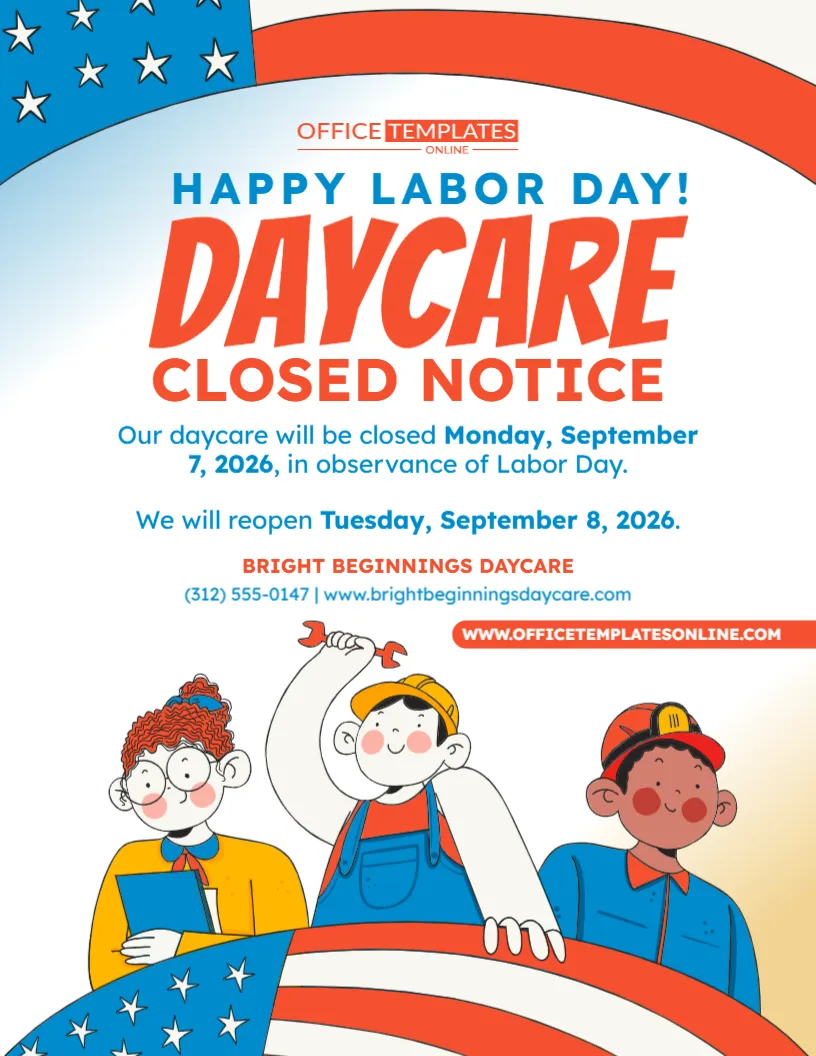
The design immediately tells families what they need to know with a large “Daycare Closed Notice” heading. Beneath it, there is space to explain that the daycare will be closed for Labor Day, show the exact closure date, and tell parents when the center will reopen.
The sample also includes dedicated space for the daycare name, phone number, and website, helping families quickly identify the childcare provider responsible for the announcement.
Visually, the template combines a cheerful childcare-friendly illustration with a Labor Day theme. Red, white, and blue patriotic elements frame the design, while illustrated workers give it a playful appearance that feels more appropriate for families and young children than a formal business closure sign.
You can customize this template online using our browser-based editor, with no login required. Replace the sample information with your daycare’s actual dates and contact details, make other available changes, and download your completed notice in PDF, PNG, or JPG format.
Built Around the Information Parents Need Most
A daycare holiday notice does not need complicated wording.
Parents mainly need answers to a few practical questions:
Why is the daycare closed?
What day will it be closed?
When will it reopen?
Which daycare does the notice apply to?
This template keeps those answers together in the center of the design.
The sample message reads:
Our daycare will be closed Monday, September 7, 2026, in observance of Labor Day.
It then follows with:
We will reopen Tuesday, September 8, 2026.
That simple structure makes the announcement easy to understand even when someone only has a few seconds to read it.
Personalize the Notice with Your Own Daycare Information
All businesses and childcare providers have different schedules, so the sample information should be replaced before you use the notice.
Customize the available areas with your:
- Daycare or childcare center name
- Labor Day closure date
- Day of the week
- Reopening date
- Closure message
- Reopening message
- Phone number
- Website
- Holiday greeting
- Other available editable details
You can keep the existing wording if it matches your needs or rewrite it to better reflect how your daycare normally communicates with families.
Edit It Directly in Your Browser—No Login Required
You do not need professional graphic design software to prepare your Labor Day closure announcement.
Open the template in our easy-to-use online editor and customize the available elements directly from your browser.
There is no login or account creation required to begin editing.
This is particularly convenient when you need to prepare a holiday notice quickly. The main layout, typography, decorative graphics, and information areas are already in place. Your job is simply to enter the correct details and personalize the available elements according to your needs.
Once everything looks right, download the completed design in your preferred available format.
A Large “Daycare Closed” Message Is Hard to Miss
The strongest feature of the layout is its oversized headline.
DAYCARE appears in large orange-red lettering, followed immediately by:
CLOSED NOTICE
Above it is a smaller “Happy Labor Day!” greeting.
This creates a useful information hierarchy. The holiday greeting establishes the occasion, while the much larger closure message tells parents what action they need to take.
Even when the notice is viewed from a short distance, the words Daycare Closed remain the dominant message.
State the Exact Labor Day Closure Date
The sample notice specifies:
Monday, September 7, 2026
Using a complete date is better than simply saying:
Closed Monday
A notice may be displayed well before the holiday. Parents could also save or receive the graphic several days in advance. Including the day, month, date, and year makes it much clearer which Monday the announcement refers to.
When adapting the template for a future year, remember to update the complete date rather than changing only the year.
Make the Reopening Date Just as Clear
For parents, knowing when the daycare reopens can be just as important as knowing when it closes.
The sample states:
We will reopen Tuesday, September 8, 2026.
This removes the need for parents to calculate the next operating day themselves.
You can customize this sentence in several ways:
Regular Daycare Hours Resume Tuesday, September 8
We Look Forward to Welcoming Everyone Back Tuesday!
Childcare Services Resume Tuesday at 7:00 AM
Our Center Will Reopen Tuesday, September 8
Normal Hours Resume Tuesday
Choose wording that accurately reflects your actual reopening schedule.
Add the Reopening Time When It Would Help Parents
If your daycare normally opens at a specific time, consider including it with the reopening message.
For example:
We Will Reopen Tuesday at 6:30 AM
Regular Hours Resume Tuesday, 7:00 AM–6:00 PM
Childcare Services Resume Tuesday at 7:30 AM
This can be especially useful when families are coordinating work schedules and morning drop-off arrangements.
If the daycare will reopen with normal hours, you can simply state that regular hours resume Tuesday.
Closed for More Than Labor Day? Change the Date Range
Some childcare centers may extend the closure beyond Labor Day itself.
If your daycare will close for the entire long weekend or for additional staff days, adapt the wording accordingly.
For example:
CLOSED SEPTEMBER 5–7 FOR LABOR DAY WEEKEND
DAYCARE CLOSED FRIDAY THROUGH MONDAY
OUR CENTER WILL BE CLOSED SEPTEMBER 4–7
Then include a clear reopening message:
WE WILL REOPEN TUESDAY, SEPTEMBER 8
or:
REGULAR CHILDCARE SERVICES RESUME WEDNESDAY, SEPTEMBER 9
Never leave families guessing whether the closure applies to one day or several.
Use the Daycare Name Parents Already Recognize
The template includes a dedicated area for the childcare provider’s name.
Replace the sample business name with your official daycare or center name.
For example:
Little Explorers Daycare
Happy Days Childcare Center
Sunshine Early Learning Center
Bright Start Child Development Center
Little Steps Preschool & Daycare
ABC Learning Academy
If your organization operates several centers, consider including the specific branch or location name as well.
Include a Phone Number for Questions
A phone number can be useful if parents need to confirm something about the closure or reopening schedule.
The template provides a clear contact-information area below the daycare name.
Add the number families normally use to reach your center.
Before publishing the notice, check every digit carefully. A holiday announcement may be shared or printed in several places, so an incorrect phone number can easily be repeated across multiple copies.
Add Your Daycare Website
There is also space for a website address.
A website can give families another place to find:
- Regular operating hours
- Holiday calendars
- Parent announcements
- Enrollment information
- Contact details
- Upcoming events
- Center policies
If your website has a dedicated parent information or calendar page, you may choose to use that address if it is practical and easy to read.
A Family-Friendly Design for a Childcare Setting
A daycare notice does not necessarily need to look like a corporate office announcement.
This template uses illustrated characters to give the design a warmer, more approachable personality.
Three worker-themed characters appear in the lower section. One holds a clipboard, another wears overalls and holds a wrench, and another wears a work helmet.
These illustrations connect the design with the meaning of Labor Day while keeping the overall appearance playful enough for a childcare environment.
Patriotic Details Establish the Labor Day Theme
The design uses an American-inspired red, white, and blue color scheme.
Across the upper edge is a curved patriotic banner with blue stars and red-and-white sections.
Another large stars-and-stripes element appears along the bottom, creating a visual frame around the illustrated characters.
Blue is also used throughout the supporting text, while orange-red lettering draws attention to the main closure announcement.
Together, these elements make the holiday theme recognizable without making the central message difficult to read.
A Clean Center Keeps the Important Message Readable
Although the design contains several decorative elements, the main closure information sits on a mostly light background.
This is important because dates and reopening information should not compete with busy graphics.
The visual order naturally moves from:
Happy Labor Day
to:
Daycare Closed Notice
then:
Closure Date
followed by:
Reopening Date
and finally:
Daycare Contact Information
That straightforward flow makes the notice practical as well as decorative.
Useful for Different Types of Childcare Providers
The template can be adapted for more than a traditional daycare center.
It may be suitable for:
- Daycare centers
- Childcare centers
- Early learning centers
- Preschools
- Nursery schools
- Child development centers
- Early childhood programs
- Before-school programs
- After-school programs
- Learning academies
- Childcare facilities
- Community childcare programs
If “daycare” is not the terminology your organization uses, simply customize the heading where the editable design allows.
You could change it to:
CHILDCARE CLOSED NOTICE
PRESCHOOL CLOSED NOTICE
CENTER CLOSED NOTICE
EARLY LEARNING CENTER CLOSED
Use language that parents and guardians already associate with your organization.
Helpful for Home Daycare Providers Too
The notice does not have to be used only by large childcare centers.
Home daycare providers can also personalize the template with their business name, holiday closure date, reopening information, phone number, and website where applicable.
If you operate a smaller program, you may prefer wording such as:
Our Childcare Program Will Be Closed for Labor Day
or:
Family Daycare Closed Monday, September 7
The same basic principle applies: make the closure and return date easy for families to understand.
Give Families Enough Time to Arrange Alternative Childcare
For many parents, a daycare closure requires advance planning.
They may need to:
- Arrange care with relatives
- Adjust work schedules
- Request time off
- Coordinate care with another parent or guardian
- Reschedule appointments
- Change transportation arrangements
For that reason, consider displaying or distributing your Labor Day closure notice well before the holiday weekend.
The earlier families receive accurate information, the more time they have to make suitable arrangements.
Place the Notice Where Parents Naturally Look
A customized notice can be displayed in areas where parents are likely to see it during their normal daycare routine.
Possible locations include:
- Main entrance
- Front door
- Reception area
- Parent check-in area
- Pickup and drop-off area
- Classroom entrance
- Parent information board
- Lobby
- Sign-in station
- Staff noticeboard
You may want to display the notice in more than one place, particularly during the week leading up to Labor Day.
Use It as a Final Reminder Before the Holiday
Even if the closure is already listed on your annual calendar, a visual reminder can still be useful.
As Labor Day approaches, you can adapt the wording to say:
REMINDER: DAYCARE CLOSED MONDAY
LABOR DAY CLOSURE REMINDER
REMINDER – NO CHILDCARE SERVICES MONDAY
WE ARE CLOSED THIS LABOR DAY
DON’T FORGET: WE REOPEN TUESDAY
A reminder close to the holiday can help families who may have overlooked the original calendar announcement.
Clarify Whether All Programs Are Closed
Some childcare organizations offer several services.
For example, you might operate:
- Daycare
- Preschool
- Before-school care
- After-school care
- Drop-in childcare
- Enrichment programs
If Labor Day affects all of them, you could add:
All Programs Will Be Closed
No Childcare or Preschool Programs on Labor Day
All Center Services Resume Tuesday
If only some services are affected, make the distinction clear so parents do not assume that every program follows the same schedule.
Mention Meal or Transportation Changes When Necessary
Some childcare programs provide transportation, meals, or other scheduled services.
If the entire daycare is closed, those services may naturally be unavailable as well. However, if there is anything unusual about the schedule, a short clarification may help.
For example:
No Transportation Services on Monday
Regular Meal Service Resumes Tuesday
All Pickup and Drop-Off Services Resume Tuesday
Avoid adding unnecessary details, but include information that families genuinely need to plan for the closure.
Multiple Locations? Customize One Notice for Each Center
If your childcare organization operates several locations, do not assume they all have identical schedules.
One center may close for Labor Day only, while another may have an additional staff-development day.
Create a separate version for each location when necessary.
Include the correct:
- Center name
- Location or branch name
- Closure date
- Reopening date
- Phone number
- Website
This makes it much easier for families to identify the notice that applies to their child.
Keep the Information Consistent Across Parent Communications
Parents may see your holiday schedule in several places.
Once the Labor Day dates have been confirmed, use the same information wherever you communicate with families.
Depending on your center, this might include:
- Printed notices
- Parent emails
- Website announcements
- Parent portals
- Childcare calendars
- Newsletters
- Digital communication platforms
- Entrance signage
Consistency is important. If one notice says the daycare reopens Tuesday but another says Wednesday, parents may not know which schedule to follow.
Do Not Overload the Notice with Unnecessary Information
The purpose of this template is simple: tell families about the Labor Day closure.
Try to keep unrelated announcements elsewhere.
The most important information should remain:
DAYCARE CLOSED
MONDAY, SEPTEMBER 7, 2026
REOPENING TUESDAY, SEPTEMBER 8, 2026
DAYCARE NAME AND CONTACT INFORMATION
A focused notice is easier to scan and remember than one containing several unrelated announcements.
Proofread the Dates Before Sharing It with Families
Before downloading your customized version, verify every detail.
Pay particular attention to:
- Daycare name
- Labor Day closure date
- Day of the week
- Reopening date
- Reopening time, if included
- Phone number
- Website
- Spelling
- Remaining sample information
Also make sure the closure date in the main message agrees with the reopening statement.
A simple date error could cause significant inconvenience for families relying on your notice.
Download Your Completed Notice in PDF, PNG, or JPG
After you have finished editing and checking the information, download the customized design in PDF, PNG, or JPG format.
These options give you flexibility for different uses.
You can choose an appropriate format depending on whether you plan to print the notice, save it for your records, or use the completed design digitally.
How to Customize Your Labor Day Daycare Closure Notice
Creating your personalized version is straightforward:
- Open the Labor Day Daycare Closed Notice Template in the online editor.
- Replace the sample daycare name with your own.
- Update the Labor Day closure date.
- Enter the correct reopening date.
- Add a reopening time if needed.
- Replace the sample phone number.
- Add your correct website address.
- Customize the closure or holiday greeting if desired.
- Adjust other available text or design elements.
- Check that no placeholder information remains.
- Proofread the dates and contact information.
- Download your completed notice as PDF, PNG, or JPG.
You can complete the customization online without logging in or creating an account.
Help Parents Plan Ahead with One Simple Holiday Notice
A daycare closure can have a direct effect on a family’s daily routine, so clear advance communication matters.
This Labor Day Daycare Closed Notice Template gives childcare providers a ready-made way to announce the holiday closure with a prominent Daycare Closed heading, exact closure and reopening dates, contact information, patriotic decorations, and friendly worker-themed illustrations.
Instead of creating a Labor Day childcare notice from the beginning, customize this template directly in your browser with no login required, replace the sample information with your daycare’s actual schedule, and download the finished design in PDF, PNG, or JPG format.
With the important dates displayed clearly, parents and guardians can quickly understand when your daycare will be closed, when childcare services will resume, and how to contact your center if they need additional information.