Keep Customers Informed When Your Business Hours Change for Labor Day
Customers should not have to guess whether your business is open, closed, or operating on a different schedule during Labor Day. This Labor Day Business Hours Notice Template gives you a clear and professional way to announce holiday schedule changes before customers make a trip, call your office, or plan an appointment.
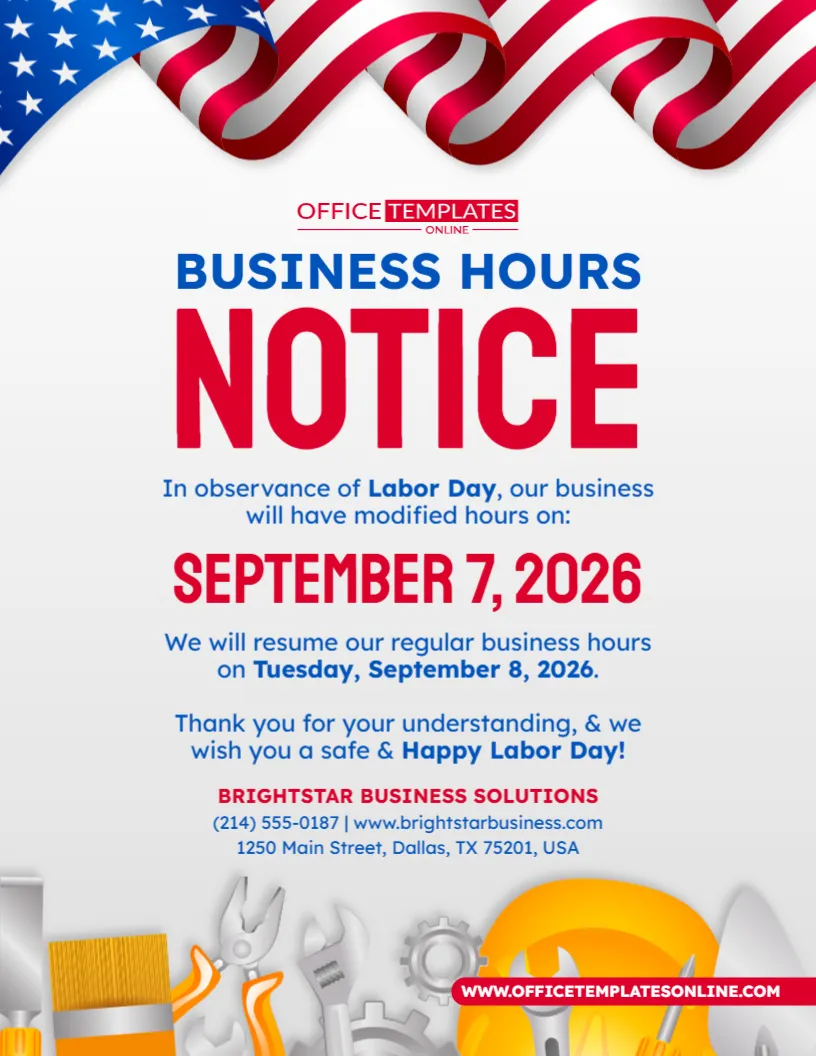
The design is built specifically around business hours communication. A large “Business Hours Notice” headline immediately tells viewers that there is a schedule update, while the content below provides dedicated space for the Labor Day date, modified-hours message, date for returning to regular business hours, holiday greeting, company name, phone number, website, and address.
Patriotic American flag graphics appear across the top, while work-related tools and a yellow hard hat decorate the lower portion of the design. The result combines the familiar red, white, and blue Labor Day theme with the practical information customers need.
You can customize the template using our easy-to-use browser-based online editor. No login is required to begin editing. When your notice is ready, download your personalized design in PDF, PNG, or JPG format.
More Useful Than a Simple “Closed” Sign
This template is particularly helpful when your holiday schedule needs more explanation than a basic closed notice can provide.
For example, your business may:
- Close completely on Labor Day
- Open for reduced hours
- Open later than usual
- Close earlier than usual
- Operate by appointment only
- Close for the entire Labor Day weekend
- Return to regular hours the following day
The template gives you enough room to explain the change clearly without making the notice look crowded.
That makes it a practical option for businesses whose customers need to know both the holiday schedule and when normal operations will resume.
What Information Does the Template Include?
The sample design is organized around several important pieces of information.
It includes areas for:
- Business hours notice heading
- Labor Day observance message
- Holiday date
- Modified-hours information
- Regular-hours resumption date
- Customer thank-you message
- Happy Labor Day greeting
- Business or organization name
- Phone number
- Website
- Street address
- Patriotic flag graphics
- Work and tool illustrations
You can use the existing structure as your starting point and replace the sample information with the details that apply to your business.
Customize the Notice Online Without Creating an Account
You do not need to install professional design software or create a new notice from an empty page.
Open the template in our online editor directly in your browser and customize the available elements. No login or account registration is required, so you can begin editing right away.
Depending on the editable elements within the template, you can change the:
- Main heading
- Holiday wording
- Date
- Modified business hours
- Reopening information
- Customer message
- Business name
- Phone number
- Website
- Address
- Text
- Colors
- Other available design elements
The basic layout has already been designed for you, allowing you to focus on making sure your holiday schedule is accurate.
Clearly State What Is Changing on Labor Day
The sample notice says that the business will have modified hours in observance of Labor Day.
This wording is useful when the schedule will be different from normal, but you can replace it with something more specific.
For example:
We Will Be Closed on Labor Day
Special Labor Day Hours: 10:00 AM – 3:00 PM
Our Office Will Close at 2:00 PM
We Will Open at 11:00 AM on Labor Day
Labor Day Hours: 9:00 AM – 1:00 PM
Closed September 5–7 for Labor Day Weekend
The more specific your message is, the easier it will be for customers to plan around the change.
If you are completely closed, say so directly. If you are operating reduced hours, include the exact opening and closing times whenever possible.
Use the Large Date Area to Prevent Confusion
The sample design prominently displays:
September 7, 2026
That date is correct for Labor Day in 2026. The U.S. Office of Personnel Management lists Labor Day as Monday, September 7, on the 2026 federal holiday schedule.
Labor Day is observed on the first Monday in September, which means its numerical date changes each year.
If you reuse this template in a future year, be sure to update the date rather than simply changing the business information around it.
Tell Customers When Regular Business Hours Will Resume
One particularly useful feature of this design is the space for a return-to-normal schedule.
The sample notice explains that regular business hours will resume on:
Tuesday, September 8, 2026
Providing this information answers an important follow-up question immediately: When can I come back?
You can customize this section with wording such as:
Regular Hours Resume Tuesday
We Will Reopen Tuesday at 8:00 AM
Normal Business Hours Resume September 8
Our Office Will Reopen Wednesday
Regular Service Will Resume After the Holiday
This can be especially helpful for customers who need to schedule appointments, make purchases, visit your office, or contact your staff.
Adapt the Wording for a Multi-Day Labor Day Weekend Closure
Some businesses close only on Labor Day Monday, while others close for part or all of the long weekend.
If your business will be unavailable for several days, change the notice accordingly.
For example:
Closed September 5–7, 2026
Labor Day Weekend Closure: Saturday Through Monday
Our Office Will Be Closed for Labor Day Weekend
Closed September 6–7 – Regular Hours Resume Tuesday
When using a date range, check both the beginning and ending dates carefully.
A customer should be able to look at the notice and immediately understand which days are affected.
A Notice That Works for Many Types of Businesses
The design uses the broad term “Business Hours Notice,” making it suitable for many workplaces rather than one specific industry.
You can adapt it for:
- Corporate offices
- Retail stores
- Small businesses
- Medical offices
- Dental practices
- Professional services
- Repair businesses
- Construction companies
- Salons and beauty businesses
- Real estate offices
- Restaurants
- Service centers
- Educational offices
- Community organizations
- Warehouses
- Local businesses
- Administrative departments
If your organization normally uses a different term, such as “office hours,” “store hours,” or “holiday hours,” you can adjust the wording where the template allows.
The Design Gives the Schedule Update Visual Priority
The words “Business Hours Notice” occupy a large portion of the upper-middle section.
“Business Hours” appears in blue, while “Notice” is shown in oversized red lettering. This makes the purpose of the design obvious before the viewer begins reading the smaller text.
The Labor Day date receives similar emphasis through large red typography.
Supporting information, including the regular-hours resumption date and customer message, appears in smaller blue text.
This creates a practical reading order:
Business Hours Notice ? Reason ? Holiday Date ? Return to Regular Hours ? Business Information
That hierarchy is particularly useful for a sign because customers may only look at it briefly.
Patriotic Flag Graphics Frame the Message
The upper portion of the template features a large flowing American flag design.
The familiar combination of red and white stripes, blue fields, and white stars immediately establishes a patriotic holiday theme.
The central portion of the notice remains mostly white, providing a clean background for the business-hours information.
This balance allows the template to look appropriate for Labor Day without allowing decorative elements to interfere with the practical message.
Work Tools Reinforce the Labor Day Theme
The lower section of the design contains several work-related illustrations, including tools, gears, a paintbrush, and a bright yellow hard hat.
These elements provide a visual connection to work and the workforce.
That connection is especially appropriate for Labor Day. The U.S. Department of Labor describes the holiday as an annual celebration of the social and economic achievements of American workers.
The tools therefore serve a purpose beyond decoration: they help visually distinguish the design as a Labor Day notice rather than a generic holiday-hours announcement.
Add a Short Customer Appreciation Message
The sample template includes a friendly message thanking customers for their understanding and wishing them a safe and happy Labor Day.
This is a useful way to soften what is otherwise a practical schedule announcement.
You can keep the existing idea or personalize it with wording such as:
Thank You for Your Understanding
We Appreciate Your Business and Wish You a Happy Labor Day
Thank You for Planning Around Our Holiday Hours
Have a Safe and Enjoyable Labor Day
We Look Forward to Serving You After the Holiday
A short closing message can make the notice feel more considerate while still keeping the schedule information as the main focus.
Add Your Company Name and Contact Details
Toward the bottom, the template provides a dedicated section for business information.
Replace the sample details with your actual:
- Business name
- Phone number
- Website
- Street address
- City, state, and ZIP code
This information helps viewers confirm that the schedule notice applies to the correct business.
Including a website can be particularly useful if customers can still access information, place orders, manage appointments, or use other online services while your physical location is closed.
Let Customers Know If Online Services Remain Available
A modified physical schedule does not always mean every part of a business stops operating.
If your website, online shop, appointment system, or customer portal remains available during Labor Day, you may want to mention it.
Possible wording includes:
Our Online Store Remains Open
Online Ordering Is Available 24/7
Appointments Can Still Be Requested Online
Visit Our Website for More Information
Online Services Remain Available During the Holiday
Only add this type of statement when it accurately represents your operations.
Where Can You Use Your Customized Business Hours Notice?
Once personalized, the design can be used anywhere customers or visitors normally look for operating-hours information.
Possible locations include:
- Front doors
- Store windows
- Reception desks
- Office entrances
- Customer service counters
- Waiting areas
- Lobby noticeboards
- Checkout areas
- Employee information boards
- Service desks
You may also use a suitable downloaded image version for digital communication when the dimensions fit the platform where you intend to publish it.
For the best results, place the notice where it is likely to be seen before a customer tries to enter or use the affected service.
Give Customers Advance Notice When Possible
A business-hours notice is often most useful when it is displayed before the holiday arrives.
If you know your Labor Day schedule in advance, consider publishing or displaying the notice several days beforehand.
Advance notice gives customers an opportunity to:
- Visit before the closure
- Reschedule an appointment
- Place an order earlier
- Contact your office before the holiday
- Plan their visit for the next business day
This is especially useful for businesses that normally receive regular Monday traffic.
Keep Your Holiday Hours Consistent Everywhere
After preparing the notice, consider whether customers may find your operating hours somewhere else.
If your Labor Day schedule is different from normal, the same information may need to be reflected in other customer-facing places, such as your website, appointment information, phone message, or relevant online business listings.
Consistency matters.
If a door notice says you are closed while another source shows normal hours, customers may not know which information is correct.
Use the final schedule shown on your customized notice as a reference when updating other channels.
Avoid Vague Phrases When Exact Hours Are Available
Wording such as “modified hours” is useful as an introduction, but customers may still need to know exactly what those hours are.
If your business will remain open for part of Labor Day, consider including the actual schedule.
Instead of:
We Will Have Modified Hours
you could write:
Labor Day Hours: 10:00 AM – 2:00 PM
Likewise, if the business is fully closed, “Closed for Labor Day” is clearer than simply saying the schedule is modified.
The goal is to reduce questions, not create new ones.
Download Your Completed Notice as PDF, PNG, or JPG
After you have finished customizing the template, you can download the completed design in PDF, PNG, or JPG format.
These options give you flexibility depending on how you plan to use your business-hours announcement.
PNG and JPG provide convenient image formats for digital use, while PDF gives you another useful format for saving or using the completed notice.
Check the requirements of your intended printing method or digital platform before selecting the final file type.
A Simple Way to Prepare Your Labor Day Hours Notice
You can personalize the template in a few straightforward steps:
- Open the Labor Day Business Hours Notice Template in the online editor.
- Decide whether you are closed or operating modified hours.
- Update the Labor Day date if necessary.
- Enter your exact holiday hours or closure message.
- Add the date and time when regular hours will resume.
- Personalize the customer thank-you or holiday greeting.
- Replace the sample business name with your own.
- Add your correct phone number, website, and address.
- Review all available editable elements and make any desired changes.
- Download the completed notice in PDF, PNG, or JPG format.
There is no login required, so you can start customizing without creating an account.
Check These Details Before You Display the Notice
Holiday-hours information needs to be accurate. Before downloading the final version, carefully verify the details that could affect a customer’s plans.
Check your:
- Labor Day date
- Opening time
- Closing time
- Closure dates
- Regular-hours resumption date
- Business name
- Phone number
- Website
- Address
- Spelling
Also remove any placeholder information that does not belong to your business.
For the sample year shown in this template, Labor Day is Monday, September 7, 2026, and Tuesday is September 8, so the example sequence of holiday and next-day resumption is calendar-correct.
Make Holiday Schedule Changes Easier for Your Customers
Changing your hours for Labor Day may be routine for your business, but customers still need a reliable way to know what to expect.
This Labor Day Business Hours Notice Template gives you a ready-made design for communicating that information clearly. It combines a prominent schedule-update headline, visible Labor Day date, space for reopening information, business contact details, a friendly holiday message, patriotic flag graphics, and work-themed illustrations in one organized layout.
Rather than creating a holiday-hours notice from scratch, open the template in the online editor, personalize it directly in your browser without logging in, enter your actual Labor Day schedule and business details, and download the finished design as PDF, PNG, or JPG.
The result is a practical Labor Day notice that helps customers quickly understand what is changing, when the change applies, and when they can expect your regular business hours to return.