Bring the Entire School Month into View with One Colorful Teacher Calendar
A school month is rarely made up of lessons alone. There may be assessments, project deadlines, meetings, special activities, student birthdays, field trips, assemblies, holidays, and dozens of smaller reminders competing for a teacher’s attention.
This Teacher Calendar template gives you a clear monthly view where those important dates can be organized together.
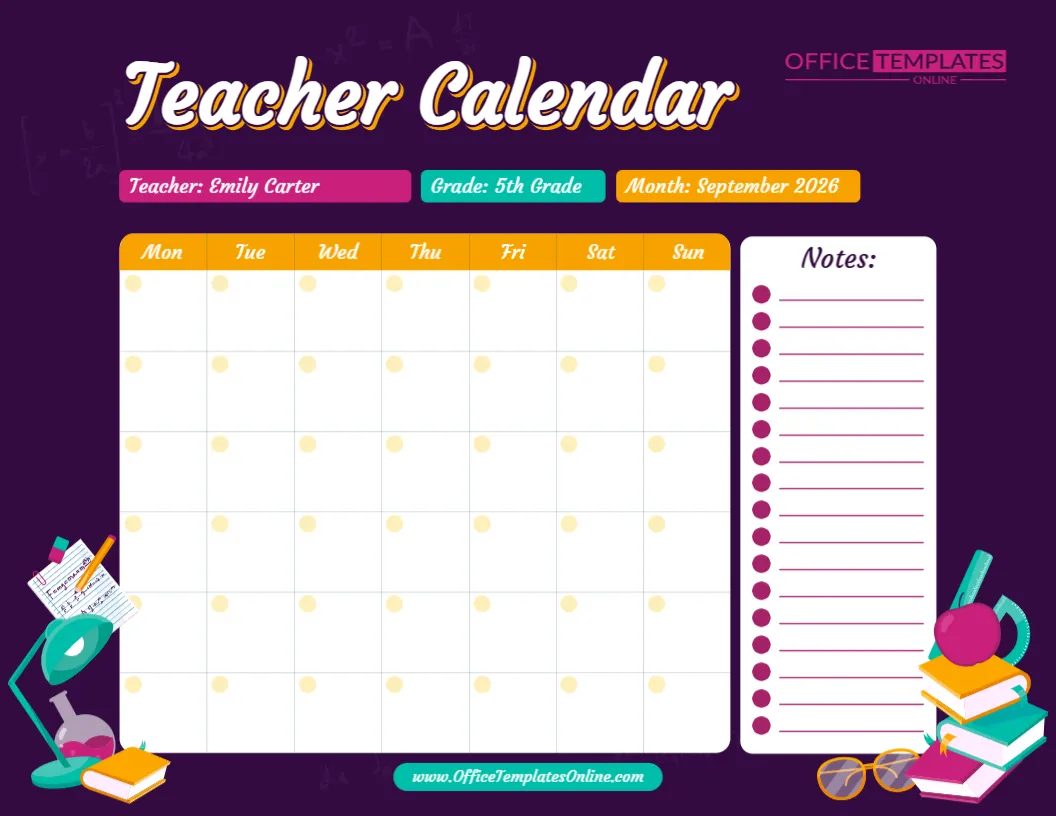
The design combines a seven-day monthly calendar grid with dedicated fields for the teacher’s name, grade, and month, plus a separate Notes panel on the right. Instead of being permanently tied to one month or school year, the calendar can be personalized with the information you need.
The sample version shows Emily Carter, 5th Grade, and September 2026. These details simply demonstrate how the finished calendar can look and can be replaced with your own information.
Customize the available content using the browser-based online editor. No login is required to start editing. When your calendar is complete, download it as a PDF, PNG, or JPG.
More Than a Blank Calendar: Add Teacher, Grade, and Month Details
One of the most useful features of this template appears right beneath the large Teacher Calendar heading.
Three clearly separated fields provide space for:
Teacher – Add the teacher’s name.
Grade – Identify the class or grade level.
Month – Enter the month and year the calendar represents.
These details make the calendar easier to identify, particularly when teachers prepare several versions for different classes, grades, or months.
For example, an elementary teacher might create:
Teacher: Sarah Wilson
Grade: 3rd Grade
Month: October 2026
A tutor, homeschool educator, or another education professional can adapt the same fields to fit their own situation.
See Monday Through Sunday in One Monthly View
The main calendar uses seven columns labeled:
Mon • Tue • Wed • Thu • Fri • Sat • Sun
This gives you a complete seven-day view rather than limiting the layout to regular school days.
Multiple rows of large blank calendar cells provide space for adding dates and the information connected with them.
The weekday headers are easy to spot because they appear across a bright orange band. Below them, the mostly white calendar area keeps your customized information visually separate from the colorful background.
This familiar calendar structure makes it easy to scan across a week or look down a particular weekday when checking upcoming plans.
Add the Correct Dates for the Month You Need
The calendar boxes are not permanently filled with printed date numbers.
Instead, each box contains a small light-colored area near the corner where dates can be placed.
That gives you flexibility to prepare the template for different months and years.
Start by entering the month and year in the field above the calendar. Then add the correct date numbers to the calendar grid.
Because the template is not locked to September 2026—or any other specific period—you can create a new version whenever the month changes.
This makes it useful throughout the academic year.
Build a Calendar Around Your Actual Classroom
Once the dates are in place, the calendar can become a visual map of what is happening in your classroom.
You could add important items such as:
- Tests and quizzes
- Assignment due dates
- Project deadlines
- Parent-teacher conferences
- Staff meetings
- School assemblies
- Field trips
- Student presentations
- Classroom celebrations
- School holidays
- Professional development days
- Report deadlines
- Special lessons
- Library days
- Sports activities
- Picture day
- Spirit days
- Student birthdays
- Beginning and ending dates for units
- Important school reminders
Monthly classroom calendars are commonly used to keep dates, classroom events, assignments, routines, and other upcoming activities visible together.
You do not have to use the calendar for every small classroom task. It can be more useful when reserved for dates that you want to see at a glance.
Use the Notes Panel for Information That Does Not Belong to One Date
The calendar grid is only one part of this template.
A tall Notes panel runs along the right side of the page and provides numerous lined entries with round bullet-style markers.
This section is helpful because not every reminder belongs to a specific calendar date.
Suppose you know that you need art supplies sometime during the month but have not decided exactly when you will need them. Instead of forcing the reminder into a particular date box, you can keep it in Notes.
The same area could hold reminders about upcoming units, materials to order, classroom goals, follow-up tasks, meeting information, or things that should carry over into the next month.
Calendar Boxes for Dates, Notes Panel for Details
A simple way to keep the finished design organized is to give the two main areas different jobs.
Use the calendar grid for information connected to a specific date.
Use the Notes panel for general reminders and supporting information.
For example, the calendar might say:
Sept. 14 – Science Project Begins
The Notes section could contain:
Prepare project materials and student instruction sheets.
Or the calendar could show:
Sept. 24 – Parent Conferences
The Notes area might remind you:
Prepare student work samples before conferences.
Using the two sections together can help you keep the monthly view concise without losing useful details.
Plan Assessments Before They Sneak Up on You
Assessments are easier to prepare for when their dates are visible ahead of time.
You might add a mathematics quiz, reading assessment, science test, or project presentation to the appropriate calendar box.
Then you can look at the surrounding days and decide where review activities or preparation should take place.
Monthly planning is often used by teachers to organize upcoming topics, assessments, homework, projects, and other classroom priorities.
This is one reason a monthly teacher calendar can complement a more detailed weekly lesson planner.
The calendar tells you what is coming. Your weekly and daily plans can then explain how you will prepare for it.
Keep Long-Term Classroom Projects on Track
Some classroom projects take several weeks.
A science investigation, reading project, research assignment, art project, or group presentation may have several important stages before the final deadline.
A monthly calendar lets you spread those milestones across the month.
For example:
September 3 – Introduce Project
September 10 – Research Check
September 17 – Draft Due
September 24 – Final Project Due
September 25 – Presentations
Seeing the stages together makes it easier to understand how the project fits into the rest of the month’s activities.
Make School Events Part of Your Teaching Plan
Special events can affect normal classroom routines.
A field trip might take most of a school day. An assembly could shorten a lesson period. A holiday might create a shorter school week. A parent conference day could affect your afternoon schedule.
Putting these events on your Teacher Calendar gives you a broader view before you create detailed lesson plans.
Teacher planning calendars are commonly used for items such as field trips, staff meetings, reminders, and other important dates.
This can make the calendar a useful starting point when planning the weeks ahead.
Include Student Birthdays and Classroom Celebrations
The calendar does not have to contain only academic information.
You can also use it for positive classroom events.
Add student birthdays, classroom celebrations, reading challenges, theme days, spirit days, reward activities, or other occasions that are important to your class.
A combination of academic deadlines and enjoyable classroom events can give the calendar a more complete picture of the month.
If you are creating a version that will be publicly displayed or shared, use appropriate judgment about what student information should appear on it.
A Colorful Design Made for an Educational Setting
The template uses a rich dark purple background that makes the lighter planning areas stand out.
Across the top is a large script-style Teacher Calendar heading.
Below it, the Teacher, Grade, and Month information appears in three brightly colored fields—pink, turquoise, and orange.
The calendar itself uses orange weekday headers over a clean white grid.
On the right, the Notes section is placed inside its own white rounded panel, making reminders easy to separate from scheduled dates.
Decorative school graphics appear around the lower edges, including books, a desk lamp, papers, pencils, glasses, an apple, and other classroom-inspired elements.
The graphics create a teacher-friendly look while leaving the central calendar area open for useful information.
Personalize the Teacher Calendar Directly Online
You do not have to build a monthly calendar grid manually.
Open this editable Teacher Calendar template in the online editor and customize the available elements directly through your browser.
No login is required to begin.
Replace the sample teacher name with your own, change the grade, enter the correct month and year, add calendar dates, and personalize the available calendar information and notes.
Since the overall layout has already been created, you can focus on filling the calendar rather than designing one from an empty page.
A Simple Order for Filling Out Your Calendar
When preparing a new month, start with the information that is least likely to change.
First, enter your teacher name, grade, month, and year.
Next, add the correct calendar dates.
After that, enter known school closures, holidays, professional development days, and other fixed school events.
Then add assessments, project deadlines, meetings, field trips, and classroom activities.
Finally, use the Notes panel for reminders that do not need their own date.
This order helps make sure major commitments are recorded before smaller activities fill the available space.
Use It as Your Own Teacher Planning Calendar
The template can remain a teacher-only planning resource.
Keep a completed version at your desk or with your other planning materials and use it as a quick reference when preparing weekly lessons.
Before planning Monday’s lessons, for example, look at the monthly calendar to see whether the week includes an assessment, special event, meeting, or shortened school day.
This broader view can help connect long-term planning with the details of individual school days.
Or Turn It into a Classroom Calendar for Students
You can also customize the design as a student-facing classroom calendar.
In that case, focus on information students actually need to see, such as important assignment dates, projects, field trips, classroom celebrations, school holidays, and special activities.
Editable classroom calendars can serve as visual schedules and can also be used to communicate upcoming events and important dates.
Keeping the wording short will make a displayed version easier for students to scan.
For example, “Science Test” will usually work better inside a small calendar box than a long explanation of what the test covers.
Create Different Calendars for Different Classes
Teachers who work with several groups can create separate calendar versions.
A middle or high school teacher could prepare one calendar for each class or subject.
For example:
Grade 7 Mathematics Calendar
Grade 8 Mathematics Calendar
Grade 9 Mathematics Calendar
Each version could show the assessments, assignments, and projects relevant to that particular class.
The Teacher and Grade fields at the top make it easier to distinguish one customized version from another.
Useful for Homeschooling and Tutoring Too
The format is not restricted to traditional school classrooms.
A homeschool educator can use the calendar for lessons, educational outings, project deadlines, reading goals, assessments, and family learning activities.
A tutor can record tutoring sessions, student goals, assignment deadlines, and upcoming assessments.
A student teacher can use it to track observations, teaching days, assignment deadlines, mentor meetings, and important placement dates.
The underlying structure remains the same: one month, seven weekday columns, identifying information, and extra notes.
Teacher Calendar vs. Teacher Monthly Planner
A Teacher Calendar and Teacher Monthly Planner may look similar, but this particular design has a strong calendar-first approach.
The large date grid occupies most of the page and is supported by specific Teacher, Grade, and Month fields.
That makes it particularly suitable when your priority is date-based organization.
Use it when you want to answer questions such as:
When is the assessment?
What date is the field trip?
Which week contains the project deadline?
When is the staff meeting?
What special events are happening this month?
A broader monthly planner may hold more general planning information, while this Teacher Calendar is especially useful for placing activities and reminders within a recognizable calendar structure.
Create a New Version Every Month
When one month ends, you can prepare another customized calendar.
Change the month and year, adjust the dates, remove events that no longer apply, and add the next month’s activities.
This makes it possible to maintain a consistent calendar style throughout the school year.
You could create versions for September, October, November, December, and onward while keeping the same overall visual design.
Teachers who save previous versions can also keep a simple record of major classroom events and planned activities from earlier months.
Download the Finished Teacher Calendar as PDF, PNG, or JPG
When your calendar is complete, you can download it in several useful formats.
PDF is a practical choice for printing or keeping the calendar with other teaching documents.
PNG provides a high-quality image version for digital use.
JPG offers a widely compatible image format that can be saved and viewed on many devices.
Choose the format that best matches how you plan to print, store, display, or use your personalized Teacher Calendar.
Make the Month Easier to Understand at a Glance
When important dates are scattered across lesson plans, notes, emails, and separate reminders, it can be difficult to see how everything fits together.
This editable Teacher Calendar template provides one central monthly view.
Add your teacher name and grade, choose the month, fill in the correct dates, place important events in the calendar, and keep additional reminders in the dedicated Notes panel. The colorful educational design makes the calendar visually engaging, while the large white planning areas keep the focus on the information you add.
Whether you use it for assessments, projects, meetings, school events, student activities, deadlines, or general classroom planning, the template can be adapted to fit the month ahead.
Customize your Teacher Calendar online with no login required, add your own dates and classroom information, and download the completed calendar as a PDF, PNG, or JPG.