Christmas shopping has a way of getting out of hand. A few extra gifts here, a last-minute panic buy there, and January’s bank statement brings an unwelcome surprise. The simplest fix is a gift list with a budget attached: everyone you are buying for, what you plan to give them, what you meant to spend, and what you actually spent. This template turns that list into one clear landscape page, with running totals at the top and tick boxes for bought, wrapped, and given.
A Page Strung With Lights
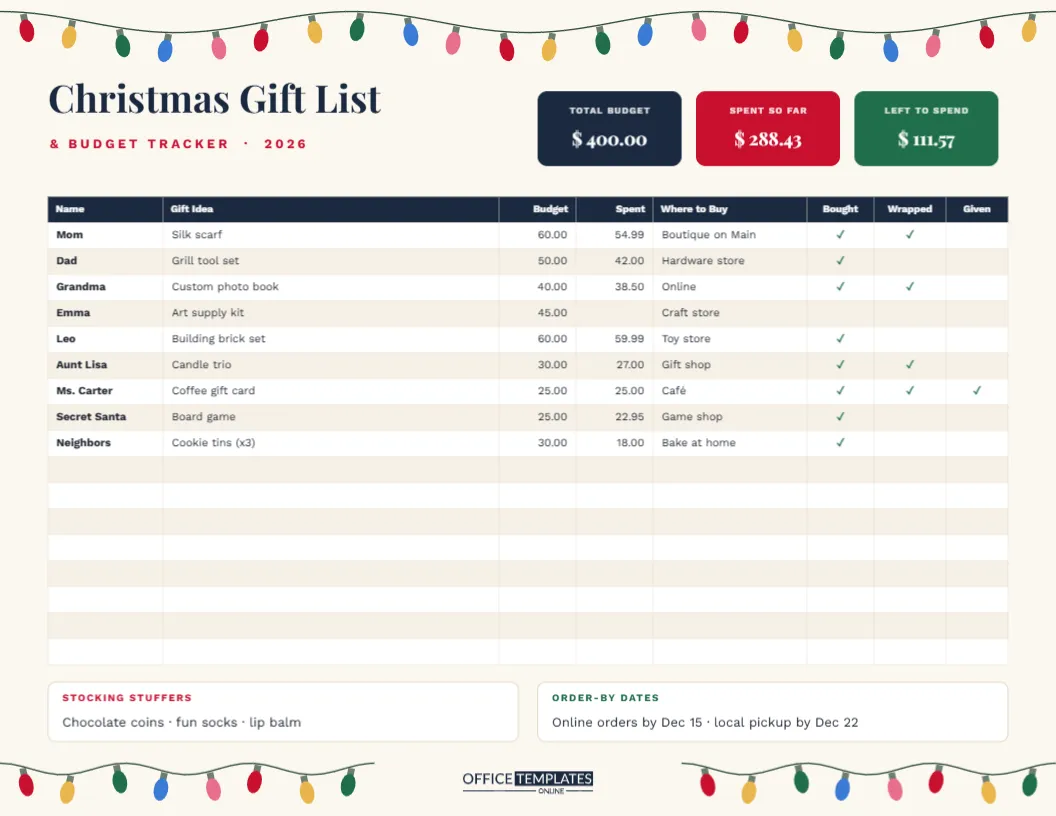
The template is US Letter landscape, 11 x 8.5 inches, on warm cream. A string of old-fashioned Christmas lights swoops across the top of the page on a dark green wire, with bulbs in red, gold, green, blue and pink, and two shorter strings return along the bottom corners to frame the footer and our logo.
Christmas Gift List is set in bold Playfair Display, with & Budget Tracker · 2026 in spaced red capitals. To the right, three coloured tiles show the numbers that matter: Total Budget in navy, Spent So Far in red, and Left to Spend in green. Below them runs the main tracker table with a navy header and eight columns: Name, Gift Idea, Budget, Spent, Where to Buy, Bought, Wrapped and Given. It has seventeen rows. Two notes at the bottom hold Stocking Stuffers and Order-by Dates.
A Simple Christmas Budget Method
- Set one total. Decide what you can comfortably spend on gifts this year, without borrowing. Write it in the Total Budget tile.
- List everyone. Family, friends, teachers, colleagues, neighbours, Secret Santa, the mail carrier. It’s easy to forget someone until the week before Christmas.
- Share out the total. Give each person a budget amount so that together they add up to no more than your total. Leave a little unallocated for surprises.
- Record what you spend as you buy each gift, and update the Spent So Far and Left to Spend tiles.
- Tick as you go: bought, wrapped, and given. On Christmas Eve you will know exactly what is still missing.
Worked Example From the Sample
The sample family has a total budget of $400.00 across nine gifts. The individual budgets add up to $365.00, leaving $35.00 spare for surprises. So far, they have spent $288.43:
| For | Gift | Budget | Spent | Difference |
|---|---|---|---|---|
| Mom | Silk scarf | 60.00 | 54.99 | 5.01 under |
| Dad | Grill tool set | 50.00 | 42.00 | 8.00 under |
| Grandma | Custom photo book | 40.00 | 38.50 | 1.50 under |
| Emma | Art supply kit | 45.00 | not yet | Still to buy |
| Leo | Building brick set | 60.00 | 59.99 | 0.01 under |
| Neighbors | Cookie tins (x3) | 30.00 | 18.00 | 12.00 under |
With $400.00 – $288.43 = $111.57 left to spend and only Emma’s $45 art kit still to buy, this family is comfortably on track. The editor’s table does not add up columns for you, so total the Spent column with a calculator and type the results into the tiles.
Using the Tick Columns
The Bought, Wrapped and Given columns turn the list into a checklist for the busy final weeks. In the sample, a green tick shows each finished step: the teacher’s coffee gift card has been bought, wrapped and already given, while Dad’s grill set is bought but not yet wrapped. When the ticks line up across a row, that gift is done. To add a tick, double-click the table, open Edit Table Data, and type ? in the cell (or an x, if your keyboard makes that easier).
Setting Up Your Own Tracker
- Type your total budget into the navy tile, then fill in names, gift ideas, and budgets in the table.
- Use Import CSV in Edit Table Data if you already keep your list in a spreadsheet.
- Add rows with + Row for a big family, or delete empty rows for a short list.
- Note where you plan to buy each gift, which helps you group shopping trips and online orders.
- The strings of lights are grouped, so you can move, resize, or delete them; each bulb can be recoloured.
Order-by Dates and Stocking Stuffers
The two boxes at the bottom handle the details that often derail a budget. Order-by dates remind you when online orders must be placed to arrive in time. Carriers publish their holiday cut-off dates each year, so check them and note your own deadlines. The stocking stuffers box collects the little extras (chocolate coins, fun socks, lip balm) that are easy to overspend on because each one seems so small. Give stocking stuffers their own row in the table if you want to track their cost too.
Tips to Stay Within Budget
- Shop from the list, not the shelf. If it is not on the page, it waits until after Christmas.
- Compare the Budget and Spent columns weekly; move leftover money to someone whose gift costs more than expected.
- Consider group gifts for bigger items, and handmade or experience gifts for people who have everything.
- Keep receipts together with the printed tracker in case anything needs returning.
Printing the Tracker
Print in landscape on US Letter at actual size, or fit to page on A4. Many people keep the printed tracker on a clipboard with a pen and update the digital copy once a week. The page is mostly cream, so it prints quickly; the coloured lights and tiles look best in colour.
After Christmas: Review and Plan Ahead
Keep the finished tracker. In January, a quick look shows where the money went, which budgets were too tight or too generous, and who you nearly forgot. Next year you can start from this page, update the names and budgets, and begin shopping earlier with a realistic total in mind.
Gift Budget Questions
Can I use it for Hanukkah or birthdays?
The layout works for any gift-giving season. Change the title and swap the lights for your own decoration.
Can I track more than seventeen people?
Yes. Add rows with + Row, or duplicate the page for a second list.
A Merry Christmas and a Calm January
Know who you are buying for, what you meant to spend, and what is left. Fill in the tracker once and let it keep your Christmas shopping on budget all season long.