Celebrate the Long Weekend and Promote Your Labor Day Specials in One Eye-Catching Newsletter
Bring your Labor Day message, weekend celebration, and special promotion together with this Labor Day Weekend Email Newsletter Template. Designed with businesses and organizations in mind, this ready-made newsletter gives you plenty of room to share a holiday greeting, advertise a discount, display important dates, add business information, and encourage customers to take action.
Unlike a simple header or small promotional banner, this is a full-length email newsletter design. It provides several clearly defined content areas, allowing you to communicate more information while maintaining a consistent and attractive Labor Day theme.
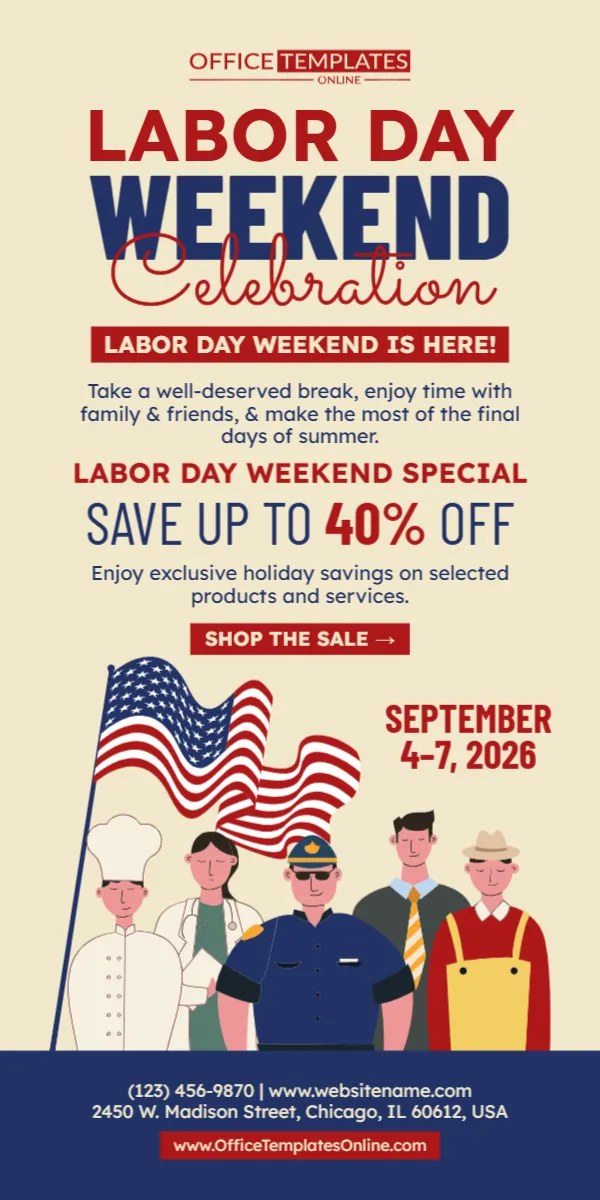
The design features bold red and blue typography, a waving American flag, illustrations representing different professions, a noticeable discount offer, a call-to-action button, promotional dates, and space for contact details.
You can personalize the template directly through our browser-based online editor with no login required. Once you have finished customizing it, download your completed newsletter in PDF, PNG, or JPG format.
One Template for Your Labor Day Greeting and Promotion
Labor Day communications do not always have to be purely promotional. Many businesses want to recognize the holiday while also informing customers about a weekend sale or special offer.
This newsletter is designed to accommodate both purposes.
At the top, the large “Labor Day Weekend Celebration” heading establishes the occasion. A short message underneath provides space for a friendly holiday greeting before the design transitions naturally into the promotional section.
The sample newsletter then highlights a Labor Day Weekend Special with savings of up to 40% off. A “Shop the Sale” call to action appears directly below the offer.
Further down, a waving American flag and illustrations of workers add a people-focused visual element to the design, while the date and business contact information remain clearly visible.
This structure makes the newsletter feel like a complete Labor Day communication rather than simply an advertisement.
See What Is Already Built into the Design
The template provides several useful sections that you can customize for your own campaign, including:
- A bold Labor Day weekend headline
- A short holiday celebration message
- A dedicated promotional section
- Space for a discount or special offer
- Supporting text for products or services
- A clear call-to-action button
- Labor Day weekend dates
- American flag artwork
- Illustrations representing workers and professions
- Business phone number
- Website address
- Physical business address
- Additional branding or website information
Because these elements are already arranged into a finished layout, you can spend less time deciding where everything should go and more time personalizing the actual message.
A Visual Tribute to the People Behind the Work
One of the most distinctive parts of this newsletter is the group of worker illustrations near the bottom.
The design depicts people from different professions, including figures dressed as a chef, healthcare professional, police officer, business professional, and worker. Combined with the American flag, these illustrations reinforce the worker-focused meaning of Labor Day.
Labor Day is observed on the first Monday in September and recognizes the social and economic achievements of American workers.
This worker-focused artwork therefore gives the newsletter a visual connection to the meaning of the holiday while still allowing plenty of space for a business promotion.
Customize the Newsletter Online Without Creating an Account
You do not need advanced design skills or specialized desktop software to personalize this template.
Simply open it in our online editor, which works directly in your browser. There is no login required, so you can begin making changes without going through an account-registration process.
Use the existing newsletter as your starting point and replace the sample content with information relevant to your organization.
For example, you can update the:
- Main Labor Day headline
- Weekend greeting
- Promotional message
- Discount percentage
- Product or service information
- Sale dates
- Call-to-action wording
- Phone number
- Website
- Street address
- Available colors, text, and other editable design elements
You can make a few simple changes or personalize the template more extensively depending on the needs of your campaign.
Replace the 40% Offer with Your Actual Promotion
The sample newsletter displays “Save Up to 40% Off,” but this is simply example content.
Change the percentage and supporting message to accurately reflect the offer you are providing.
For instance, your customized newsletter might advertise:
25% Off Storewide
Labor Day Weekend Clearance
Buy One, Get One 50% Off
Free Shipping This Weekend
Save $50 on Selected Services
Special Labor Day Pricing
End-of-Summer Savings
You can also remove the discount-style wording and use the area for another type of announcement if your campaign is not based on percentage savings.
The important thing is to make sure the final offer is accurate, easy to understand, and consistent with the promotion customers will actually receive.
The 2026 Dates Are Already Featured Prominently
The example design shows the promotional period as September 4–7, 2026, making it suitable for a sale or campaign that runs from the Friday before Labor Day through Labor Day itself.
In 2026, Labor Day falls on Monday, September 7, according to the U.S. Office of Personnel Management’s federal holiday schedule.
If your promotion runs on different dates, simply replace the sample date range.
For example, your offer might begin earlier, finish before Labor Day, or continue beyond the holiday. Always make the dates in the newsletter match the actual terms of your promotion.
If you reuse the design for a future year, remember to update the date as well. Labor Day does not have a fixed numerical date; it is observed annually on the first Monday of September.
Designed for Businesses That Need More Room to Communicate
A small banner is useful when you only need to announce a discount. A newsletter can be a better choice when you have several pieces of information to communicate together.
This template gives you room to combine a greeting, promotional message, offer, dates, call to action, visuals, and contact information in one coordinated design.
That can make it suitable for Labor Day communications from:
- Retail stores
- E-commerce businesses
- Restaurants
- Local shops
- Home service providers
- Healthcare-related organizations
- Professional service businesses
- Automotive companies
- Salons and beauty businesses
- Furniture and home décor stores
- Online sellers
- Community organizations
- Small businesses
- Corporate teams
The sample content is intentionally broad enough to be adapted to different industries. Change the wording so the finished newsletter speaks naturally to your own customers or audience.
Encourage Readers to Take the Next Step
A promotional newsletter becomes more useful when readers immediately understand what you want them to do after seeing the offer.
The sample design includes a bright “Shop the Sale” call-to-action area directly beneath the discount message.
For a retail or e-commerce promotion, you may decide to keep this wording. For other campaigns, a different CTA may be more appropriate.
Consider phrases such as:
- Shop Now
- View the Sale
- Explore Offers
- Save Today
- Get the Deal
- Learn More
- Book Today
- See Our Specials
- Visit Our Website
Choose wording that fits the action associated with your promotion.
Keep in mind that the template creates the visual appearance of the call to action. If you are using the downloaded design in an email campaign and want an area to function as a clickable link, you will generally need to configure that link within the email platform or system where the finished graphic is used.
A Warm, Easy-to-Read Color Scheme
The newsletter uses a warm, light-colored background instead of placing all of its content on a dark or highly decorated surface. This gives the longer layout a comfortable amount of visual space.
Dark blue is used for major supporting text, while red draws attention to important promotional information such as the Labor Day heading, discount percentage, sale button, and dates.
The American flag near the bottom introduces stronger patriotic colors without overwhelming the upper content.
This approach helps separate the newsletter into easy-to-recognize sections while maintaining one consistent Labor Day theme from top to bottom.
Make the Newsletter About More Than a Sale
Although the design contains a prominent sales section, you can customize it for communications where the holiday message is equally important.
For example, a business could use the introductory section to thank employees and customers, followed by information about a Labor Day weekend promotion.
You could also adapt the newsletter for:
- A Labor Day customer appreciation message
- Holiday weekend business hours
- A Labor Day event announcement
- Employee recognition
- A community celebration
- A seasonal promotion
- An end-of-summer campaign
- A holiday closure notice combined with a customer message
The existing sections give you flexibility to decide how much emphasis should be placed on celebration and how much should be placed on promotion.
Add Your Real Business Information Before Downloading
At the bottom of the template, you will find sample contact information, including a phone number, website, and street address.
These are placeholders and should be replaced before you use the finished newsletter.
Add your own relevant business information so recipients know where to find you or how to learn more about your organization.
Depending on your intended use, you may want to include your:
- Business name
- Phone number
- Website
- Physical address
- Relevant contact details
Carefully review these details before downloading. A beautiful newsletter is much less useful if it contains an incorrect phone number or outdated website address.
Download the Completed Newsletter as PDF, PNG, or JPG
Once your customization is complete, you can download the finished Labor Day newsletter in three convenient formats: PDF, PNG, and JPG.
PNG and JPG are useful options when you need your finished design as an image, while PDF provides another format for saving or using the completed newsletter according to your requirements.
Having all three options allows you to select the format that works best for your intended use.
Create Your Labor Day Weekend Newsletter Step by Step
You can personalize this template without having to build a newsletter layout from the beginning.
- Open the Labor Day Weekend Email Newsletter Template in the online editor.
- Replace the sample heading or greeting if you want a different message.
- Add your own Labor Day weekend promotion.
- Change the sample 40% discount to your actual offer.
- Update the promotional dates if necessary.
- Personalize the call-to-action wording.
- Replace the sample phone number, website, and address with your information.
- Adjust other available editable elements to fit your campaign.
- Proofread the entire newsletter.
- Download your finished design as PDF, PNG, or JPG.
Since customization requires no login, you can get straight to editing the template in your browser.
Before You Send It, Give the Details One Final Check
Promotional newsletters often contain more information than simple banners, so a final review is particularly important.
Check your discount percentage, promotional dates, business name, website address, phone number, physical address, and call-to-action wording.
Make sure you have removed or replaced all sample information that does not apply to your business.
It is also helpful to keep promotional text concise. The design already provides several visual sections, so each section should communicate one clear idea rather than contain a large amount of text.
If your promotion has detailed terms, exclusions, coupon requirements, or other conditions, consider providing those separately in your email or on the relevant landing page rather than squeezing everything into the newsletter graphic.
Create a Labor Day Newsletter That Celebrates and Promotes
Labor Day has long been associated with recognizing the achievements and contributions of American workers. The first Labor Day celebration took place in New York City in 1882, and Congress made the first Monday in September a legal holiday in 1894.
This template brings that worker-focused theme together with the familiar long-weekend tradition and a dedicated area for your special offer.
With its full newsletter layout, patriotic American flag, worker illustrations, large Labor Day Weekend Celebration heading, promotional section, visible date range, CTA, and contact-information area, you have a complete starting point rather than an empty design.
Open the template in the online editor, customize it without creating an account or logging in, replace the sample information with your own Labor Day weekend message, and download the finished newsletter as a PDF, PNG, or JPG.