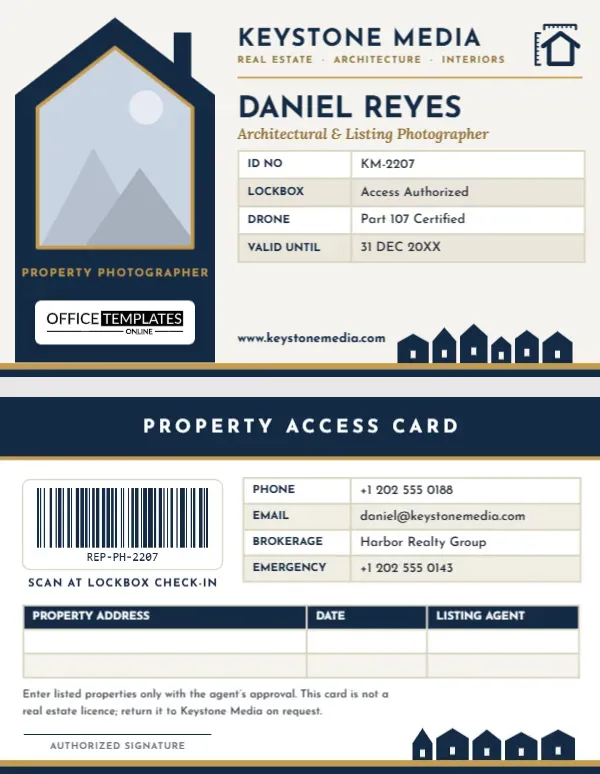
Real estate photographers spend their days walking into other people’s homes, often when nobody is there. A listing agent hands over a lockbox code, a seller leaves for the afternoon, a neighbour watches you carry tripods through the front door. In that job, a professional ID card is not decoration. It is how you prove you belong in the property. This horizontal Real Estate Photographer ID Card was designed for listing, architectural, and interior photographers who want a badge that looks as polished as the photos they deliver, and that carries the practical details agents, sellers, and building managers actually check.
Listings, Lockboxes and a Badge at the Door
Think about the moments when someone questions you: a condo concierge asking why you need the service lift, a tenant who was not told about the shoot, a security guard at a new development, a neighbour who calls the listing agent. In each case, a clear card with your name, photo, company, and a scannable code settles the matter quickly. Many brokerages now ask vendors who enter listings (photographers, stagers, inspectors) to carry visible identification, and some lockbox systems log entries against a named person. Carrying a badge that matches your booking makes you the easy, trusted vendor agents call back.
Navy Roofline, Brass Trim and a Gabled Photo
The card is laid out in landscape, 3.375 inches wide and 2.125 inches tall, the standard CR80 credit-card size, so it slides into horizontal badge holders and wallets alike. The whole left side is a deep navy panel cut in the shape of a house: a pitched roof with a small chimney on the top edge and straight walls down to the bottom. Inside it, your photo sits in a gabled frame, like a front elevation of a house, outlined in brass. Beneath the photo, PROPERTY PHOTOGRAPHER is set in small brass capitals, and our logo sits on a white plate at the foot of the panel.
On the warm off-white right side, KEYSTONE MEDIA heads the card in Josefin Sans with Real Estate · Architecture · Interiors underneath, and a navy house-with-ruler icon sits in the top corner as a nod to floor plans. A brass rule separates the header from your name, DANIEL REYES, and the italic Lora line Architectural & Listing Photographer. A four-row table lists your ID number, lockbox authorisation, drone certification, and validity date. Along the bottom, a row of little navy houses stands on a brass ground line, a small neighbourhood skyline that repeats on the back of the card.
On the Reverse: Access Details and a Shoot Log
- PROPERTY ACCESS CARD in white on a navy header band with a brass rule.
- A barcode in a white panel with Scan at lockbox check-in, useful if your brokerage or office scans vendor cards when handing out keys.
- Contact table with phone, email, the brokerage you shoot for most, and an emergency number.
- Shoot log table with columns for property address, date, and listing agent, ready to write in by hand or fill in the editor.
- A short access note: listed properties are entered only with the agent’s approval, and the card is not a real estate licence.
- Authorized signature line and the same skyline of houses on the brass ground line.
A Lockbox Check-In Routine That Keeps Agents Happy
A good ID card works best alongside a simple routine. Here is one that many experienced listing photographers follow:
- Confirm the appointment with the listing agent the day before and ask whether the sellers, tenants, or pets will be home.
- Arrive at the booked time, wear your badge where it can be seen from the doorway, and knock or ring before using the lockbox, even if you were told the home is empty.
- Photograph the lockbox and the front door as you arrive; it gives you a timestamped record of entry.
- Note the address, date, and agent on the shoot log on the back of your card, or in your phone.
- Leave everything exactly as you found it: lights, blinds, thermostat and doors. Take a quick phone photo of any room you rearranged so you can put it back.
- Lock up, return the key, and text the agent that you have left the property.
Personalising the Keystone Badge
- Photo: click inside the gabled frame and pick Replace Image. Your photo fills the house shape and keeps the brass outline.
- Company and tagline: type your business name over KEYSTONE MEDIA and adjust the services line, for example Listings · Drone · 3D Tours.
- Name and title: replace DANIEL REYES and the italic role line.
- Details table: select it and use Edit Data. Swap LOCKBOX for your MLS vendor number, or DRONE for Matterport Certified if you offer 3D tours. The – Row button removes a line you do not need.
- Barcode: select it, open the Barcodes & QR panel, and enter your own ID. Keep it to around ten to twelve characters so it scans reliably at this size.
- Icon and skyline: the house-with-ruler icon is an editable vector you can recolour from its swatches. The row of houses is one grouped object, so you can recolour or remove it in a single click.
Beyond Listings: Other Property Pros
The house-shaped panel makes the card instantly readable as property, so it suits more than listing photographers. Architectural photographers shooting new builds can change the services line to Architecture · Hospitality · Commercial. Interior photographers working for designers can swap the drone row for Interiors & Styling. Real estate videographers, drone operators, floor plan technicians, home stagers, and virtual tour providers all work in empty homes too, and all benefit from a badge that makes them look like part of the agent’s team rather than a stranger with a bag.
Card Stock and Finish for a Navy Design
Deep navy with brass accents looks rich on PVC cards printed with a dedicated ID card printer, and it hides scuffs well. If you print at home, choose a bright white 110 lb matte cardstock and slip the card into a rigid horizontal holder; glossy stock can make the navy look slightly purple under indoor lighting. Print the back at 100 percent scale and test the barcode with your phone or scanner before you print a batch. Punch the slot on the short left edge above the roof, or use a clip holder so the house panel stays intact.
Questions From Property Photographers
Is this an official licence or MLS badge?
No. It is a company ID for your photography business. Some boards and brokerages issue their own vendor badges; if yours does, wear that one and use this card as your business ID.
Can I add a QR code to my portfolio?
Yes. Open the Barcodes & QR panel, add a QR code, and place it where the barcode sits, or beside the contact table if you keep both.
What if I work for several brokerages?
Change the BROKERAGE row to Multiple brokerages or delete it, and list your main contact number instead.
Open the template, place your photo in the house frame, add your company details, and walk into your next listing looking like part of the agent’s team.