At a wedding reception, a school prom, or a company holiday party, the photo booth is where the fun happens, and the person running it is part host, part technician, and part cheerleader. Guests need to know who to ask when the printer runs out of paper, venue staff needs to know who owns the pile of cables in the corner, and the event planner needs to find you fast. This Photo Booth Operator ID Card is designed for booth rental companies and their attendants. It looks like the thing everyone takes home: a classic four-frame photo strip.
A Photo Strip Down the Side
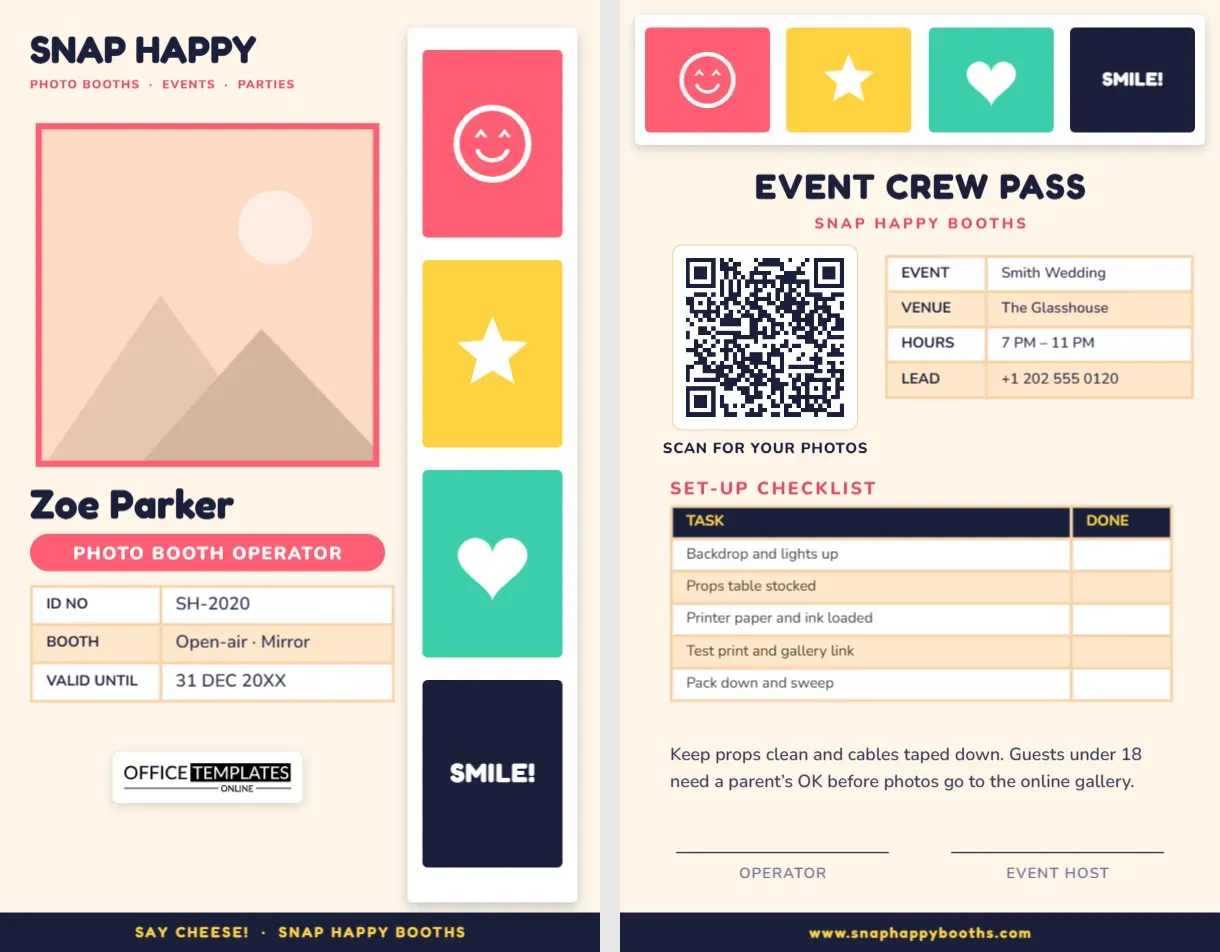
A tall white photo strip runs down the right-hand side of the card with a soft shadow, just like a print fresh out of the booth. Its four frames are filled with bright colours and props: a coral frame with a smiley face, a sunny yellow frame with a star, a teal frame with a heart, and a navy frame with the word SMILE! It is cheerful without being childish, and it fits weddings as well as birthday parties.
On the cream area to the left, SNAP HAPPY heads the card in a rounded Fredoka type, with Photo Booths · Events · Parties in coral. Your photo is big and square with a coral border, so guests in a dim reception room can match your face to your badge. Your name, Zoe Parker on the sample, is set in bold navy, and a coral pill reads PHOTO BOOTH, OPERATOR. A three-row table lists your ID number, the kind of booth you run (open-air and mirror on the sample), and the validity date. Our logo sits on a white plate below, and a navy footer across the bottom reads SAY CHEESE! · SNAP HAPPY BOOTHS in yellow.
It is sized as a standard vertical ID badge, 2.125 x 3.375 inches (CR80).
The Event Crew Pass
The back turns the photo strip on its side: a horizontal strip with the same four props runs across the top. Under it, EVENT CREW passes in navy and the company name in coral. On the left, a QR code labelled SCAN FOR YOUR PHOTOS, perfect for pointing guests to tonight’s online gallery. On the right, a table for the event name, venue, hours, and the lead’s phone number. Below, a real set-up checklist with a done column: backdrop and lights up; props table stocked; printer paper and ink loaded; test print and gallery link; pack down and sweep. A short note about keeping props clean, taping cables down, and parental permission for under-18 guests appears above signature lines for the operator and the event host.
A Props Kit for Every Kind of Event
| Shot | How to take it | Why it matters |
|---|---|---|
| Front three-quarter | Wheels turned slightly toward the camera, lens at headlight height | The classic hero image for listings and covers |
| Profile | Exactly side-on, camera at the middle of the doors | Shows proportions and stance |
| Rear three-quarter | Mirror of the front shot | Shows exhausts, lights, and the car’s shape from behind |
| Interior | From the rear seat or open driver’s door, wide lens | Buyers want to see the dashboard, seats, and trim |
| Details | Badges, wheels, engine bay, odometer | Proves condition and originality |
| Rolling shot | From a second car, slow shutter speed, safe road | Brings motion and energy to editorial work |
Running the Booth Like a Pro
Arrive early enough to set up before guests arrive; a half-built booth during the drinks reception looks messy. Tape every cable to the floor and keep the power strip out of the walkway. Run a test print and check the gallery link on your own phone. During the event, stay close to the booth, greet groups, suggest poses and hand out props, then step out of the frame. Keep the props table tidy and wipe glasses and hard props regularly. Watch the paper and ink so the printer never runs dry in the middle of a busy hour, and if the venue needs you to stop at a certain time, give guests a friendly last call ten minutes before.
Filling In the Snap Happy Card
- Your photo: click the coral-bordered square and pick Replace Image. A fun booth-style photo of you works perfectly.
- Company name: retype SNAP HAPPY and the coral line with your business name and services, such as 360 Booths · GIF Booths · Selfie Stations.
- Tables: the booth details and event table are open for editing from the Edit Data button. Update the event details on the back for each booking.
- QR code: link it to the event gallery in the Barcodes & QR panel so guests can find their photos the next day.
- Photo strip: each strip is one group; ungroup it to change a frame colour or swap a prop. The smiley is an editable vector, and the star and heart are shapes.
- Colours: match your brand by recolouring the strip frames, pill, and footer.
Useful for Every Booth Business
Photo booth rental companies with several attendants, 360 video booth operators, selfie mirror hire companies, wedding venues that run their own booth, event planners who provide booths as part of a package, and school parent groups running a booth at a fundraiser all benefit from a clear, friendly badge. Give each attendant their own card with their photo and a different ID number, and keep the back updated for each event.
Getting Coral, Teal and Yellow to Print True
Coral, yellow, teal, and navy are saturated colours that most printers handle well, but yellow can look pale on some inkjet printers, so print a test. The cream background should stay a warm off-white; print on bright white stock rather than cream paper. Laminate the card or use PVC, since booths often sit near drinks. A lanyard in one of the strip colours looks great, and a clip holder keeps the card from swinging into the camera.
Booth Operator Questions
Can I print the event details fresh for each job?
Yes. Keep the front the same and update the back table and QR link before each event.
What if my booth prints 2 x 6 strips with three frames?
Ungroup the strip on the front and delete one frame, then space the remaining three evenly.
Can guests scan the QR code from the badge?
Yes, although many operators also print the same QR code on a sign next to the booth.
Open the template, add your photo and tonight’s event, and run the booth with a badge as fun as the photos you print.