Medical photographers work in some of the most sensitive settings any photographer can enter: wards, operating theatres, burns units and outpatient clinics, photographing patients at vulnerable moments for their treatment records, research and teaching. Hospitals expect every member of staff to wear clear identification, and patients have every right to know who is taking their picture and why. This Medical Photographer ID Card is written for clinical photographers, medical illustration departments, dermatology and wound care imaging teams, dental and ophthalmic photographers, and students on clinical placements.
Clean Teal and a Heartbeat Across the Middle
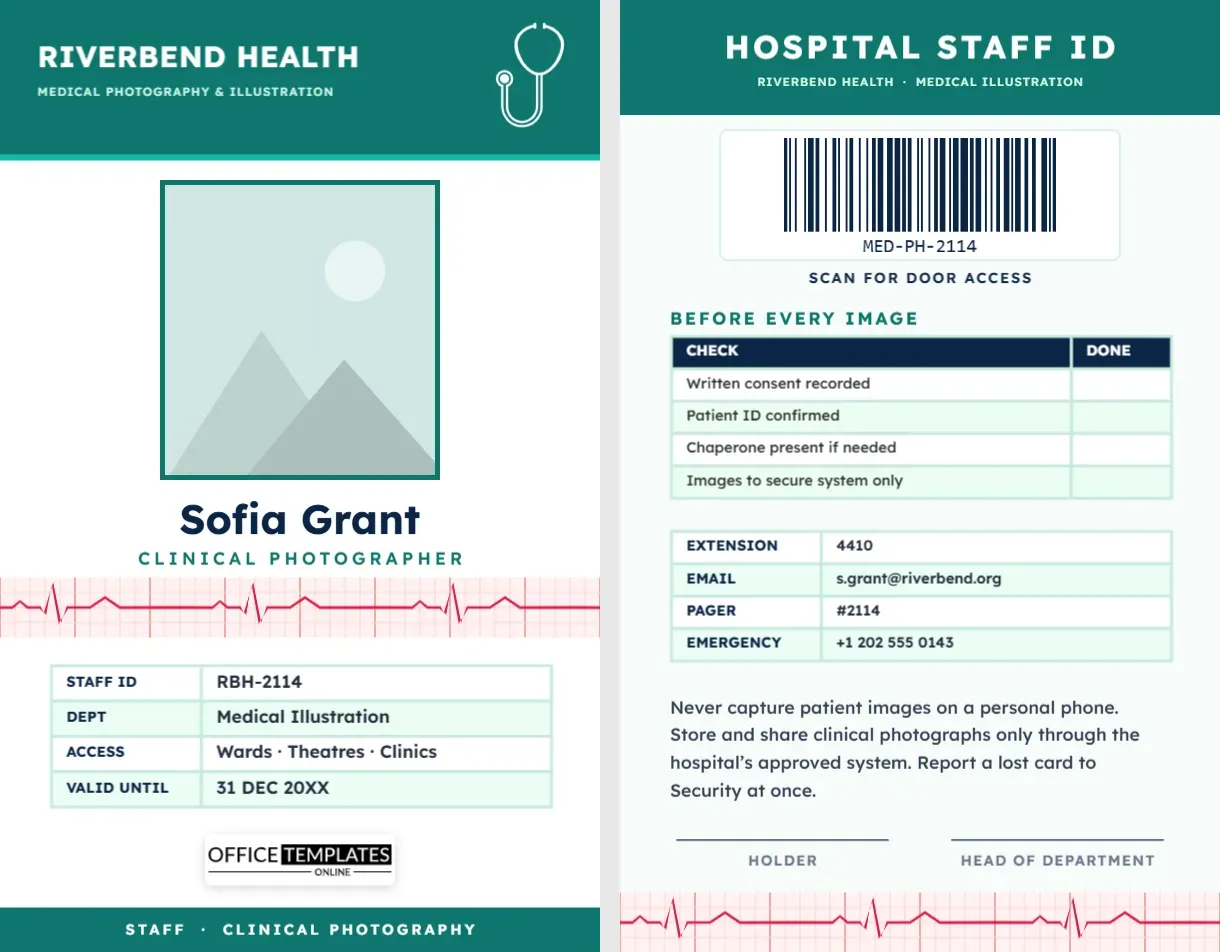
The design follows the look of hospital staff badges: calm, clean, and easy to read. A teal header band carries RIVERBEND HEALTH in Lexend, a highly legible sans-serif designed for readability, with Medical Photography & Illustration in mint below and a white stethoscope on the right. A thinner bright teal line marks the edge of the header.
Your photo sits in the centre of the white card with a teal border. Beneath it, your name, Sofia Grant on the sample, is set in navy with CLINICAL PHOTOGRAPHER in spaced teal capitals. Then the motif that gives the card its character: a strip of pale pink ECG graph paper runs edge to edge, with fine and bold grid lines, and a red heart trace with regular P, QRS and T waves crosses it. A four-row table lists staff ID, department (Medical Illustration), access areas (wards, theatres and clinics), and expiry date. Our logo sits on a white plate above a teal footer reading STAFF · CLINICAL PHOTOGRAPHY.
The badge is a portrait CR80 card, 2.125 x 3.375 inches, which slots into the vertical holders most hospitals use.
The Staff ID Reverse
- HOSPITAL STAFF ID heading on a teal band.
- A large barcode labelled Scan for door access, suitable for staff door systems and department sign-in.
- Before Every Image: a checklist table with a done column: written consent recorded; patient ID confirmed; chaperone present if needed; images to secure system only.
- Contacts: extension, email, pager number, and emergency contact.
- A privacy note: never capture patient images on a personal phone, store and share clinical photographs only through the approved system, and report a lost card to Security.
- Signatures for the holder and the head of department, and the ECG strip repeated along the bottom edge.
Standard Views in Clinical Photography
Clinical images are only useful for comparison if they are taken the same way every time. Departments usually define standard views; common ones include:
| View | Typical use | Consistency tip |
|---|---|---|
| Full face, frontal | Dermatology, facial surgery, orthodontics | Eye level, Frankfort plane horizontal |
| Left and right lateral | Profiles, ears, neck | Patient turned exactly 90 degrees |
| Oblique (three-quarter) | Facial contours, lesions on the cheek | Mark the floor to repeat the turn |
| Close-up with scale | Wounds, skin lesions | Include a scale and patient identifier label |
| Full body | Mole mapping, posture, conditions over time | Same background, distance, and lighting at every visit |
Your department’s protocols always come first; the table is a general overview.
Consent and Confidentiality
Patient images are part of the medical record. That means they need the patient’s informed consent, often recorded on a specific form that states how the images will be used: for the record only, for teaching, or for publication. Consent for one use does not cover another. Images must be stored on approved, secure systems, not on personal devices, cloud accounts or messaging apps. When photographing children or people who cannot consent, follow your organisation’s policy on guardians and advocates. The checklist on the back of this card keeps these steps visible every time you pick up the camera.
Updating the Riverbend Card
- Photo: click the teal-framed photo and use Replace Image. Follow your hospital’s ID photo rules: plain background, face forward.
- Hospital name: retype RIVERBEND HEALTH and the department line.
- Tables: choose the staff details or the checklist, then open Edit Data. Use + Row on the checklist for extra local steps, such as Clinician request form received.
- Barcode: enter the staff number used by your access system in the Barcodes & QR panel.
- ECG strip: the grid and trace are one group on each side. Recolour the trace to teal or navy, or delete the strip for a plainer badge.
- Stethoscope: it is an editable vector; recolour it from its swatch or replace it with your hospital’s approved logo.
Clinics and Departments That Use It
NHS and hospital medical illustration departments, private dermatology and plastic surgery clinics, dental practices that photograph patients, veterinary hospitals (change the checklist to owner consent), ophthalmic imaging technicians, forensic medical examiners, and universities with clinical photography courses. Clinics can also adapt it for other imaging staff, such as ultrasound or retinal imaging technicians.
Printing Hospital Badges
Hospitals clean everything, including badges, so PVC cards are the practical choice; they can be wiped with disinfectant. The white and teal design prints cleanly on card printers, and the thin ECG grid lines should be checked on a test print to make sure they are visible but faint. Use a breakaway lanyard, which many infection-control and safety policies require, or a clip on the chest pocket. Keep the photo side facing out.
Setting Up a Consistent Clinical Studio
Consistency is what makes before-and-after comparisons trustworthy. Most departments photograph against a plain mid-blue or grey background, use the same lens and focal length for each standard view, and light the subject with two soft lights at equal distances so shadows do not change between visits. Mark the floor for the patient’s and the photographer’s positions, and record the camera settings in the image metadata. A colour reference card in the first frame of each session helps keep skin tones accurate, which matters in dermatology and wound care where subtle colour change can signal healing or infection.
Clinical Photography FAQs
Is this card an official hospital ID?
No. Hospitals issue their own ID. Use the template where your organisation allows, such as in private practice, for students on placement with approval, or as a department supplementary badge.
Can I show my professional registration?
Yes. Add a row with + Row for your registration or membership number.
Why is there a heartbeat on a photography badge?
It signals a medical setting at a glance, so patients and staff immediately understand the photographer is part of the clinical team.
Open the template, add your photo, department, and staff number, and wear a badge that reassures every patient you photograph.