Launch a drone in a public park, over a construction site, or beside a wedding venue, and sooner or later someone walks over to ask what you are doing. A calm answer and a professional credential end most of those conversations in seconds. This Drone Pilot ID Card is built for commercial aerial photographers and videographers: it looks like the screen you stare at during every flight, it shows your remote pilot details up front, and the back carries a working pre-flight checklist you can glance at before takeoff.
Designed Like the View From Your Controller
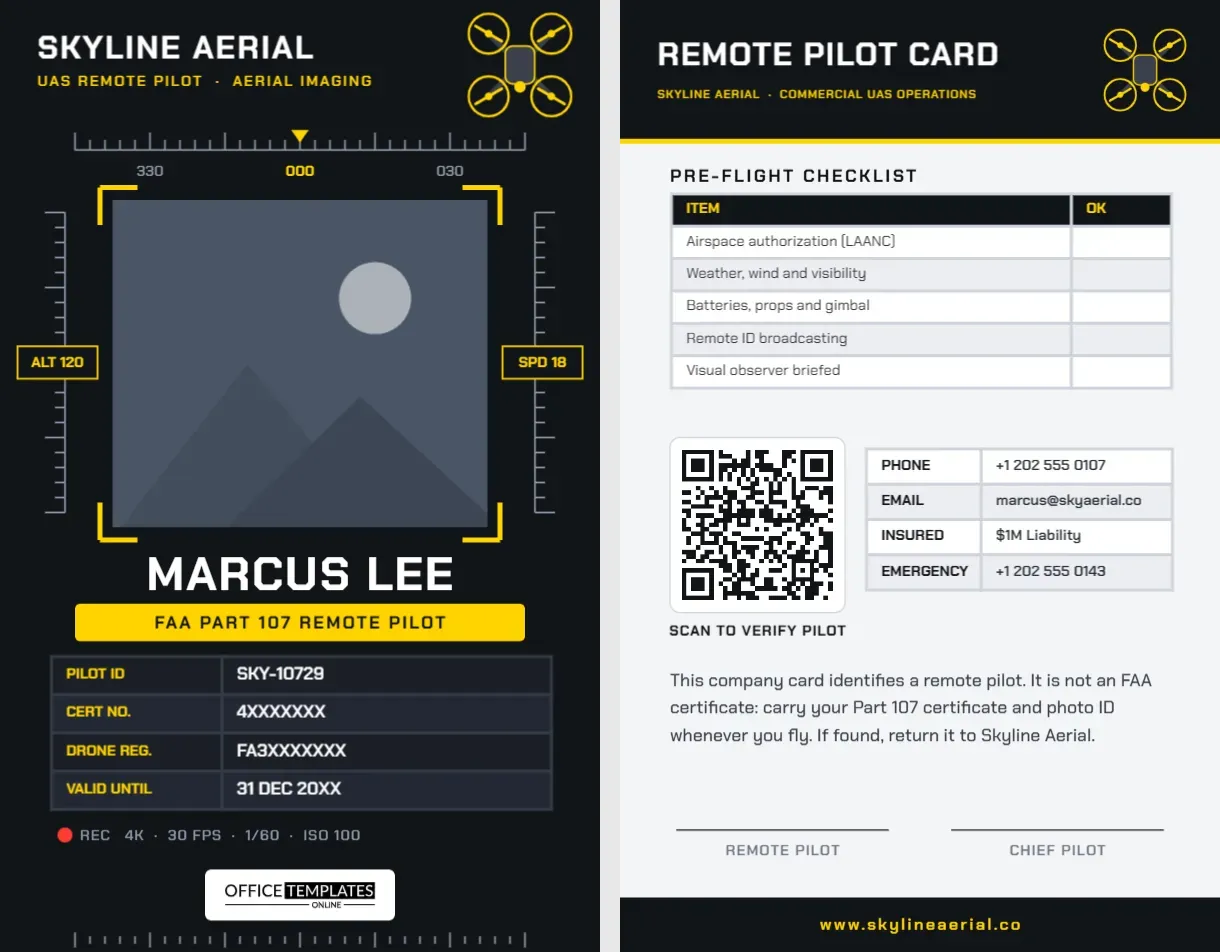
The front of the card is almost black, a dark graphite that makes the yellow accents glow like a flight display. SKYLINE AERIAL sits top left in Chakra Petch, a squared, technical typeface, with UAS Remote Pilot · Aerial Imaging in yellow below. In the top right corner, a top-down quadcopter is drawn in yellow outline, four rotors spinning around a central body.
Below the header, a heading tape runs across the card with tick marks, a yellow marker triangle, and the bearings 330, 000, and 030. Your photo sits in the middle as if it were the live camera feed, surrounded by four thick yellow corner brackets. On either side, altitude and speed ladders climb the card with tick marks and two boxed readouts: ALT 120 and SPD 18. The design reads like a screen at a glance, yet every piece is a simple editable shape or text box.
Under the camera feed, your name is set in large white capitals, and a yellow bar states FAA PART 107 REMOTE PILOT. A dark four-row table holds your pilot ID, certificate number, drone registration, and expiry date, labels in yellow and values in white. A recording line with a red dot, REC 4K · 30 FPS · 1/60 · ISO 100, sits above our logo, and a second row of ticks along the bottom edge echoes the heading tape at the top.
The card is portrait CR80, 2.125 inches wide by 3.375 inches tall, the size of a standard badge.
Reading the HUD Elements
| Element on the card | What it imitates | How to use it |
|---|---|---|
| Heading tape with 330 · 000 · 030 | The compass strip on many flight apps | Leave it as decoration or change the numbers to your favourite bearing |
| Yellow corner brackets | The framing guides on a live camera view | They frame your photo; recolour them to match your brand |
| Altitude and speed ladders | Telemetry scales on the sides of the display | Grouped tick marks; recolour or delete as one object |
| ALT 120/SPD 18 readouts | Live altitude and speed | Type your own, for example ALT 400 as a nod to the ceiling |
| REC line | Recording status and camera settings | Change to your preferred settings or your camera model |
What the Law Expects You to Carry
This card is a company ID, not an FAA document, and the back says so clearly. In the United States, commercial drone flights fall under Part 107, and the rules expect a few things from you:
- Your remote pilot certificate and photo ID must be in your possession when you fly, ready to show to the FAA or law enforcement if asked.
- Drone registration: aircraft flown commercially must be registered, and the registration number must be marked on the outside of the drone.
- Remote ID: most drones must broadcast Remote ID, either built in or through an add-on module.
- Airspace authorization: flights in controlled airspace need permission, which many pilots obtain through LAANC in approved apps.
The card’s table has space for your certificate number and your drone registration, so you can show both details alongside your official certificate. Pilots outside the US can replace the FAA wording with their own authority’s licence, for example, a UK Flyer ID and Operator ID.
The Pre-Flight Checklist on the Back
The reverse opens with a dark header band reading REMOTE PILOT CARD and a smaller drone. Beneath it, a real table lists five checks with an OK column to tick: airspace authorization (LAANC); weather, wind and visibility; batteries, props and gimbal; Remote ID broadcasting; and visual observer briefed. Because it is an editable table, you can add rows for anything your operation always checks, such as NOTAMs reviewed or Client briefed on flight area, with the + Row button. Below the checklist, you will find a QR code labelled SCAN TO VERIFY PILOT, a contact table with phone, email, insurance cover and emergency number, a short note about carrying your certificate, and two signature lines for the pilot and the chief pilot.
Editing the Aerial Card
- Photo: click inside the bracketed frame and choose Replace Image. The frame is a pattern-filled shape, so your photo scales to fit it.
- Company and name: double-click SKYLINE AERIAL and MARCUS LEE to type your own. Chakra Petch is narrow, so longer names still fit.
- Pilot table: select it and choose Edit Data to enter your certificate and registration numbers.
- QR code: open the Barcodes & QR panel and link it to a page with your insurance certificate, portfolio, or a verification page your clients can check.
- Accent colour: the yellow can become safety orange or cyan; change the corner brackets, readout boxes, header subtitle, and bar together.
Who Flies With a Badge Like This
Real estate and construction progress photographers, roof and solar inspectors, wedding and event videographers, surveyors and mapping pilots, agricultural operators, news and documentary crews, and drone instructors all use it. Teams can print one per pilot and one per visual observer, changing the yellow bar to VISUAL OBSERVER for the second person.
Printing a Dark Card So It Stays Readable
A near-black background prints beautifully on PVC with a card printer and looks sharp in the field. On a home inkjet, dark areas can band or smudge, so use a matte photo cardstock, let it dry fully, and place it in a hard sleeve; you will be pulling it out with gloves in the cold. Keep the yellow accents strong, because a pale yellow disappears in bright sunlight. Test the QR code on the printed card before you rely on it.
Pilot Questions
Can I show both my Part 107 and a night waiver?
Add a row with + Row and type your waiver or authorization details. Keep numbers accurate, as clients may check them.
Does the card replace my certificate?
No. Always carry your official remote pilot certificate and photo ID when flying; the card identifies you and your company.
Is the drone drawing editable?
Yes. It is a group of simple shapes, so you can recolour the rotors, resize it, or ungroup it to change the body.
Open the template, drop your photo into the bracketed frame, enter your pilot details, and keep the checklist on your lanyard for every launch.