A Dark Teaser That Makes People Wait for the News
A teaser works when it says very little in a striking way. This card does it with a dark navy page covered by outlined STAY TUNED letters, repeated like a wall of echoes, and a white rounded card in front that says COMING SOON with a red megaphone. It suits product launches, new services, events, music releases and opening dates that you want to build up before the reveal.
Outlined Text Wall and White Card
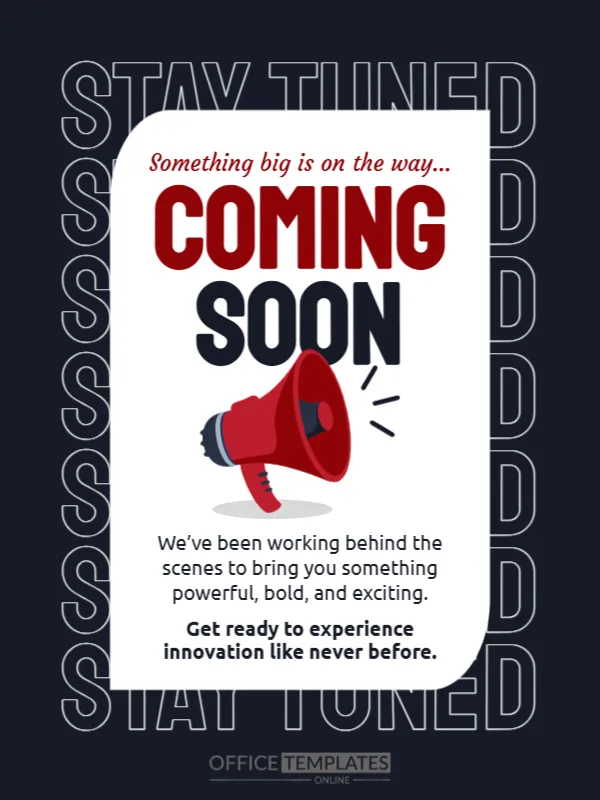
The design is 600 x 800 pixels, portrait, one page. Seven rows of STAY TUNED fill the background in thin white outlines. In front, a white card with one rounded corner holds a script line in red, the words COMING SOON in red and black capitals, a megaphone, and two short paragraphs. The fonts are Staatliches, Courgette and Ubuntu.
Teaser Wording
The script line reads Something big is on the way. Under the megaphone, We’ve been working behind the scenes to bring you something powerful, bold, and exciting, then in bold, Get ready to experience innovation like never before. These are general words. Replace them with a hint that suits your project, such as a date, a colour or a first letter of a name. A good teaser gives people a reason to come back.
What to Add Without Giving Everything Away
- A reveal date or a countdown.
- A hashtag people can follow.
- A hint, such as a silhouette or a first clue.
- Where updates will appear.
- A request to turn on notifications.
Keeping the Mystery
Resist the urge to explain the product. The point of a teaser is curiosity. Show a date or a clue and save the details for launch day. If you must say something, speak about the feeling, not the features.
Planning the Reveal Post
Prepare the reveal design in the same colours before you publish the teaser. A matching sequence of teaser, countdown and reveal feels like a campaign. Schedule all three in advance so that nothing is rushed.
Saving the Dark Teaser
Dark designs look striking on phones. Check that the thin outline letters are visible at low brightness, and save the finished card as an image for your feed and stories.
Step by Step Editing of the Dark Stay Tuned Teaser Design
- On the dark stay tuned teaser design, click the main headline and type your own words, keeping a similar length.
- Retype every name, date and contact line on the dark stay tuned teaser design, checking each against a trusted source.
- Search the dark stay tuned teaser design for the words Lorem and Company so that no placeholder remains.
- Click any logo or photo on the dark stay tuned teaser design, choose Replace Image and resize the new picture to fit.
- Zoom the dark stay tuned teaser design to full size and read each line aloud before you save it.
- Keep a clean master of the dark stay tuned teaser design without private details, so later versions start tidy.
You may also like the product launch announcement post. For comparison, open the feature update announcement. Consider the event launch announcement poster. Looking beyond the dark stay tuned teaser design? See all announcements.