Make the Speaker Obvious From Across the Room
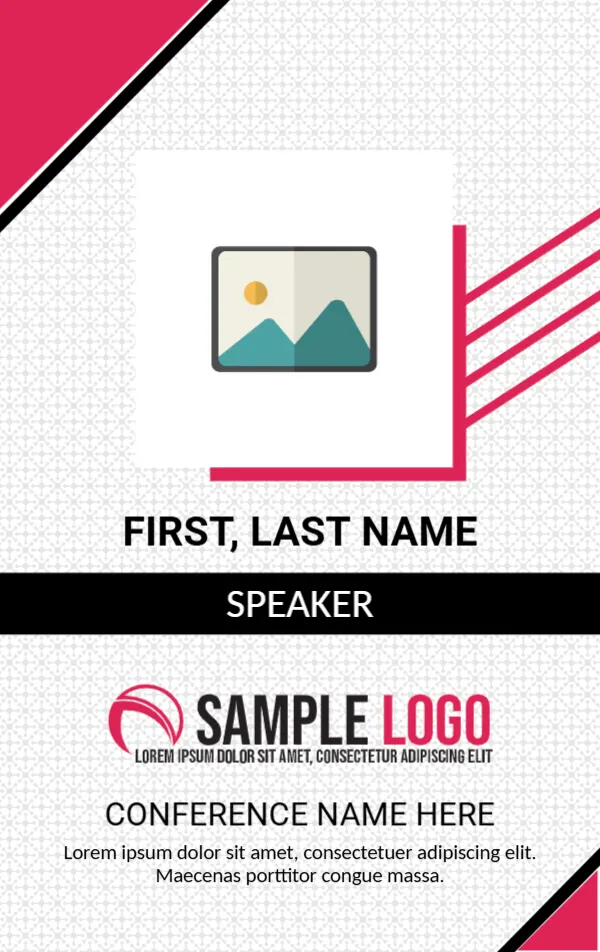
At a conference, people must find three kinds of person quickly: the speakers, the organisers and the sponsors. The easiest way is to design the badges so that the role is obvious without reading small text. This name badge does that with a bold black band across the middle that says SPEAKER in white capitals, and a large photograph above it. Attendees spot the band and know who to approach with questions.
Pink Corners, a Photo Square and a Black Band
The badge is a vertical card, 2.125 x 3.375 inches. The background is white with a faint geometric tile pattern in grey. In the top left corner, a hot pink triangle with a black stripe on its edge cuts across. In the centre, a large white square holds the photo placeholder, with three pink lines flowing from its right side like a banner. Below, FIRST, LAST NAME is set in bold black capitals, and the black band beneath it reads SPEAKER.
The lower part shows a SAMPLE LOGO in pink and black, then CONFERENCE NAME HERE in large grey capitals and a line of placeholder text. A second pink triangle closes the bottom right corner.
Turn the Badge Into Any Role
The black band is simply text, so you can change it. Make a set of badges for the whole event with different words, and perhaps different band colours.
| Role | Band text |
|---|---|
| Speaker | SPEAKER |
| Organiser | ORGANISER |
| Sponsor | SPONSOR |
| Attendee | DELEGATE |
| Volunteer | STAFF |
Colour coding helps too. Use black for speakers, pink for organisers and grey for attendees, and print a key on the registration desk.
Name Size Matters
Attendees read badges from two or three feet away, so the name must be large. This design uses big capitals for the name, which is correct. If a name is long, reduce the size slightly, but keep it readable. Put the first name on its own line in larger type if you can, since people use first names at conferences.
What to Add in the Footer Text
The placeholder sentence is Latin filler. Replace it with a short, useful line: the dates and venue, the event hashtag or the website. Keep it to one or two short lines. A QR code that links to the programme or to the speaker’s bio can also help, if you want to add one.
A Photo on a Speaker Badge
A photo on a speaker badge is unusual but helpful for a very large event, where attendees want to match a face to a name. Click the placeholder and choose Replace Image. For most events, you may prefer to replace the photo with the event logo or delete it and increase the size of the name.
Printing and Lanyards
Print on 250 to 300 gsm card stock and insert into a vertical badge holder with a lanyard. At 2.125 x 3.375 inches, the badge fits standard credit card sized holders. Print a few spares for late additions. If you print on a home printer, laminate the finished cards to protect the ink.
For a landscape event badge with a photo and an orange tag, see the event name badge. For a double sided conference attendee ID, see the conference attendee ID card. More are in ID cards.