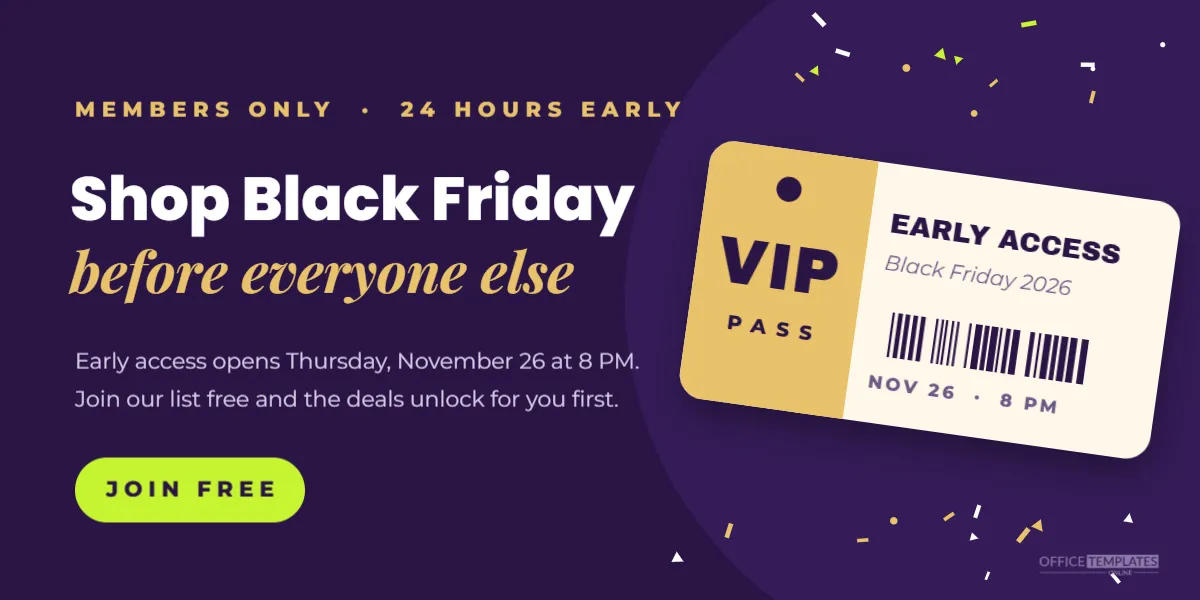
Early access is one of the most effective Black Friday tactics. Giving subscribers or loyalty members a head start rewards your best customers, grows your email list, and spreads orders over more hours, which helps both your website and your warehouse. This Web Banner invites visitors to join and shop before everyone else, with a VIP pass that makes the offer feel exclusive.
Design of the Early Access Banner
The banner is 1200 x 600 pixels, a common size for website banners, blog headers and email images. The background is a deep plum purple, with a slightly lighter circle behind the right side to give depth. Small gold, white and lime confetti pieces float along the top and bottom edges.
The left half carries the message. A small gold line reads MEMBERS ONLY · 24 HOURS EARLY. The headline Shop Black Friday is set in white Poppins ExtraBold, followed by before everyone else in gold Playfair Display italic. Two short lines explain the offer: early access opens Thursday, November 26 at 8 PM, and joining the list is free. A bright lime rounded button reads JOIN FREE.
The right side shows a tilted pass card, like a ticket for a private event. A gold stub on the left carries a punched hole, VIP in heavy letters and PASS below. The cream main part reads EARLY ACCESS and Black Friday 2026, with a barcode and the start time. A soft shadow makes the pass appear to float. The brand mark sits in the bottom right corner.
How Black Friday Early Access Campaigns Work
- Announce early: Put this banner on your homepage and in emails two to three weeks before Black Friday.
- Collect sign-ups: The JOIN FREE button links to an email or SMS sign-up form.
- Open early: Send members a private link or code when early access starts.
- Open to everyone: Launch the public sale on Black Friday, with stock that remains.
Editing the Early Access Offer
Every line can be edited. Change the timing in the kicker to 48 HOURS EARLY or FIRST PICK if your offer is different. Update the date and time in the description and on the pass. If you require a paid membership, change JOIN FREE to BECOME A MEMBER and adjust the copy.
The pass is a grouped object. Double-click into it to edit the text, or select the whole pass to change its angle. The barcode is decorative; it does not need to be scanned.
Where to Place the Early Access Banner
| Place | Purpose |
|---|---|
| Homepage hero or below the header | Reach every visitor |
| Website pop-up | Catch visitors before they leave |
| Email newsletter | Remind current subscribers to share it |
| Checkout confirmation page | Invite recent buyers back |
| Social media | Drive new followers to sign up |
Building a Sign-Up Page for Early Access
The banner works best when it links to a simple page with the same look. Repeat the headline and the date, add a short form asking only for an email address (and perhaps a first name) and explain what members get. After sign-up, show a thank you message and send a confirmation email that repeats the start time. Simple pages convert better than long forms.
Rules for a Fair Early Access Sale
Be clear about what early access includes. Say whether members get the same prices as the public sale or an extra discount, whether some items are excluded, and whether stock is limited. Members who feel rewarded become loyal customers; members who feel tricked unsubscribe. Also check that any sign-up form follows your local privacy rules, including clear consent to receive marketing emails or texts.
Colour Choices for a VIP Feel
Purple and gold have long been linked with royalty and exclusivity, which is why they suit a members-only offer. If your brand colours are different, try black with gold, emerald with cream or navy with silver. Keep the button in a bright contrasting colour, such as the lime here, so it is the most clickable thing on the banner.
Resizing the Banner for Other Spaces
For a website strip, change the canvas to a wider, shorter size and move the pass closer to the text. For a square social post, stack the text above the pass. For an email header, use a width of around 600 pixels and enlarge the text slightly so it stays readable on phones.
Measuring Black Friday Early Access Results
Track how many people sign up from the banner and how many of them buy during early access. Most email and website tools show clicks and conversions. If sign-ups are low, try changing the headline or the button text; small changes like Get early access versus Join free can make a noticeable difference.
Using the VIP Pass Design Year Round
The VIP pass works for any members-first event: new collection launches, summer sales, birthday clubs, or ticket presales. Change BLACK FRIDAY on the pass and in the headline, and keep the rest.
Writing the Early Access Email
The banner collects sign-ups, but the email that opens early access does the selling. Keep the subject line short and specific, such as Your early access starts now or Members only: Black Friday opens early. Repeat the VIP pass visual at the top of the email, state the start and end time clearly and put the shop link in a big button. Send a reminder a few hours before early access closes, because many people open the first email and then forget.
Preparing Your Website for an Early Opening
Opening the sale early for members means your prices, codes, and stock need to be ready earlier too. Test the member link or code the day before. Check that sale prices show correctly on product pages and at checkout. If you use a password page or a hidden collection for members, make sure the public cannot find it before the official start. A smooth early access experience makes members feel valued and more likely to buy again on the public sale day.
Early Access Banner Questions
Can I add a countdown?
Static images cannot count down, but you can place a countdown widget from your website builder next to the banner.
Does the banner work on mobile?
On small screens, banners shrink. Consider making a taller mobile version with larger text.
Can I use it for in-store early opening?
Yes. Change the copy to Members shop from 5 AM and the button to Get your pass.
Rewarding your best customers first is good business. Set your early access time, link the button to your sign-up page, and roll out the VIP treatment this Black Friday.