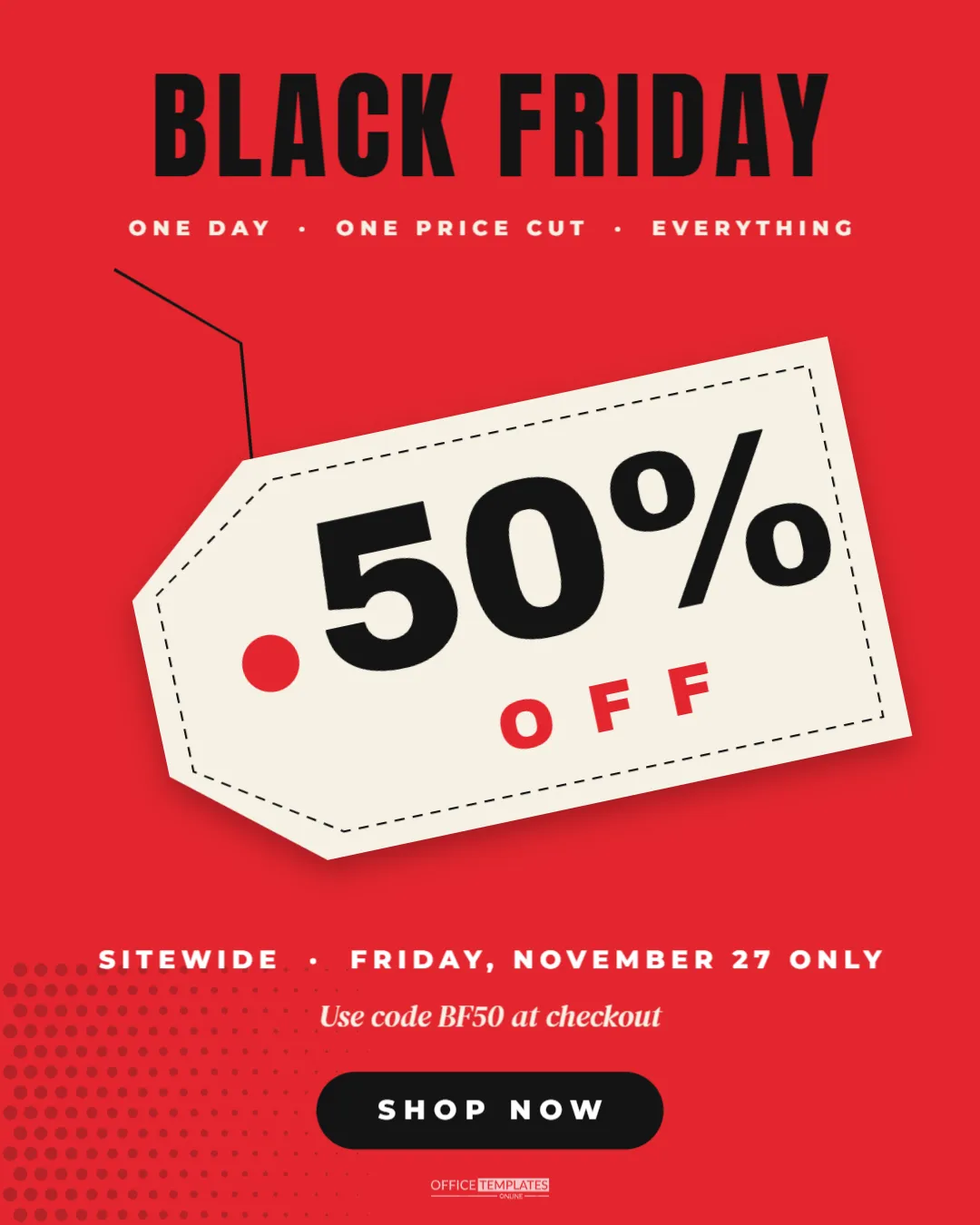
Half price is the offer people remember. When your Black Friday deal is a straight 50% off, the design should say so as plainly as a price tag in a shop window. This portrait Instagram post puts the number on a big cream swing tag, hanging on a string across a bright red background, with BLACK FRIDAY at the top and a code and button at the bottom.
Inside the 50% Off Post Design
The post is 1080 x 1350 pixels, the 4:5 portrait size that takes up the most screen space in the Instagram feed. The background is a strong signal red. BLACK FRIDAY runs across the top in tall black Anton capitals, with a small cream line beneath: ONE DAY · ONE PRICE CUT · EVERYTHING.
The centre of the post is a large cream swing tag, tilted slightly as if it is hanging from its string. The tag has a punched hole on its pointed end, a dashed stitched border inside its edge, and a soft shadow under it. 50% is printed on the tag in heavy Archivo Black, with OFF in spaced red letters below. A thin black string runs from the hole up and off to the top left.
Below the tag, a white line reads SITEWIDE · FRIDAY, NOVEMBER 27 ONLY, followed by Use code BF50 at checkout in an elegant italic serif. A black pill button reads SHOP NOW. Faint black halftone dots sit in the bottom left corner, and the brand mark is centred at the foot.
Why a Price Tag Makes a Good Black Friday Visual
A swing tag is something everyone recognises from real shops. It tells the viewer this is a price before they even read it, which makes the message faster to understand. The tilt adds movement, and the cream tag stands out sharply against the red, so the number is the first thing anyone sees.
Changing the Discount on the Tag
Double-click the 50% and type your own figure. Two digits and a percent sign fit best. For other offers, the tag is flexible:
- 30% with OFF beneath for a smaller sale;
- $20 with OFF beneath for a fixed amount;
- BOGO with FREE beneath for buy one get one;
- 2 FOR 1 with a smaller font size.
The tag and its text are grouped, so they rotate together. Double-click into the group to edit the text without moving the tag.
Editing the Code and Button
Replace BF50 with your own promo code. Short codes in capitals are easiest to remember and type on a phone. If you do not use codes, change the line to Prices already reduced, no code needed. Change SHOP NOW to LINK IN BIO or VISIT US TODAY if the sale is in-store only.
Colour Options for the 50% Off Post
Red is the classic sale colour, but it is not the only choice. Try:
| Background | Tag | Feel |
|---|---|---|
| Black | Cream | Classic Black Friday |
| Kraft brown | White | Handmade and eco brands |
| Hot pink | Black | Beauty and fashion |
| Electric blue | Yellow | Tech and gadgets |
| Forest green | Cream | Outdoor and home |
When you change the background, also change the tag’s hole colour to match, so it still looks punched through.
Being Honest About 50% Off
Discount claims should be accurate. If only some items are half price, say up to 50% off or 50% off selected styles, not just 50% off. Many countries have rules about advertising reference prices and discounts, and customers notice when a deal is not what the graphic promised. A clear, honest post builds trust that lasts beyond the weekend.
Caption Ideas for a Half Price Post
- Half price. Everything. Friday only. Code BF50 at checkout.
- Our biggest discount of the year is here: 50% off sitewide.
- You asked, we listened. Black Friday means half price on the lot.
Reusing the Swing Tag Post
The swing tag design works for more than Black Friday. Change the headline to SUMMER SALE, CLEARANCE, BIRTHDAY SALE, or MOVING SALE, and the tag carries the new discount. Keeping a template like this in your account saves time for every sale through the year.
Downloading the 50% Off Post
Download as PNG and upload as a portrait post. Instagram keeps the 4:5 shape, but the profile grid shows a centred crop, so the tag and headline sit in the middle where they stay visible. The same image works on Facebook, where portrait images also take up more feed space.
Planning a 50% Off Black Friday Offer
A half-price sale is attractive, but it needs to make sense for your business. Before you post, check your margins on the items included, decide whether the offer is sitewide or limited to certain ranges, and set clear start and end times. Many shops run 50% off only on older stock or one category, and a smaller discount on new arrivals. Whatever you choose, the post should match the offer exactly, so customers are not surprised at checkout.
It also helps to decide in advance whether the discount stacks with other codes, gift cards, or loyalty points. Put the answer in your caption or on your website’s sale page, and brief your team so everyone gives the same answer when customers ask.
Testing the Post Before Sale Day
Look at the finished post on your phone before it goes live. Check that the code is spelled the same way as in your checkout system and that it works with a test order. Make sure the dates are right, and the button text matches what customers actually need to do. Ask a colleague who has not seen the design to read it for five seconds and tell you the offer; if they can, the post is ready.
50% Off Post Questions
Can I add a product photo behind the tag?
Yes. Add a full-size photo frame, send it to the back, and lower its brightness so the tag still stands out.
Can I remove the string?
Select the thin black line and delete it. The tag then looks like a sticker rather than a hanging tag.
Is there a square version?
Change the canvas size to 1080 x 1080 and move the elements closer together, or use the square Black Friday post template.
A clear number on a familiar tag is hard to scroll past. Set your discount, add your code, and hang this tag in your followers’ feeds.