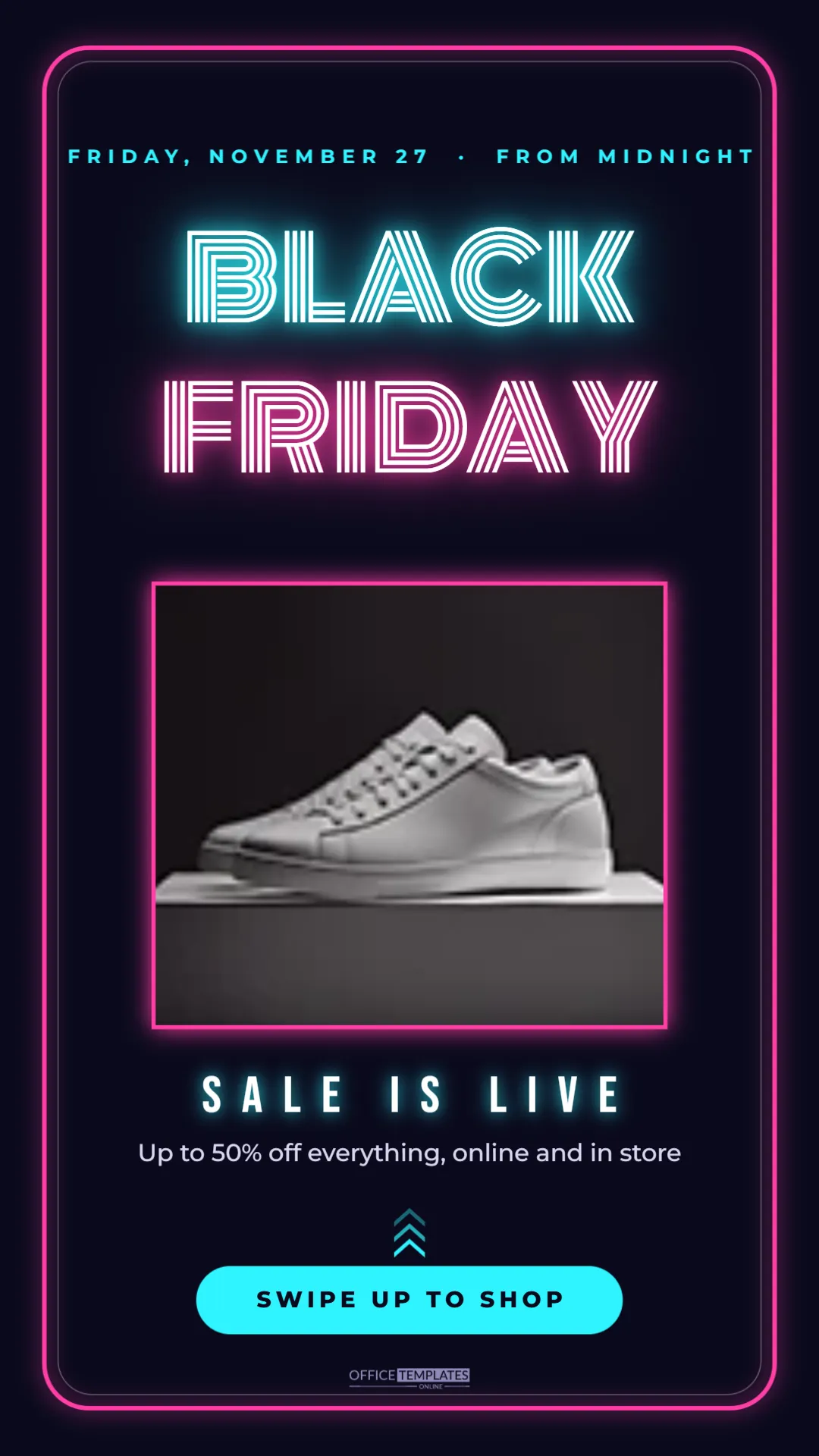
Stories are where people check in with brands during Black Friday. They tap through quickly, so a story needs to glow, literally if possible. This 1080 x 1920 Instagram story template uses a neon sign look: glowing cyan and pink lettering on a midnight background, a product photo framed in light, and a clear button telling people what to do next.
The Neon Black Friday Story Design
The background is a deep midnight blue, close to black. A hot pink rounded frame runs around the whole story with a soft glow, as a neon tube bent into a rectangle, and a thinner white line sits just inside it.
At the top, a cyan line reads FRIDAY, NOVEMBER 27 · FROM MIDNIGHT. Below it, BLACK glows in cyan, and FRIDAY glows in pink, both set in Monoton, a font made of parallel lines that looks like bent glass tubing. Each word has a coloured halo with a bright white core, which is what makes neon look real.
The middle of the story holds a large rounded photo frame with a glowing pink edge, ready for a product shot. Below it, SALE IS LIVE appears in white Bebas Neue with a cyan glow, followed by a short offer line: Up to 50% off everything, online and in store. Three stacked chevrons point upward to a cyan pill reading SWIPE UP TO SHOP. The brand mark sits at the bottom.
Adding Your Product Photo
Click the frame in the middle and choose Replace Image to upload a product photo. Products on dark or colourful backgrounds suit the neon look best; a white studio photo will look very bright against the midnight page. If you only have white background photos, a lifestyle shot or a flat lay often works better here. The frame keeps its pink glowing edge whatever you put inside.
Editing the Black Friday Story Text
- Dateline: change it to your start time, such as THURSDAY 8 PM, or ALL WEEKEND.
- Headline: keep BLACK FRIDAY, or swap in CYBER MONDAY later in the weekend.
- SALE IS LIVE: replace with NOW ON, LAST DAY, or 50% OFF.
- Offer line: one short sentence about the deal.
- Button: SWIPE UP TO SHOP, TAP THE LINK or DM TO ORDER.
Links in Instagram Stories
Instagram now uses a link sticker instead of the old swipe up gesture. Upload the story, add the link sticker from the sticker tray, and place it on top of the cyan pill, or just below it. Many brands keep the words swipe up because people still recognise them, but tap the link is more accurate. Change the pill text to whichever your followers respond to.
Keeping the Neon Glow Readable
Neon effects look best when there is plenty of dark space around them. Avoid adding extra text close to the headline, and keep the photo inside its frame. If you change colours, choose bright, saturated pairs: lime and purple, orange and blue, or yellow and pink all glow well. Pastels do not.
Instagram covers the top and bottom of stories with your profile name and the reply bar. The important text in this template sits inside safe margins, so nothing key is hidden.
A Black Friday Story Sequence
One story rarely sells on its own. A short sequence of four to six frames works well on sale day:
- This neon announcement frame.
- Two or three product frames, each with a price.
- A poll or quiz sticker: Which would you pick?
- A countdown sticker to the end of the sale.
- This frame again with LAST CHANCE in place of SALE IS LIVE.
Duplicate this template for the product frames and keep the neon frame and headline so the sequence feels like one campaign.
Saving Neon Stories as Highlights
After 24 hours, stories disappear unless you save them to a highlight. Create a Black Friday highlight on your profile and add these frames, so late visitors can still find the deals. A small neon cover image for the highlight, made from the BLACK lettering, keeps the look consistent.
Neon Story Uses for Other Businesses
The neon style suits bars, gaming shops, beauty brands, electronics sellers, and nightlife venues. A bar might use it for a Black Friday happy hour, a salon for a late-night booking offer, and a game shop for midnight launch deals. Change the headline and photo, and the look carries over.
Downloading the Neon Black Friday Story
Download as PNG for crisp glow edges, then post from your phone. The design also works as a Facebook story and a WhatsApp status, which use the same tall format.
Timing Your Black Friday Stories
Story views peak at different times for every account, but a few patterns hold for Black Friday. Many shoppers browse late on Thanksgiving evening, then again early on Friday morning and over lunch. Post this announcement frame first thing, then add new frames at those times rather than all at once. Instagram shows stories in the order they were posted, so spreading them out keeps your account bubble near the front of followers’ story trays through the day.
Check your insights after the first day. If your followers tap away quickly from text frames but watch product frames, use more photos on Saturday. If the link sticker gets few taps, try moving it higher or changing the wording on the pill.
Matching the Neon Story to Your Feed Post
Followers see your feed posts and your stories in different places, but they should feel like one campaign. Use the same two neon colours, the same headline font, and the same offer wording in both. If your feed post uses a different style, change the neon colours in this story to pick up its main colour. A consistent look makes your sale easier to recognise, and recognition is what turns a second glance into a click.
You can also share your feed post to your story and place it inside the photo frame here, so the story directly points people to the post with the full details.
Neon Instagram Story Questions
Can I make the glow stronger?
Select the headline text and increase the shadow blur in the text settings. Do it gently, or the letters will blur together.
Can I use it as a TikTok cover?
Yes. TikTok uses the same 9:16 shape. Keep text away from the right edge, where TikTok places its buttons.
Does it work in light mode?
The neon effect needs a dark background. For a light version, try one of the other Black Friday story templates.
Neon is made for the night before Black Friday. Drop in your product, set your time, and let the story light up your followers’ screens.