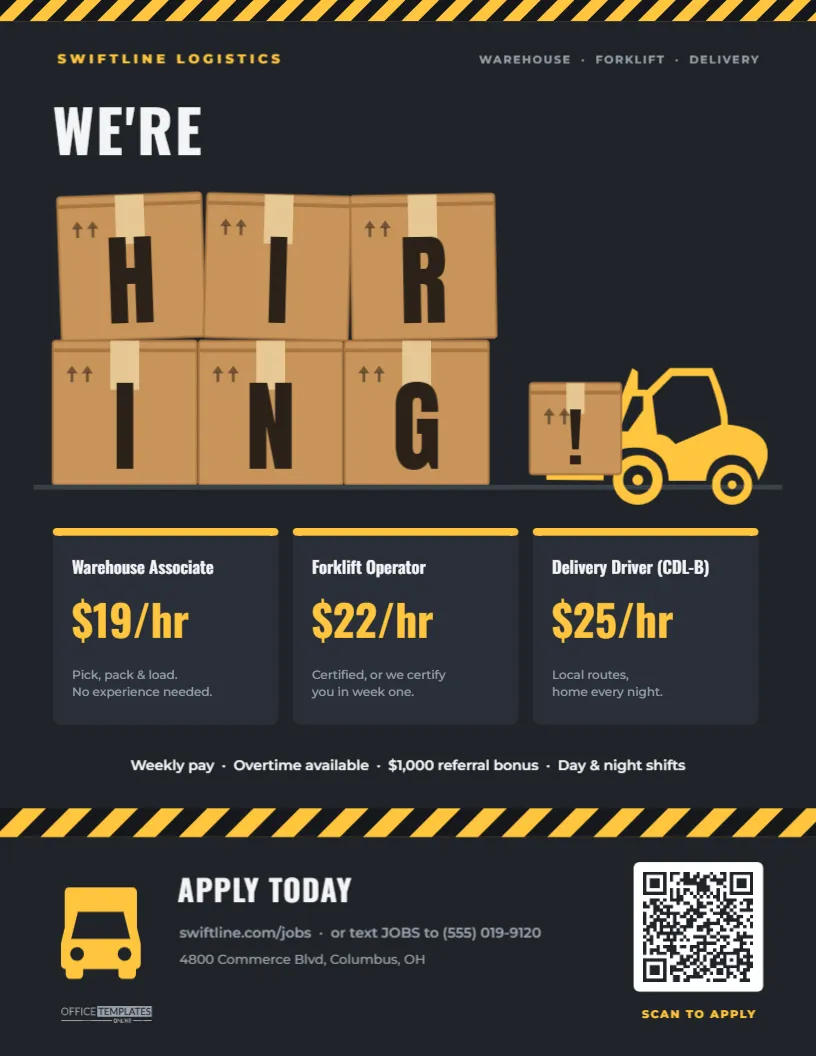
Logistics hiring moves fast. Peak season arrives, a new route opens, a distribution centre adds a night shift, and suddenly you need a dozen people by next Monday. This Warehouse and Delivery Driver Hiring Flyer is built for that pace. It says what the jobs are, what they pay, and how to apply, in a design that looks like it belongs on a loading dock: six kraft cardboard boxes stacked two rows high spell out H-I-R-I-N-G, and a yellow forklift rolls in to deliver a final box marked with an exclamation point. It fits warehouses, fulfilment centres, moving companies, courier services, wholesalers, food distributors and 3PL operators.
Six Boxes, One Word: The Idea Behind the Design
People who work in logistics spend their days around boxes, pallets and forklifts, so the imagery speaks to them directly. The stacked boxes are drawn with the details that make them read as real shipping cartons: a darker flap seam along the top, a strip of packing tape down the centre, and this-side-up arrows in the corner. The top row is slightly skewed, as if stacked by hand. The flyer is framed top and bottom by black-and-yellow hazard stripes, the universal warehouse floor marking.
Reading the Flyer from Top to Bottom
The page is US Letter, 8.5 x 11 inches, portrait, on a dark charcoal background.
- A thin hazard stripe across the top edge.
- The company name, SWIFTLINE LOGISTICS, in yellow on the left and WAREHOUSE · FORKLIFT · DELIVERY on the right.
- WE’RE in tall white Oswald, then the six boxes spelling HIRING in black Anton letters, sitting on a floor line.
- A yellow forklift, an editable vector icon, with the small “!” box on its forks.
- Three dark cards, each with a yellow top edge: Warehouse Associate at $19/hr, Forklift Operator at $22/hr, and Delivery Driver (CDL-B) at $25/hr, each with a two-line description.
- A perks line: weekly pay, overtime available, a $1,000 referral bonus, and day and night shifts.
- A thicker hazard stripe band, then the footer: a yellow delivery truck icon, APPLY TODAY, the website with a text-to-apply number, the depot address, and a white QR code labelled SCAN TO APPLY.
Requirements Worth Printing on a Logistics Posting
Stating requirements up front saves you from interviewing people who cannot legally do the job. These are the typical ones for each card on the flyer; confirm your own with your safety and compliance team:
| Role | Licence or certification | Typical minimum age | Physical demands |
|---|---|---|---|
| Warehouse Associate | None; on-the-job training | 18 | Lift to 50 lb, stand for a full shift |
| Forklift Operator | OSHA-compliant forklift certification (often provided by the employer) | 18 | Sit and stand, good depth perception |
| Delivery Driver (CDL-B) | Class B commercial driver’s licence and DOT medical card | 18 in-state, 21 for interstate | Load and unload, clean driving record |
| Van Driver (non-CDL) | Regular driver’s licence | 21 in many company policies | Frequent stops, lifting parcels |
Keep the flyer itself short; one line per card, such as Certified, or we certify you in week one, is enough. Put the full list on the application page behind the QR code.
Editing the Boxes, the Cards and the Pay
- The letters on the boxes are separate text boxes on top of each box, so you can change the word. Six letters fit this stack; for a shorter word such as JOBS, delete two boxes and centre the rest.
- Each box is one grouped object (the carton, seam, tape and arrows together), so it moves as a unit. Select a box and recolour it from its colour swatches if you want white or brown boxes.
- The forklift and truck are editable vector icons; recolour them to your brand colour in one click.
- Role cards: double-click the title, pay, and description to retype them. For a single role, delete two cards and widen the remaining one.
- QR code: select it and paste your own application link into its options panel. The editor can also make an SMS QR code, which fits the text JOBS to idea on this flyer.
- Company details: update the name at the top and the address, website, and phone number in the footer.
Posting: Pay the Right Way for Hourly Logistics Jobs
Hourly workers compare warehouse jobs by the dollar. If the pay varies by shift, say so: $19/hr days, $21/hr nights is clearer than a range. Mention weekly pay if you offer it, because it matters to many applicants more than a slightly higher rate paid monthly. A referral bonus is worth highlighting too; your current crew is the fastest route to reliable new hires. And if you offer overtime, state it plainly, since for many warehouse workers overtime is the main attraction of peak season.
High-Traffic Spots for Logistics Recruiting
- Your own gatehouse, break room and driver check-in window.
- Truck stops, diesel fuel islands and trucking school noticeboards.
- Laundromats, convenience stores and community centres near the depot.
- Workforce centres and veterans’ employment offices.
- Local Facebook jobs groups and neighbourhood apps, with the PNG download.
Printing on a Dark Charcoal Background
Print from the PDF download. The charcoal background uses more ink than a white page, so for large batches a print shop’s laser printing is cheaper and more even than an inkjet. For outdoor noticeboards or a gatehouse window, laminate the flyer or print it on waterproof synthetic paper. The hazard stripes run edge to edge; if your printer leaves a margin, the stripes simply stop short of the edge, which still looks intentional.
Warehouse Flyer Questions
Can I make a version for one role only, such as drivers?
Yes. Change the boxes to spell DRIVERS (seven letters: add one box by duplicating an existing one), keep only the driver card, and enlarge it.
Will the yellow and black print well in black and white?
It stays readable, because the letters are dark on light boxes and the text is white on charcoal, but the design is at its best in colour.
Is there room for a Spanish version?
Click Add Page, copy the elements across, and translate them; ESTAMOS CONTRATANDO replaces the headline, and the box word can become ¡EMPLEO!.
Open the template, set your roles and rates, point the QR code at your application page, and get it up at the gate before the next shift change.