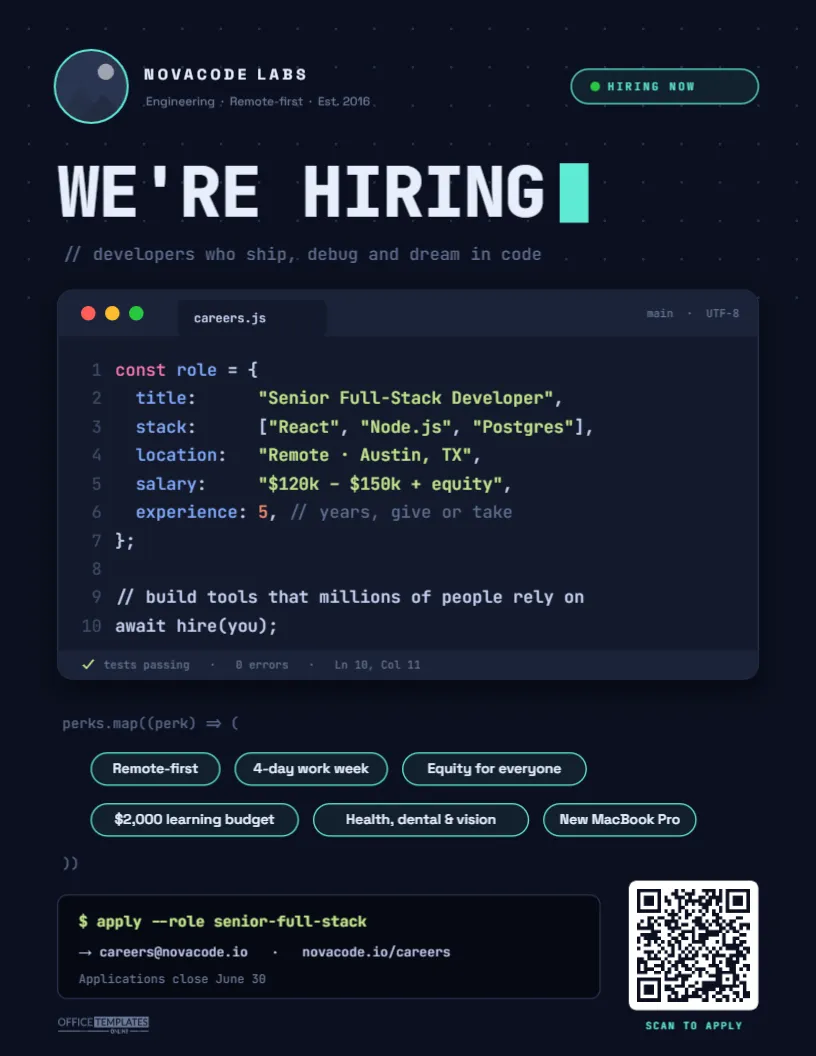
Developers have a finely tuned filter for recruiting fluff. Rockstar ninja wanted posters get ignored, and a vague competitive salary line gets an eye roll. This Software Developer Hiring Poster talks to engineers in their own language instead. The job ad is literally written as code: a dark editor window called careers.js holds a syntax-highlighted object with the job title, tech stack, location, and salary, and the last line reads await hire(you);. It is built for startups, agencies, SaaS companies, internal IT teams and university labs that want their open role to feel like it was written by an engineer, not a committee.
Why a Code-Editor Layout Stops Developers Mid-Scroll
People who write code all day recognise the shape of an editor instantly: the three coloured window dots, the file tab, the line numbers down the left, the colours that separate keywords from strings. When that familiar shape shows up on a noticeboard or in a feed, it earns a second look before a single word is read. The format also forces good habits. An object literal has no room for filler, so the poster ends up stating the facts developers actually want: what the role is, which tools you use, where they would work, and what it pays.
The design keeps everything else in the same world. Perks are written as a perks.map() call with each benefit inside a rounded chip, and the footer is a terminal panel with a command-line prompt, $ apply --role senior-full-stackfollowed by the careers email and web address.
Line by Line: What the careers.js Window Says
Here is how the ten lines of sample code map to real job information, and what to type in each one:
| Line | Sample text | Replace it with |
|---|---|---|
| 1 | const role = { | Leave as is, or rename role to your team name |
| 2 | title: "Senior Full-Stack Developer" | The exact job title from your listing |
| 3 | stack: ["React", "Node.js", "Postgres"] | Three core technologies, not a wish list of twenty |
| 4 | location: "Remote · Austin, TX" | Remote, hybrid, or on-site, plus the city |
| 5 | salary: "$120k – $150k + equity" | A real range; engineers skip ads without one |
| 6 | experience: 5, // years, give or take | Years of experience, with a friendly comment |
| 9 | // build tools that millions of people rely on | One line about the impact of the work |
| 10 | await hire(you); | Keep it; it is the punchline |
A status bar under the code finishes the illusion with tests passing · 0 errors · Ln 10, Col 11 and a small green tick.
The Rest of the Design, Top to Bottom
- Header: a round logo slot with a teal ring, the company name NOVACODE LABS in spaced capitals with Engineering · Remote-first · Est. 2016 underneath, and a pill on the right reading HIRING NOW with a green status dot.
- Headline: WE’RE HIRING set in heavy JetBrains Mono, followed by a solid teal block cursor, over a faint dot grid. Below it, a code comment: // developers who ship, debug, and dream in code.
- The editor window: a deep navy panel with a soft shadow, macOS-style red, yellow, and green dots, and the syntax colours developers know: pink keywords, blue property names, green strings, an orange number, and grey comments.
- Perk chips: Remote-first, 4-day work week, Equity for everyone, $2,000 learning budget, Health, dental & vision, and New MacBook Pro.
- Footer: the black terminal panel on the left and a white QR code on the right with SCAN TO APPLY beneath it.
The page is US Letter, 8.5 x 11 inches, in portrait orientation, which prints on any office printer and scales cleanly to a larger poster.
Editing the Code Window Without Losing the Syntax Colours
The whole code block is a single text box, and each character carries its own colour. That makes it easy to edit as long as you work inside the existing text:
- Double-click the code to start editing, then select only the words between the quote marks (for example, Senior Full-Stack Developer) and type your own. New characters pick up the colour of the text you replaced, so strings stay green, and keys stay blue.
- Keep the punctuation. Quotes, commas, and brackets are what make it read as real code. A developer will notice a missing comma, and yes, some of them will tell you.
- Line numbers are a separate text box on the left. If you add or remove a line of code, update the numbers so they still match.
- Adding your logo: click the round placeholder in the top-left corner and choose Replace Image. Your logo fills the circle, and the ring stays in place.
- Updating the QR code: select it and change the link in its options panel to your own careers page or application form. The editor also offers email, phone, and text-message QR types if you prefer applicants to reach you directly.
- Changing the perks: each chip is a rounded shape with text on top. Edit the words, then widen or narrow the shape so the text sits in the middle. You can drag chips between the two rows.
Writing a Job Ad Engineers Will Actually Trust
The layout gets attention; the content decides whether anyone applies. A few principles that hold up with technical candidates:
- Publish the salary range. Many US states now require it anyway, and a missing range is the most common reason developers scroll past.
- Be honest about the stack. List the tools used day-to-day, not every technology someone once touched. If the codebase is a legacy PHP monolith you are migrating, say so; the right person finds that interesting.
- Swap buzzwords for specifics.Four-day week and $2,000 learning budget beat great culture every time.
- Name the problem they would solve. The comment on line 9 is the place for it: payments at scale, a hospital scheduling system, a game engine.
- Make applying quick. A QR code that opens a short form will outperform sending a cover letter and portfolio by a wide margin.
Where a Developer Hiring Poster Earns Its Keep
Printed posters still work in the places developers gather in person:
- Meetup nights and user groups, especially if you sponsor the pizza.
- Hackathons, game jams and coding bootcamp demo days.
- University computer science buildings and makerspaces.
- Co-working spaces and startup incubators.
- Your own office kitchen, to encourage employee referrals.
Download a PNG or JPG as well and post it on LinkedIn, a company Slack community, or a developer Discord server; the code look works just as well on a screen.
Printing a Dark Navy Poster Cleanly
Dark designs need a little care on paper. Print from the PDF download for the sharpest text, and use a bright white matte or satin stock so the navy stays deep and the teal and green accents stay vivid. Office inkjets sometimes band on large dark areas, so for more than a handful of copies a local print shop’s laser or digital press is the better choice. Before printing a batch, scan the QR code on a test print with your phone to make sure the link opens.
Questions About the Developer Poster
Do I have to use JavaScript?
No. You can rewrite the window in Python, Go, or any other language. Change const role = { to role = { and rename the file tab to careers.py, for example. Keep the structure of key, colon, and value so it still reads at a glance.
Can it advertise several roles?
It works best for one role, because the object lists one title and one salary. For two or three openings, click Add Page and make a version per role, or list the titles in the stack line’s array format.
Will non-developers understand it?
Mostly, yes. The key words (title, location, salary) are plain English, and the headline says WE’RE HIRING in big letters. But the poster is deliberately tuned for technical readers, which is the point.
Open the template, drop in your logo, rewrite the object with your real role and range, point the QR code at your careers page, and ship it. Then wait for the pull requests. Well, the applications.